Hot Springs Village, Arkansas
There should be updates to every thing apple this next week. More than likely no help for us though.
You’re ignoring this member’s posts.
This topic is closed.
51 replies4k viewsLast reply
There should be updates to every thing apple this next week. More than likely no help for us though.
You’re ignoring this member’s posts.
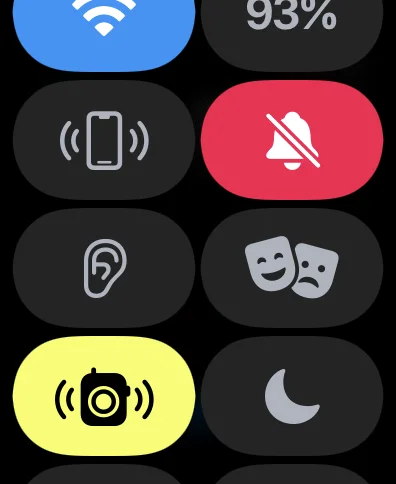
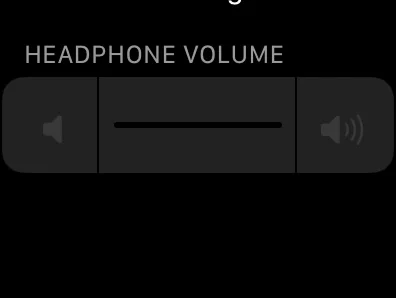
Can you direct or show how you’re able to control hearing aid function from your Apple Watch without the ON app? I had added the accessibility icon to the screen when you swipe it up from the Home Screen, but tapping it just shows a volume bar that isn’t even adjustable (pictures attached). How are you accessing either program or volume settings?
You’re ignoring this member’s posts.
You’re ignoring this member’s posts.
You’re ignoring this member’s posts.
I can if your watch is close enough to your iPhone and connected to the iPhone then you should have the remote controls for the aids, program and volume.
You’re ignoring this member’s posts.
I have everything right by each other. Still the same problems. Cursory search online doesn’t yield anything helpful either. Oh well. Have the Watch 7; maybe the newer watches have glitched out between both iPhone and Watch software updates?
I’m still using the app for now as it hasn’t caused problems yet, but wanted to know workarounds if needed. Can you share what your watch face shows when you tap on hearing accessibility option from the watch control panel?
You’re ignoring this member’s posts.
Have you restarted the watch lately. I have had issues in the past and a reboot does wonders
You’re ignoring this member’s posts.
Bookmarked this discussion so I could come back to it today when I had more time.
I deleted the ON app and rebooted both my phone and watch. I find the easiest for me is the triple click option. Able to control the aids from there with no problem except when I go to the tv adapter which defaults to 84 on the vol scale! I manually turn them way down and then they work great.
As far as the watch goes I think jcw11 might have hit the nail on the head with the problem being the newer watches. I also have a 7 running 8.4.2 and get nothing but the same results he does, which is a headphone volume screen that controls nothing!
I doubt if 15.4 will help anything since I am currently on the 15.4 release candidate. I can live without the watch control feature since we have the phone capability and the manual buttons already. The ON app is now the OFF app as far as I’m concerned.
You’re ignoring this member’s posts.
Have you tried scrolling down, I have the watch series 5 and if I don’t scroll down all I see is the headset volume.
You’re ignoring this member’s posts.
Luga, on your iPhone, go to the Watch app and select the settings for Accessibility >> Accessibility Shortcut (all the way to the bottom) and select Hearing Devices. This will give the Apple Watch the same accessibility capabilities as the iPhone.
You’re ignoring this member’s posts.
You’re ignoring this member’s posts.
But you have the hearing aid control on the iPhone? Never seen that issue maybe a bug in watch 7. I never seen that issue, but I have watch 5
You’re ignoring this member’s posts.
Doesn’t work.
But you have the hearing aid control on the iPhone?
Yep, phone control panel works as it’s supposed to. Problem is only on the watch with no app (app works great). Like you are guessing, maybe a Watch 7 bug.
You’re ignoring this member’s posts.

I’ve done this and get the same result as @lgbuck62 . Just a slider that you can’t control.
Also the selection of Program or Mic Volume in the complication does not enable the complication on the watch.
Worse, I’ve upgraded to RC for both Apple Watch 8.5 (build 19T242) and IOS 15.4… Still broken on the watch. 
You’re ignoring this member’s posts.
Not sure what to say other than my watch series 5 is working as it should. And I have the latest released firmware on both my iPhone and watch
You’re ignoring this member’s posts.
I had the same control of my Philips 9030’s as Chuck mentions and was able to control the aids from a triple click of the iPhone or via the Apple Watch Version 5. However, everything but the volume has disappeared once I unpaired the Aids from my iPhone.
I have not tried to reconnect the 9030’s because the has graciously given me Phonak P90’s. Therefore, not sure if the Watch controls will return.
David
You’re ignoring this member’s posts.
No the controls are for MFI aids only is my understanding and what I have observed
You’re ignoring this member’s posts.
Agreed…the 9030’s ARE MFI and worked beautifully with my phone and watch but Obviously Phonak doesn’t work with MFI.
I was able to manipulate some of the Phonak features via “3 click” and my watch until I stupidly removed the 9030’s from my iPhone fearing conflicts if I didn’t.
I don’t want to Forget my Phonaks and reinstall the 9030’s then reinstall the Phonaks again since everything is currently working perfectly, other than the occasional SIRI jumping in at the wrong moment caused mainly by interference with the temples on my glasses…something I will address shortly.
You’re ignoring this member’s posts.
I have gotten to the point of not needing the ON app, yes at times I still try to use it on the watch. Guess what? I have had less unmute issues, I have had better battery life, and less issues with connectivity while using the TV adapter. I have found that if I do have connectivity issues, I restart my iPhone and problem stops for a few days. So there seems to be an issue with the iPhone not cleaning up stale cache and that seems to be causing the connectivity issues.
You’re ignoring this member’s posts.
IOS 15.4 has been released. No noted changes to hearing devices was noted. So far so good
You’re ignoring this member’s posts.
Hearing Aids0 replies
Fitting Software Requests1.1k replies
Hearing Aid Self-Fitting (DIY)302 replies
Fitting Software Requests513 replies
Fitting Software Requests419 replies