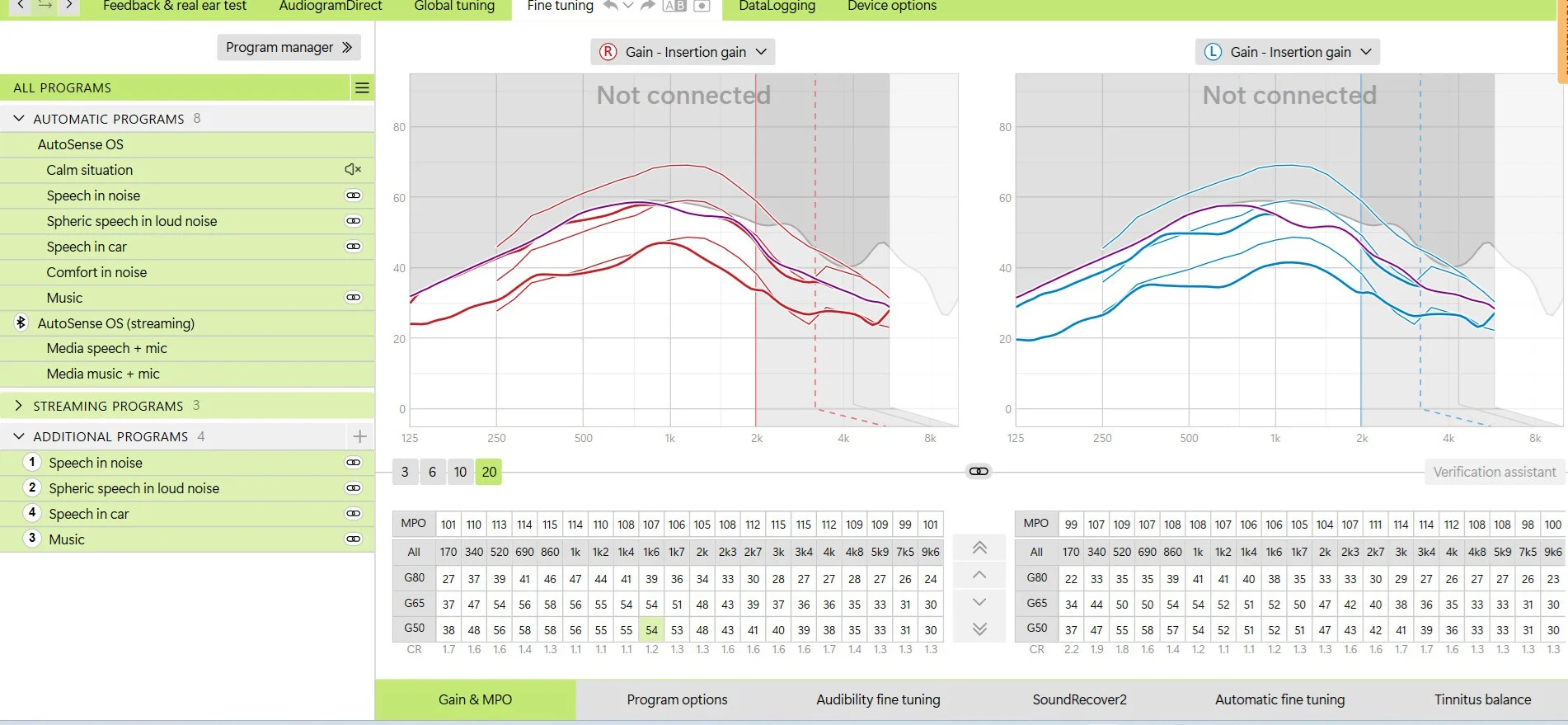
Hi, my audi fitted my , and they are a little loud, I would like to reduce the
volume without affecting the fine-tuning, He told me to reduce the volume in all
frequencies, and this would not affect the fine-tuning. Was he talking about reducing the
or reducing the G80 G65 G50 ?
Thanks
Sorry your post is a little confusing, you say your audiologist fitted and program your , but your asking about the G80 etc? This is only available to change in target, your Audiologist is no doubt talking about using the app to lower the volume right?
I’m, using target, he said you can lower the volume manually with one press (2dB) or lower all settings by 3 selecting all the frequencies. It will affect only the volume and not the fine-tuning if you select all the frequencies.
My question is he referring to lower The or The G80 G65 G50 ?
It looks like he is on holiday, that’s why I’m asking here.
Oh that’s cool, you have an audiologist that’s willing to help out with your project, but yes you can adjust the volume (amount of gain) using the up/down arrows on the fine tuning page, definitely not referring to the , this will adjust automatically when you adjust the volume, I’m wondering have you read the step by step guide to programming before doing anything else, as it’s very helpful for setting up the first time, cheers
Since you are using Target, go to fittings and then “Automatic fine tuning” and then select too loud or too soft and then fix it. This will change volume while keeping the various relationships in sync.
Hi tenkan,
Not the , Oh I thought it was the MOPs, and I was just lowering them.
So what I will do is to leave the MPOs as they are and just lower the
G80 G65 and G50 in all frequencies. Thanks for your suggestions.
The HAids settings are a little loud, but the real reason I need to lower the volume
is because of the occasion, If it wasn’t for the occlusion I could leave them as they are. If I lower them too much, the occlusion becomes less, but then I don’t get enough amplification for speech. I have to find a balance that gives me less occlusion and a good amplification of sounds for speech,
There is an occlusion compensation setting, and I am testing it,
Thanks
With the correct molds and vent, this is not a problem,
That’s what I thought, But I’m living in a place where with my hearing loss
it’s difficult to get the best fitting or molds, Here you don’t need to be an audilogist
to do fittings, you just need a 2-year college diploma, that’s OK for mild hearing
loss but for severe to profound healing loss you need a good audiologist.
This frustration is what led me to get the Phonak target, so I could do some additional fitting… I guess that my best option is to get a mold with a larger vent, I have several molds from older hearing that I can put the infinios speakers in and just drill a larger vent myself, hahaha. Then, when I have tested with the best vent size, I can go back to where I bought them and tell them to do new molds with the right vents for me. Thank you very much for this valuable information!
Is this the real occlusion effect? Does your voice is boomy when you put hearing aids in the ear and keep them turned off? Check each ear separately, so test only one hearing aid in one ear at once.
Hi,
when I block my ear or ears with the hearing aids off, it doesn’t sound
boomy, but when the hearing aids are on, my own voice sounds very loud,
I can understand speech, the problem is when I speak my voice sounds very loud and this makes conversations uncomfortable.
Hi,
when I block my ear or ears with the hearing aids off, it doesn’t sound
boomy, but when the hearing aids are on, my own voice sounds very loud
So this is no real occlusion effect, it’s rather “ampclusion”. It’s because you are probably overamplified in lower frequencies. Probably much in below 250 Hz range.
Occlusion appears as sort of a boominess primarily on your own voice and your internal sounds (walking, chewing). It will be present regardless of whether the hearing aids are on or off because it’s a physical effect. If you turn your hearing aids off and keep them in, is the effect still there? If not, then the boominess is a gain issue. You also don’t want to confuse occlusion with just plugging/muffling of sound, which is a lack-of-gain issue and typically gets worse if the hearing aids are …
I see interesting large bone-air gap in your right 250 Hz.
So, if it’s not occlusion then a solution would be to lower the
G80 G65 G 50 gain at the 170Hz because Target only has 170Hz as the lowest
adjustments, hers a copy of my latest fitting values.
About the, I see interesting large bone-air gap in your right 250 Hz.?
Thanks for the information and suggestions!
For what I see, you have probably too weak receiver. UP would be definitely better and counterintuitively has better (broader) frequency response. It could provide definitely better hearing in noise even in non-Spheric programs (Spheric also).
I don’t think you need to activate SoundRecover 2 until dead regions in the cochlea are confirmed or there is distorted sound from higher frequencies due to cochlear or neural pathology.
So, if it’s not occlusion then a solution would be to lower the
G80 G65 G 50 gain at the 170Hz because Target only has 170Hz as the lowest
adjustments,
Probably yes.
What diameter of vent you have in your earmolds? Watching your screens I suppose - 3 mm?
Yes, I’m going to play with the Sound recover 2 and see if it sounds better
without it, I’m going to buy the UP speakers, now I have the P speakers,
Thanks for your suggestions! The vent size I have now is 1mm.
Thanks for your suggestions! The vent size I have now is 1mm.
You’re welcome! 1mm gives that so lowered feedback threshold? Strange. Have you ever tried to temporarily plug the vent (by thick plastic guitar string or rolled piece of tissue paper) and check the feedback threshold again?
If the feedback threshold will be still lowered it could mean that your earmold has slit leaks and need to be remade and/or need to have smaller vent diameter, like 0.6mm.
However, first check and test does your issue is indeed “ampclusion”.
Hi, I dont have any feedback, I think as you said that the issue is ampiclusion
and what I have to do is to lower the gain in the 170 Hz, but also increasing the
vent size can also lower the gain. Yes I have tried to block the vent and when I do,
low frequencies sound better but when I talk my voice is just too loud,
the ideal thing is a hearaing aids that just wouldnt amplify the wearers voice hahaha.
But for phone calls this can be done, using the my phonak app, when on a phone call
just click on the speakers where it says mute, and you can hear the person on the other end and they can hear you but it mutes your own voicem hahaha
You don’t have feedback, because your gains are below the feedback threshold. However, gains are probably too low (so you’re underamplified), which defeats the purpose of having hearing aid to help hearing better.
That can be checked by , but knowing that first-fit (thinner red or blue lines) are usually already underamplified especially in higher frequencies, and you have your actual gain below that lines, which suggest that you probably are far from optimal fitting (I assume you didn’t have REM).
So, no, increasing vent size isn’t a good option, because is makes impossible to reach proper gain, especially in highest frequencies. Incresing vent size isn’t good for your degree of hearing loss. And it’s not good option, because you have still possibility to lower your low frequency gains.
Increasing vent size is one of possibilities to decrease real occlusion effect, but NOT “ampclusion”.



 New Jersey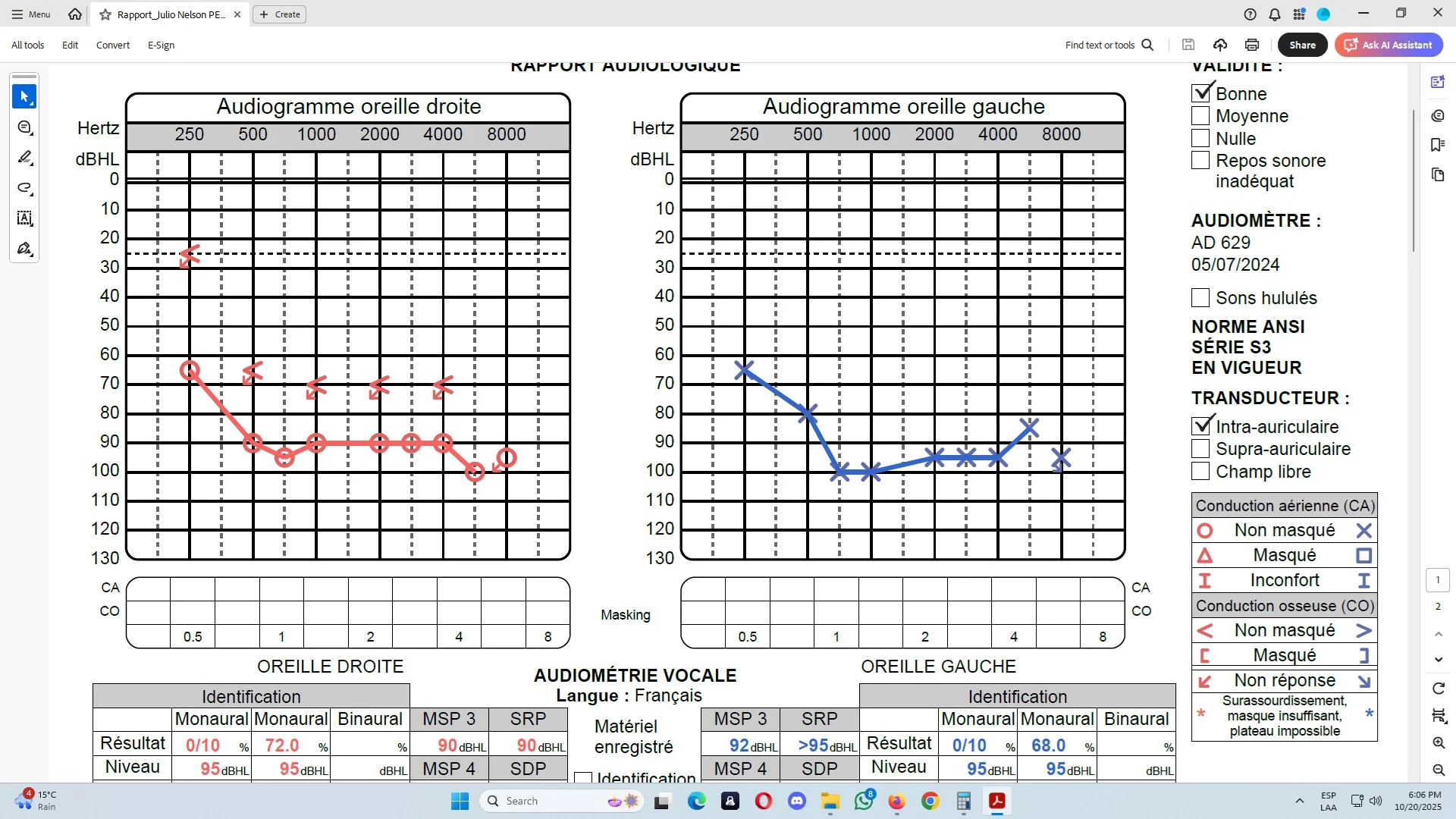
 Poland