
 Hertfordshire, UK
No idea.
But it is happening with other audio devices too. Apple are aware of the issue and currently investigating. They have had diagnostic logs from me now as well.
You’re ignoring this member’s posts.
This topic is closed.
47 replies5.1k viewsLast reply
No idea.
But it is happening with other audio devices too. Apple are aware of the issue and currently investigating. They have had diagnostic logs from me now as well.
You’re ignoring this member’s posts.
You’re ignoring this member’s posts.
Yeah I have heard it doesn’t resolve the issue. I suspect it’s hardware related more than software related. I am speaking to Apple engineers again tomorrow so let’s hope they do manage to fix it very soon as it isn’t just impacting hearing aid users but also those with other Bluetooth devices.
You’re ignoring this member’s posts.
I am having the same issues with my new Philips Hearlink 9040 which is related to Oticon in some way. Same firmware too. Anyway I have been dealing with Apple and they act like no one has this problem.
I am on my second iPhone 15 pro max, same problem on both with latest ios. I am on my second Apple case number sent to engineering.
Hearing aids work fine on my iPhone 8 plus, iPhone 13 pro max, and iPhone 14 pro. Ipad pro does have a problem too but I did not get these hearing aids for that. I will deal with one device at a time.
You’re ignoring this member’s posts.
I am also having the same issue. I have Oticon Real One and have intermittent issues streaming from my iPhone 15 Pro.
Very loud crackle/static rather than the regular audio. Particular from the right aid. Also dropping out on one or both aids. I’ve tried a new pair of Oticon Real Ones, thinking the issue was the aids and not the phone.
I don’t have any issues with the sound when streaming from my tv streamer.
Apple don’t seem to accept this is a known problem. Has anyone had any success with a refund from Apple? At this point, I’d rather get my money back and buy a regular iPhone 15. Anything to be able to listen to music / podcasts / social media etc again.
You’re ignoring this member’s posts.

QUOTE:-
I understand that you are experiencing issues with your iPhone 15 while using it with your BMW. According to a recent report by MacRumors, Apple has acknowledged the issue and is working on a fix that will be available later this year21. The issue is related to a limited number of in-car wireless chargers that cause temporary disruptions to iPhone 15 NFC chips, which may disable the NFC capabilities of the device1. Until the fix is implemented, Apple recommends that iPhone 15 users experiencing these issues should refrain from using their wireless chargers in BMW vehicles12. The problem has sparked complaints from affected users on various platforms, including Reddit, Apple’s Support community, and MacRumors’ own forums2.
UNQUOTE.
The above is from the Internet BING.
Wair a while before moving to iphone15.
You’re ignoring this member’s posts.
This issue with BMW was fixed with 17.1.1. The other Bluetooth issues haven’t yet been resolved.
You’re ignoring this member’s posts.
You’re ignoring this member’s posts.
The latest iOS update (17.1.2) seems to have improved connectivity when streaming to the Oticon Real .
You’re ignoring this member’s posts.
Sadly tried and doesn’t work. However, appears it had been fixed in the latest 17.2 beta 4 software. Apple are calling me today so I’m hoping this means they will confirm they have fixed the issue.
You’re ignoring this member’s posts.
Just updated to new iPhone 15 Pro. If I hit Livelisten (by mistake, I never use it), I can’t turn it off. Updated the old phone to latest OS and it does the same thing. Haven’t found a way to turn it off without rebooting the phone. Amazing all these new “improvements”.
You’re ignoring this member’s posts.
Did you turn on Live Listen through the triple-click screen? If so, enter that same screen via the “ear” icon in the Control Center. On there you may find the Live Listen button “lit up” and you’ll be able to turn it off.
You’re ignoring this member’s posts.
You’re ignoring this member’s posts.

Yes this is a known bug. Also affects my iPhone 12 Pro for example. There is though a way to do it still!
If you go into Settings on your iPhone and then go to Accessibility then Hearing Devices, click on the box at the top where it says which hearing aids are paired, then scroll down to the bottom and you can turn live listen on and off from there.
I expect Apple will fix the bug soon, but in the meantime this would be quicker than restarting your phone each time!
You’re ignoring this member’s posts.
You’re ignoring this member’s posts.
If you go into Settings on your iPhone and then go to Accessibility then Hearing Devices
You can also get here directly from the triple-click screen.
You’re ignoring this member’s posts.
You can normally, but if you read the last few posts in this thread then you will see that there is a bug in IOS 17.1.x and the three clicks menu way of controlling Live Listen doesn’t work currently, which is the reason for my suggested workaround.
You’re ignoring this member’s posts.
This is the triple-click screen:
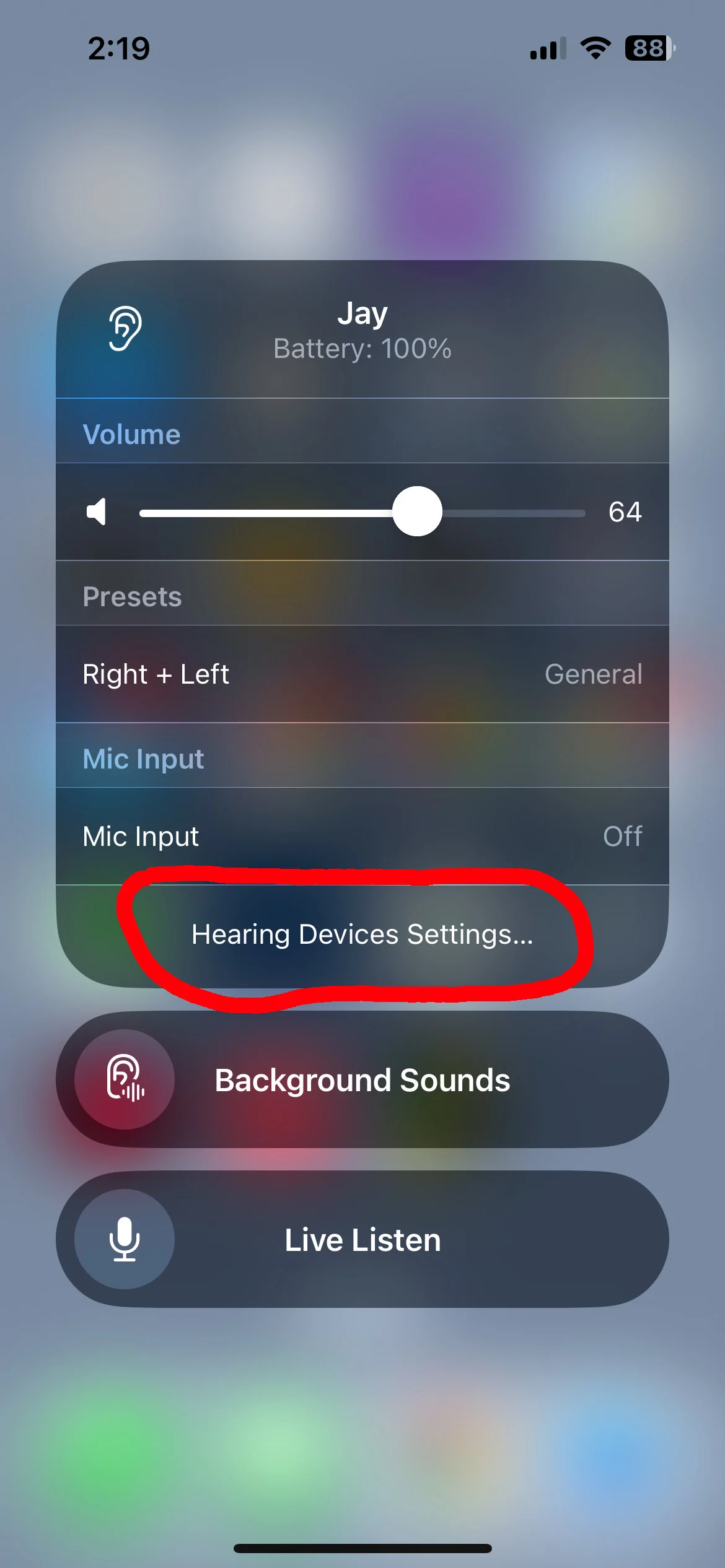
Touch the text circled in red to go directly to the Settings screen that you referred to. This is faster than starting at the top of Settings.
Also, maybe my reply to @louyo wasn’t clear. This is the Control Center:
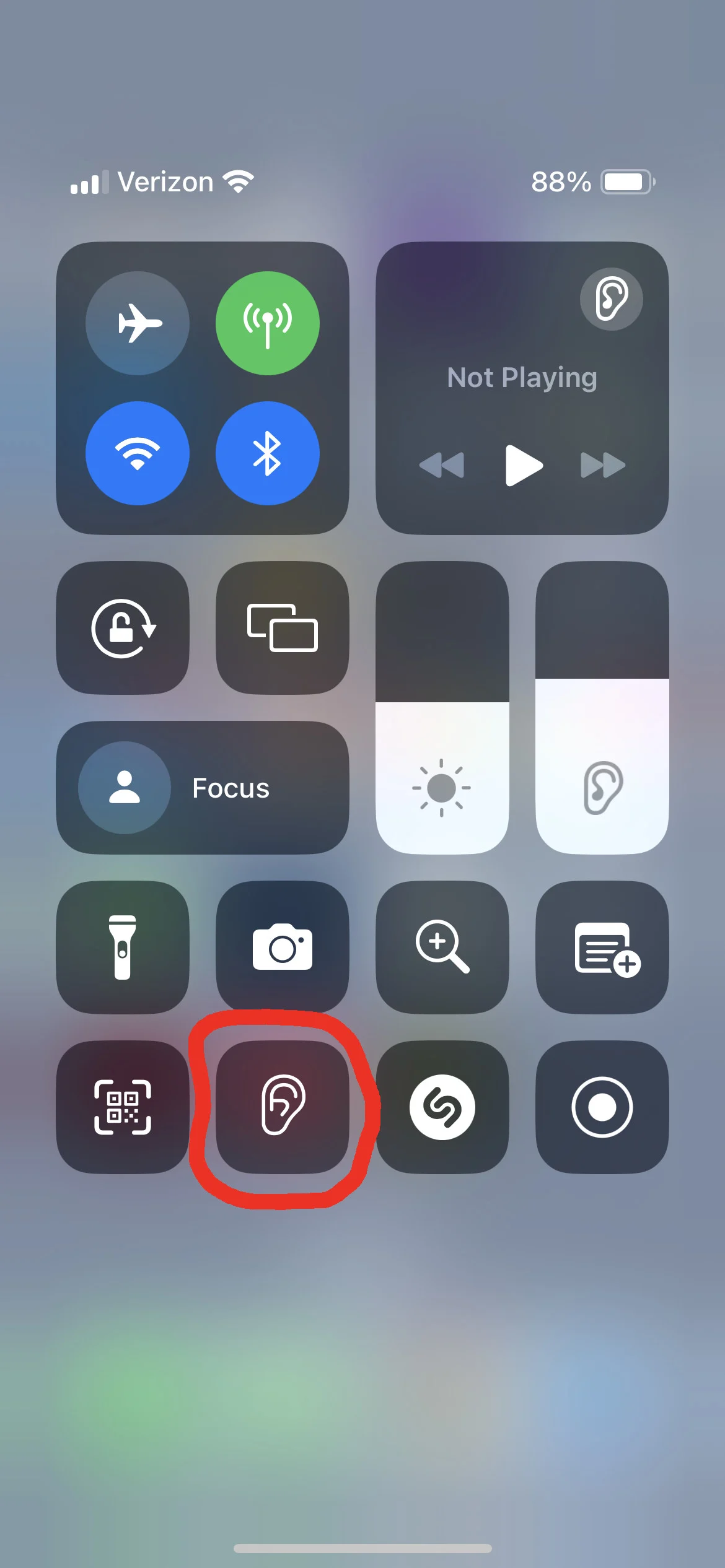
Touch the ear icon circled in red, and you’ll get to a screen that looks identical to the triple-click screen but isn’t. On this screen, the Live Listen button works properly, and can turn Live Listen on or off. Works this way on my phone, and I’d be surprised if it doesn’t work on yours.
You’re ignoring this member’s posts.
Ok now that is actually better explained and yes that does work for me too (although I never use live listen myself).
You’re ignoring this member’s posts.
You’re ignoring this member’s posts.
Hearing Aids5 replies
Hearing Aids4 replies
Hearing Aids4 replies
Fitting Software Requests892 replies
Hearing Aids144 replies
 Rotterdam, the Netherlands
 Malaysia