
 Texas Hill Country
The Cochlear Nexa is the newest generation of the implant array, the part that’s under the scalp and goes into the cochlea.
My implants are the previous generation, the 600 series.
You’re ignoring this member’s posts.
This topic is closed.
59 replies3.2k viewsLast reply
The Cochlear Nexa is the newest generation of the implant array, the part that’s under the scalp and goes into the cochlea.
My implants are the previous generation, the 600 series.
You’re ignoring this member’s posts.

@Raudrive I see, this comes after the Nucleus 8 or whatever his name is, which was out last year or a year before! which is the external processing unit!
You’re ignoring this member’s posts.
The Nexa implants are not out here in the USA that I know of. I believe the N8 processor can be used with the new Nexa implants with an update but not sure. The coming K3 will probably be in the same situation as the N8. This is an educated guess on my part.
Processors are typically reverse compatible with older implants. This allows the patient to get new updated processors without having to replace the implant with surgery.
You’re ignoring this member’s posts.
Yesterday I got to thinking about you and user using only SCAN programs so I changed to a SCAN program myself. Going to give it a try for a while to see what I think. Initially it’s not much different than the non-SCAN program I have used exclusively.
You’re ignoring this member’s posts.

@Raudrive did you change to just scan or scan FF?”
I can’t pick much difference between scan and scan FF. I have mine on FF mostly all the time, unless the stupid app changes it on me which occurs a lot. And I don’t notice a change when it happens either.
You’re ignoring this member’s posts.
Hi Sheryl.
My K2 and N7 processors do not have the FF in an automatic program, strictly a manual option.
That is N8 SCAN 2 technology.
You’re ignoring this member’s posts.
I can’t pick much difference between scan and scan FF.
Auto FF rejects more posterior sounds than regular Scan 2. I found myself too isolated with it, couldn’t tell when things were happening behind me as easily, eg. a car.
Auto FF also isn’t as aggressive at posterior noise rejection as manual FF, so not as useful when talking to someone in a noisy environment.
I’ve therefore reverted to plain ol’ Scan 2 and manually activating FF when needed.
The only other program I use regularly is a manually created one which duplicates my regular Scan 2, but has all noise reduction turned off. I use this when listening to concerts. The soft violin sounds of an ensemble out on stage would be recognised as background noise and therefore suppressed with the regular Scan 2 program; this no longer happens with the specialised program.
I also use the receiver extensively. And streaming.
You’re ignoring this member’s posts.
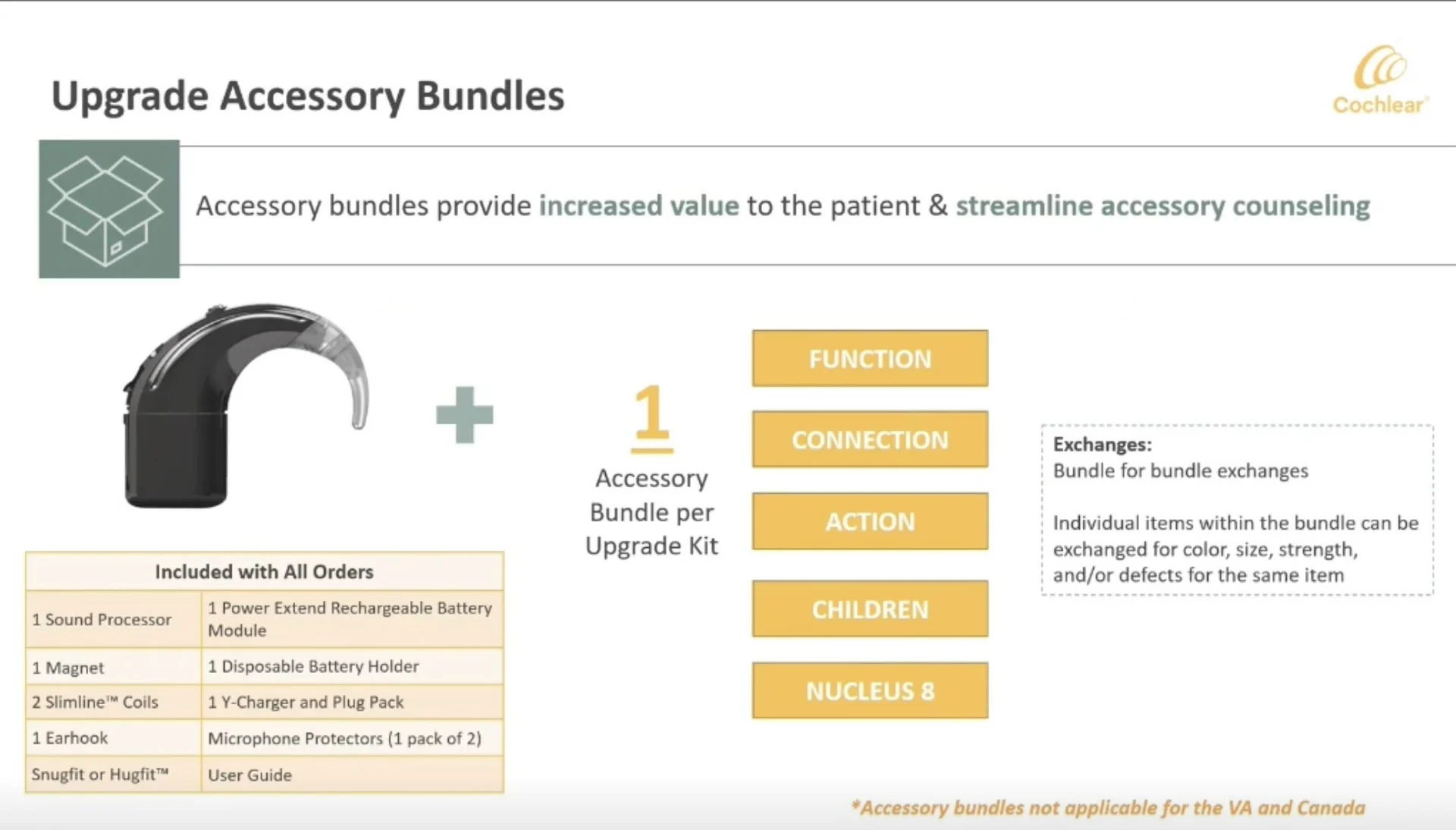
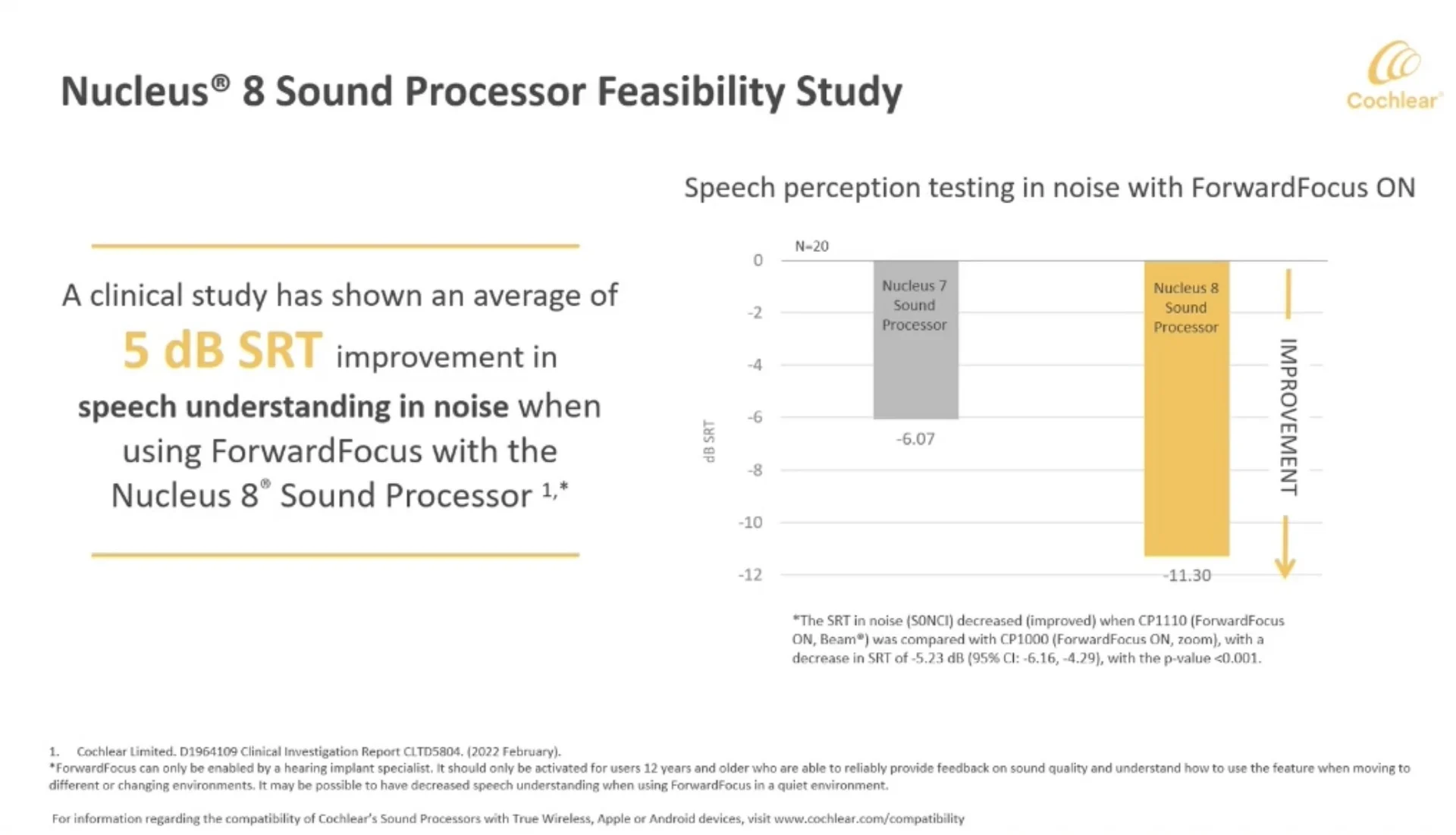
These are screenshots from the AudiologyOnline webinar about Nucleus 8:
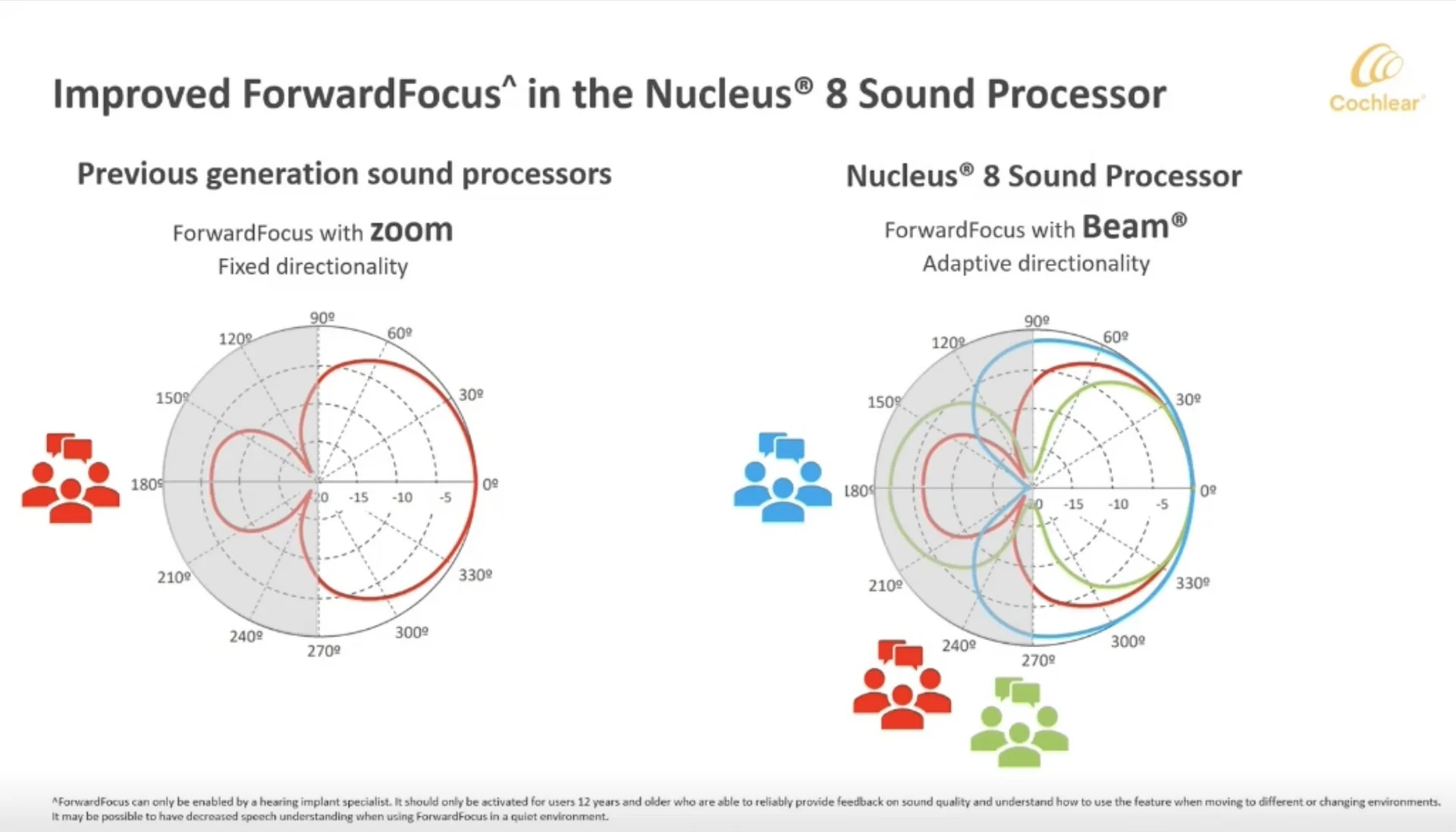
As you can see, SCAN2 changes between directionality patterns (drawn in different colors) depending on the environment.
EDIT:
Analyze the notches: null points have little to no sound reception.
These are:
Blue - 1 null point at 180° (perfectly behind your back) but quite much sound reception not only from the front, but also from both sides
Red - 2 null points at 120° & 240° and some sound reception behind back
Green - 2 null points at 90° & 270° (perfectly on both sides) - most precise to get sound from the front at the expense of also hearing sound from back
END OF THE EDIT
This was a very useful slide. After that, I have gained a better understanding and motivation to use that feature.
It is a pity that in general in the materials available to patients there is little such specific information on this technicalities.
You’re ignoring this member’s posts.
I found myself too isolated with it, couldn’t tell when things were happening behind me as easily, eg. a car.
See my previous post. It could explain your issues.
You’re ignoring this member’s posts.
so I changed to a SCAN program myself. Going to give it a try for a while to see what I think. Initially it’s not much different than the non-SCAN program I have used exclusively.
In a quiet situation, it will be Quiet program which is probably simply an Everyday program - with more omnidirectional microphone patterns, autosensitivity automatically cranked up, etc…
You’re ignoring this member’s posts.
See my previous post. It could explain your issues.
I’ve seen that slide previously. From what I remember, it doesn’t distinguish whether this is auto FF or manual FF. The info I have is from my audiologist when I asked more technical questions.
You’re ignoring this member’s posts.
D1913968_3-1_Nucleus 8 Whitepaper_EN-GB.pdf (590.7 KB)
Some info about Forward Focus is also here. However it was heavily concealed, I don’t know why!
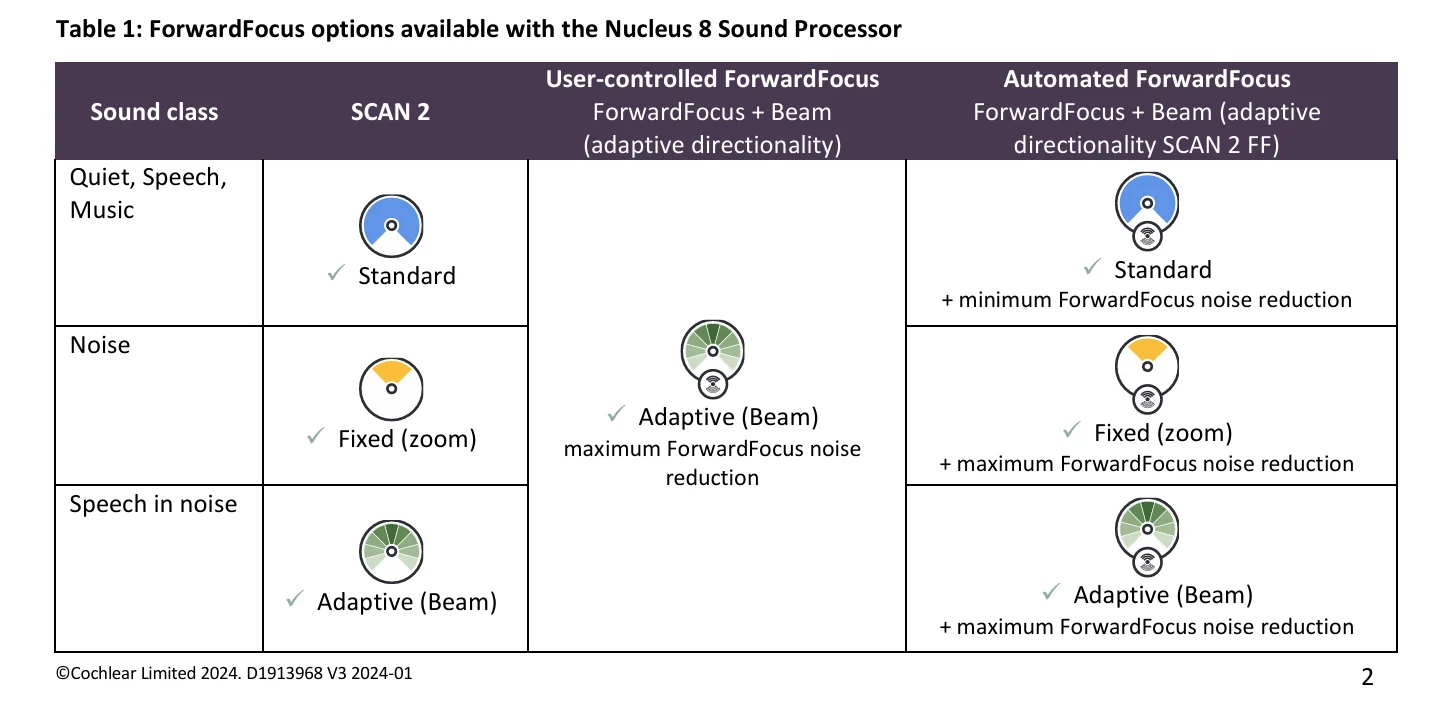
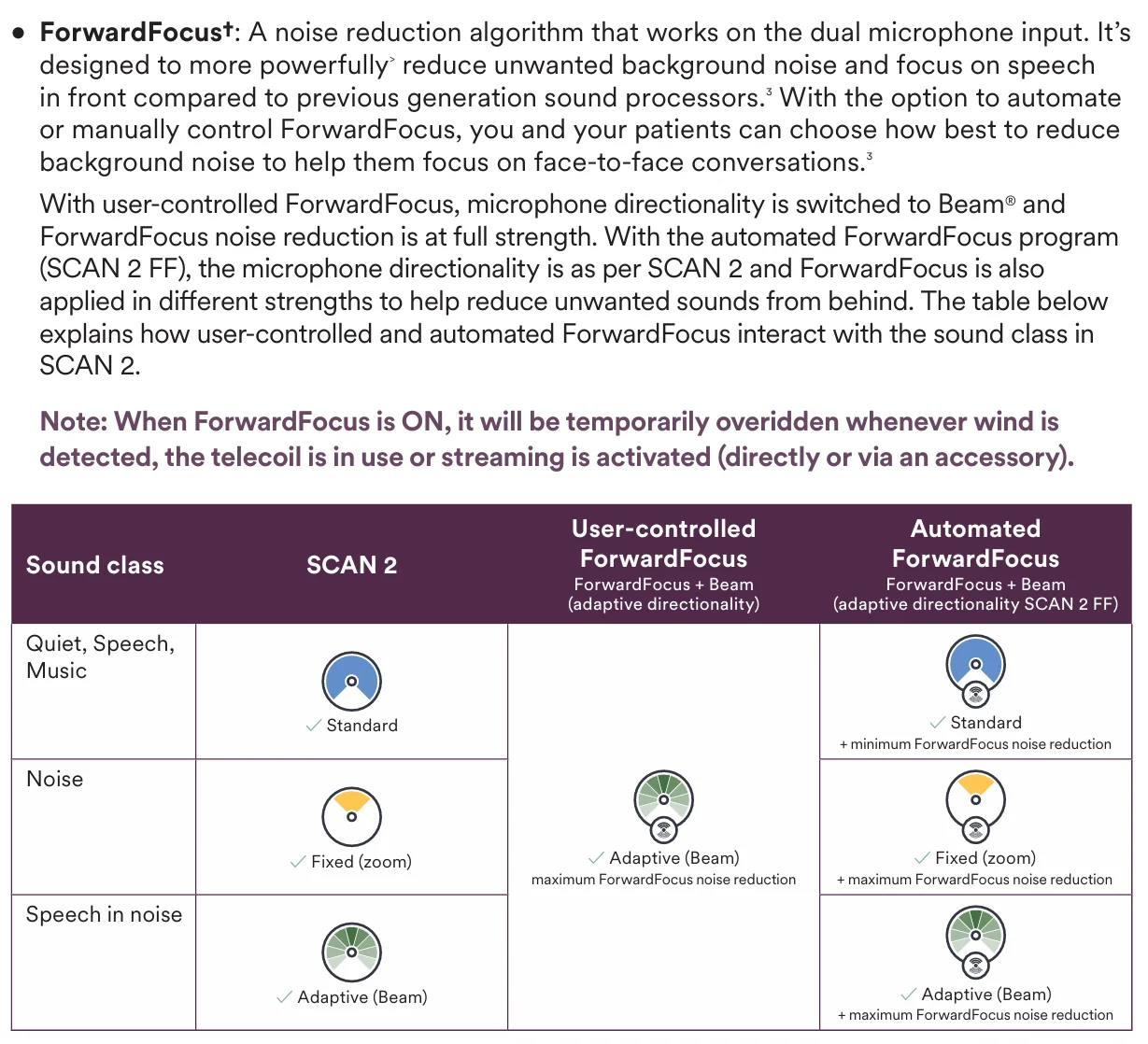
From the above screen shot, we can conclude that the manual ForwardFocus is ALWAYS the strongest possible.
You’re ignoring this member’s posts.
That pretty interesting.
I suspect the K3 will also have the same SCAN 2 technology.
I do know the FF on the N7 and K2 does help in certain environments. Its one of those things that later that day you remember that you could have used FF and maybe heard better. Hindsight…
You’re ignoring this member’s posts.
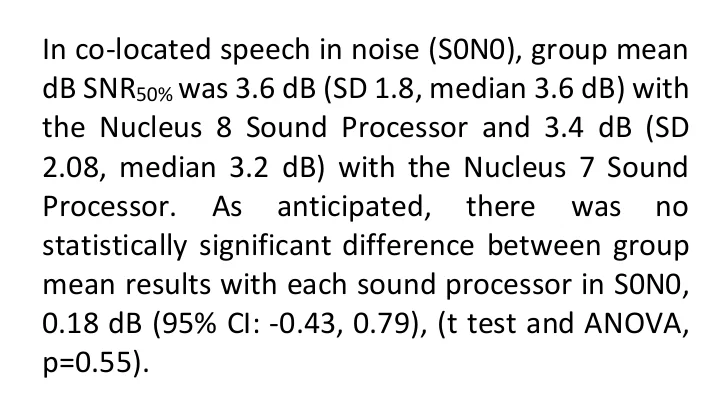
This is also interesting, but not emphasised. In the event of noise occurring in the same location as speech (0° for both speech and noise), there is no difference between N7 and N8.
You’re ignoring this member’s posts.
D2068708_V2_EN_N8_Getting_Started_Guide_for_Professionals.indd5
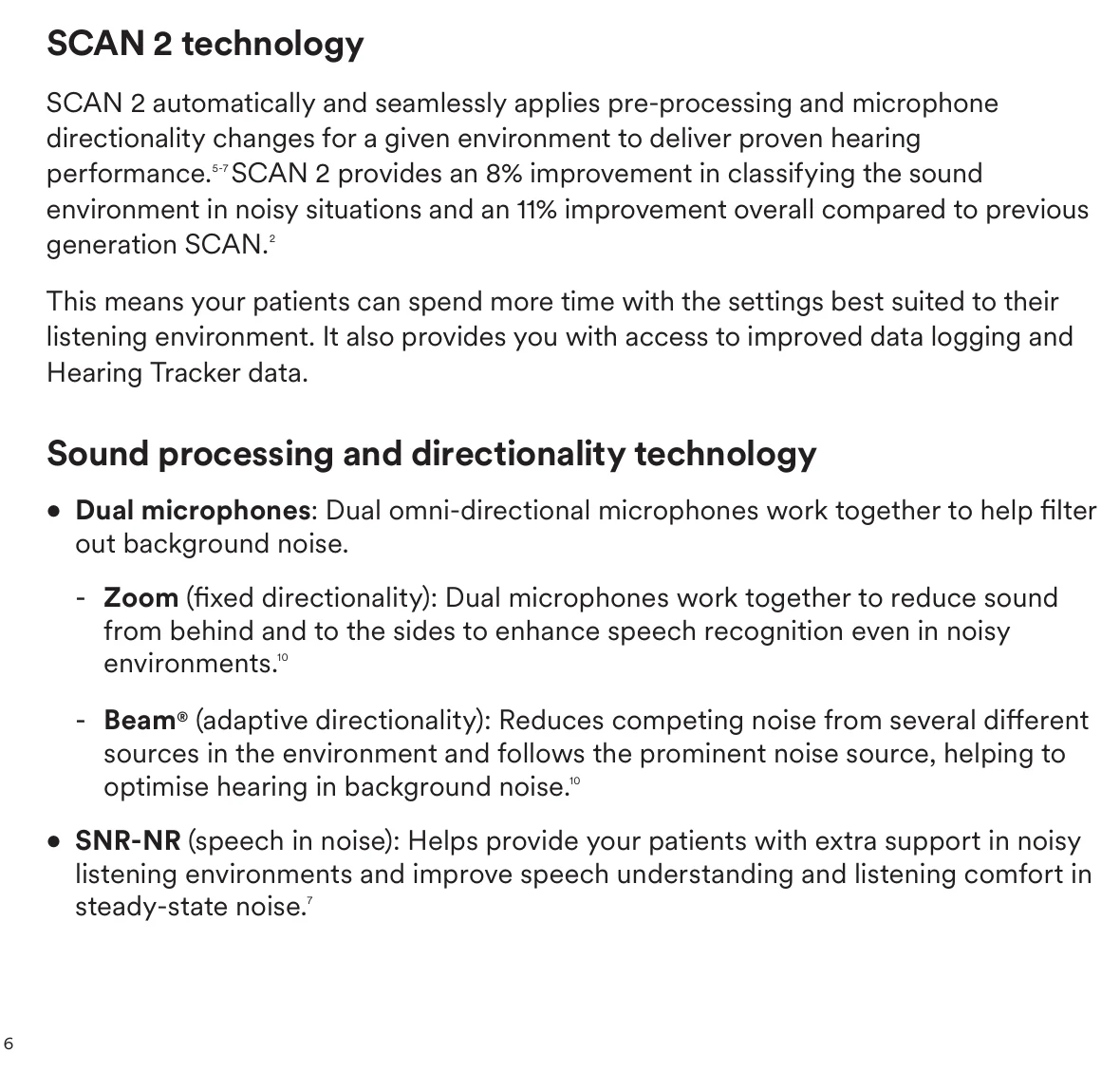
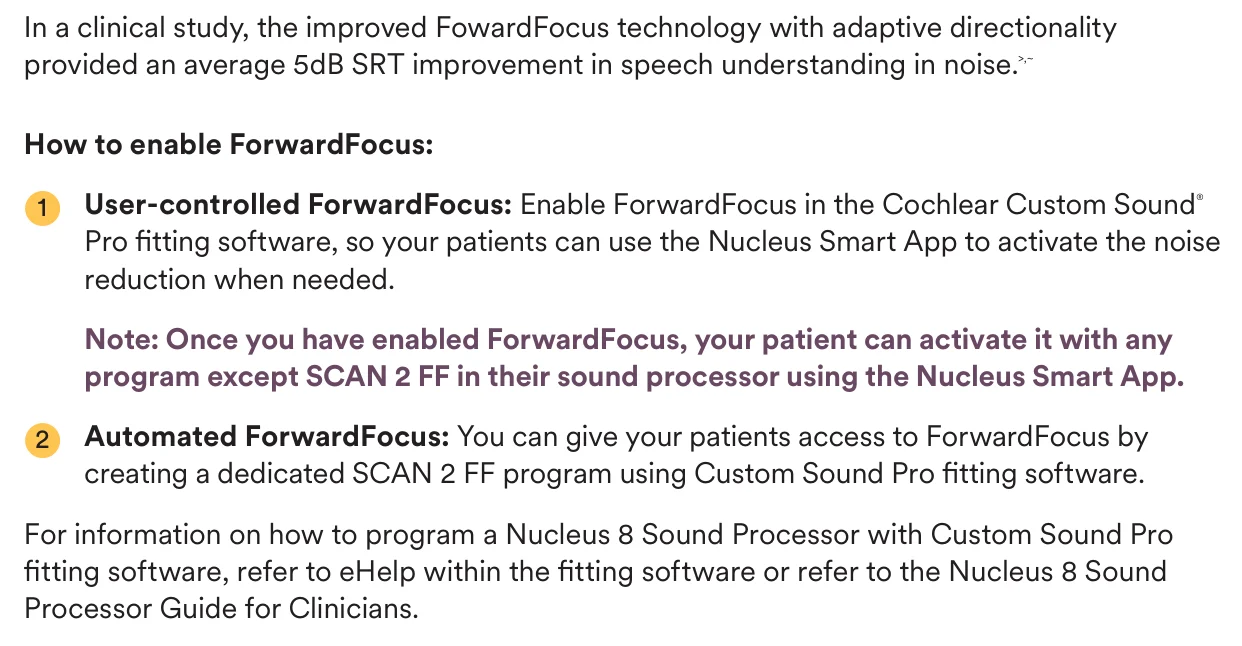
Finally, I have just found a bit more useful info about N8 automation!
You’re ignoring this member’s posts.
I received an email from my audiologist today. He attached a Cochlear news letter that the K3 has passed . So it should be available here in the USA anytime.
This Cochlear attachment also had the new Nexia implant system nformation that is also FDA approved. It should be available in the USA later this summer.
Cochlear Launches World’s First and Only Smart Cochlear Implant System12
Find out more Cochlear Launches World’s First and Only Smart Cochlear Implant System Upgradeable Firmware: The Cochlear™ Nucleus® Nexa™ System features upgradeable firmware on the implant...
You’re ignoring this member’s posts.
This is good news Rick. Can I ask how those that are from a 2 processor clinic get on with upgrades? I imagine it would be a difficult process getting all your processors upgraded.
You’re ignoring this member’s posts.
This is good news Rick. Can I ask how those that are from a 2 processor clinic get on with upgrades?
Hi Sheryl,
My understanding is the two processor clinics are for the patients initial implant/processor. It’s so that patient has a backup.
When I upgrade I am pretty sure only one processor will be given to me per implant. I will still have the old processors that will hopefully serve as backups.
You’re ignoring this member’s posts.
You’re ignoring this member’s posts.

@studio.prawns_0q, thanks. It seems that article is not only about Kanso 3, but also about new Phoenix system and CI1032 and new FMS and SPACE coding strategy.
Actually the Spread precompensation advanced combination encoder is not new. Precompensating for spread of excitation in a cochlear implant coding strategy - PubMed10
You’re ignoring this member’s posts.
Cochlear Implants5 replies
Cochlear Implants8 replies
Cochlear Implants1 reply
Classifieds5 replies
Hearing Aids174 replies
 Melbourne
 Poland