Yes I see the “Tap” control option. However that has no effect on being able to have a hands free conversation. If my phone is in my pocket, the caller cannot hear me until I place my phone near my face.
You’re ignoring this member’s posts.
138 replies6.6k viewsLast reply
Yes I see the “Tap” control option. However that has no effect on being able to have a hands free conversation. If my phone is in my pocket, the caller cannot hear me until I place my phone near my face.
You’re ignoring this member’s posts.
All good points!! However Jabra should not indicate that the phone is ‘compatible’ if they know such critical features will or may not work. They need to say “buy a new phone if you wish to use our product”
You’re ignoring this member’s posts.
Well Duh!! is NOT . All the App does is turn ON the Auracast channel channel in the / After that you can literally turn off your phone and Auracast plays on.
You’re ignoring this member’s posts.
I imagine it your phone then, i see its not on the hands free compatability list. I can have my phone in my car, be outside putting something in my trunk and tap to answer then have a conversation. Same when my phones in my back pocket. As long as im within bt range, im hands free and its using my aid microphones to pick up my voice for callers.
I believe for hands free you need a phone with LE 5.3. I think you mentioned having a S21 and they only have 5.2 bt.
Here is a list of Android phones on the Jabra handfree compatability list…
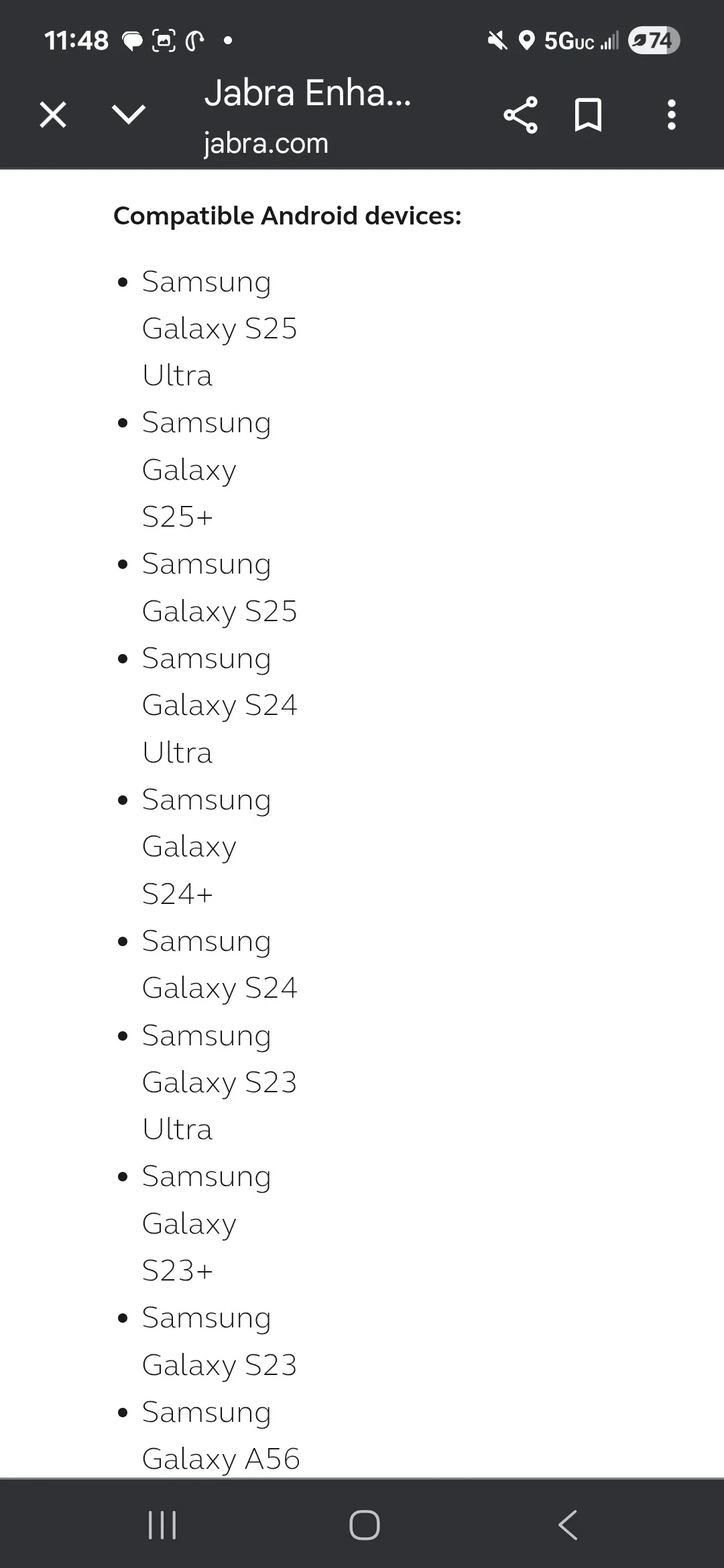
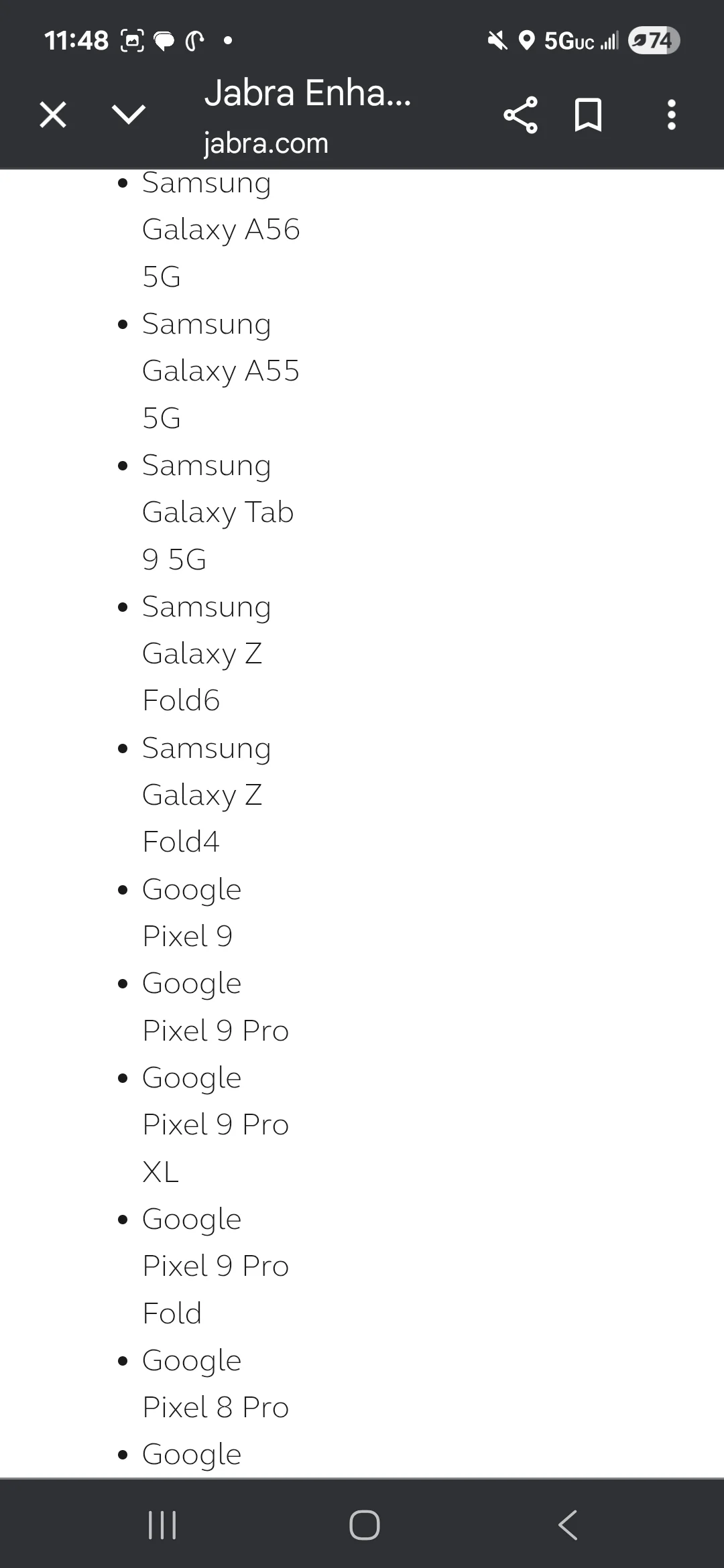
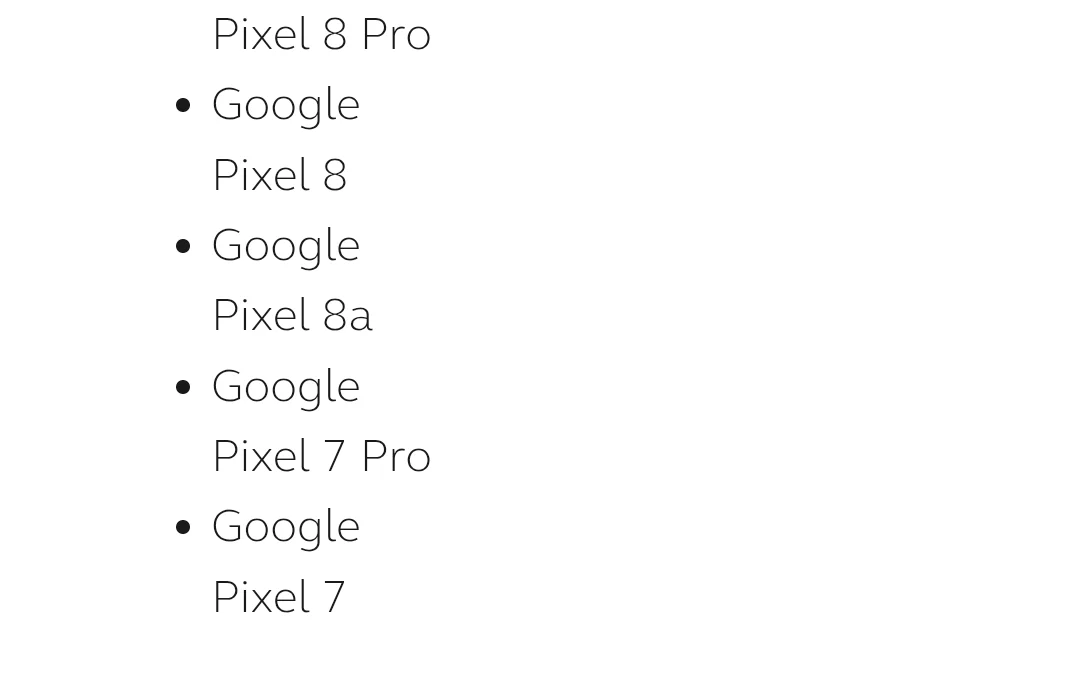
You’re ignoring this member’s posts.
Actually the S21+ is listed as ‘compatible’ in 'Full list of Android Devices:
Jabra Enhance Pro Compatibility | Jabra Support25
Find compatibility information for Jabra Enhance Pro hearing instruments and see the full list of compatible iOS and Android devices.
You’re ignoring this member’s posts.
Samsung Galaxy S21 Ultra
Samsung Galaxy S21+
Samsung Galaxy S21
Samsung Galaxy S20 Ultra 5G
Samsung Galaxy S20+
Samsung Galaxy S20
Samsung Galaxy S20 FE
Samsung Galaxy A56 5G**
Samsung Galaxy A55 5G**
Samsung Galaxy A54 5G
Samsung Galaxy A53 5G
Samsung Galaxy A52
Samsung Galaxy Z Fold6**
Samsung Galaxy Z Fold4**
Samsung Galaxy Tab S9 5G**
Samsung Galaxy Note 20 Ultra
Samsung Galaxy Note 20
Google Pixel 9 Pro Fold**
Google Pixel 9 Pro XL**
Google Pixel 9 Pro**
Google Pixel 9**
Google Pixel 8 Pro**
Google Pixel 8**
Google Pixel 8a**
Google Pixel 7 Pro**
Google Pixel 7**
Google Pixel 7a
Google Pixel 6 Pro
Google Pixel 6
Google Pixel 6a
Google Pixel 5
Google Pixel 5a 5G
OnePlus 9 Pro
OnePlus 9
OnePlus 9R
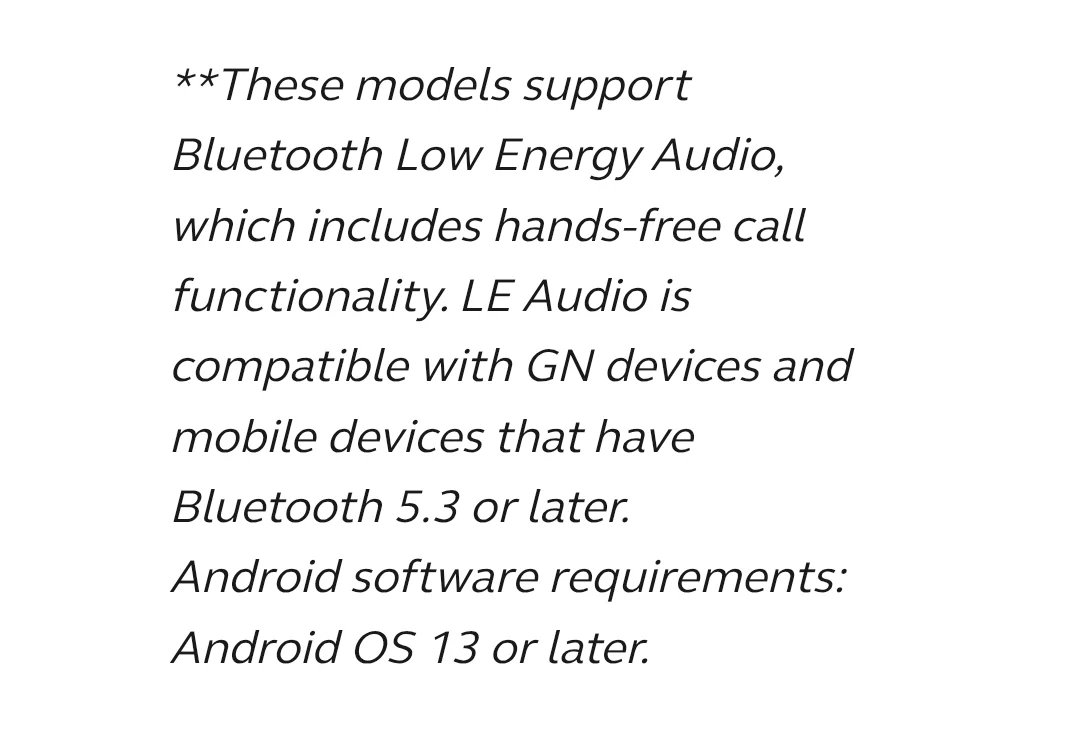
**These models support Bluetooth Low Energy Audio, which includes hands-free call functionality. is compatible with GN devices and mobile devices that have Bluetooth 5.3 or later.
Android software requirements: Android OS 13 or later.
You’re ignoring this member’s posts.

You forgot to include the information that says that handsfree calling is only supported by the phones with (**). @Iwantohear wants handsfree calling. Sometimes the minimum compatibility does not meet the person needs
You’re ignoring this member’s posts.
You’re ignoring this member’s posts.
Yes I see the “Tap” control option. However that has no effect on being able to have a hands free conversation. If my phone is in my pocket, the caller cannot hear me until I place my phone near my face.
Do you have a smart or fitness watch?
I never use the buttons on my Jabra 30’s to answer the phone but always use a button on my Garmin running watch. The phone call still goes through the phone and hearing aid with Garmin watch just “answering” the call.
Pretty much any connected watch should let you do the same.
You’re ignoring this member’s posts.
I also discovered that I can turn OFF the Bluetooth on my phone, but still receive Auracast audio from my TV with it off. Velly velly interesting
Well of course all your phone is doing is telling your hearing aids which transmission to listen to. Once you did that the phone has no role to play.
Well Duh!! Auracast is NOT BT. All the App does is turn ON the Auracast channel channel in the HA/ After that you can literally turn off your phone and Auracast plays on.
Auracast is Bluetooth - but most phones don’t yet support Bluetooth Auracast transmission from the phone.
You’re ignoring this member’s posts.
A single press allows to change programmes however when doing a long press for a couple of seconds it makes a different type of sound. What is that?
It depends what your audiologist has set it to do in the fitting software, but the default is that a long press on one aid increases the volume and on the other aid reduces the volume. I forget which aid does which (and anyway the audiologist may have changed from the default as you have a CROS fitting).
The default, at least for Jabra 30s, is a long press on either ear changes the program.
A short press on the right ear increases the volume and a short press on the left ear decreases the volume
You’re ignoring this member’s posts.
Auracast is Bluetooth
It’s essential to understand that there is no single ‘BlueTooth.’ There’s , ‘BT LE’ (Low Energy, also called BTLE), and ‘BT ’ (also called BTLEA). There are several releases of BT and BTLE and will be several releases of BTLEA, if there aren’t already. The different BTs have different capabilities.
IOW, you need to look carefully at compatibility lists, and if there are footnotes or asterisks or other special characters, you need to track them down. This is potentially a big deal with phones that aren’t from Samsung or Google. Moto phones, for example, have BT, but most don’t support or .
You’re ignoring this member’s posts.
 Dallas Ft. Worth Texas
The problem is the greedy hearing aid manufacturers. They make a lot of money selling users accessories such as TV streamers, , etc. and to make sure you can’t purchase a third party product, they each use a priority CODEC version of Bluetooth. Microcrap can’t figure out what to do with this mess, and they just make sure that their crappy software, Windows 11, version of Bluetooth doesn’t work with the newest hearing aids. Apple, on the other hand has been working with hearing aid manufacturers for years and their products work flawlessly with hearing aids using their , (Made for iPhone), software. I can easily switch my hearing aids from my iPhone 13 to my iPad by just turning off the Bluetooth on my phone and turning on the Bluetooth on the iPad. Unfortunately, unlike the AirPods, the hearing aids can’t automatically switch between the two devices.
The future is and Low Energy Bluetooth. However, I haven’t found anyplace that uses the technology. My Jabra EP 30 hearing aids has both and their iPhone app has built in Auracast capabilities. Bravo to GN. There are several dongles that can connect Auracast to a Windoze PC. Because my employer provides me with a Windoze laptop, I refuse to spend my own money to make Auracast work on their machine.
You’re ignoring this member’s posts.
Indeed you are correct. The big print giveth and the sneaky asterisk taketh away  Obviously if they are clear that almost any phone prior to a 2023 release is NOT going to give you all of the features that they promote, then that would negatively impact their sales when people realize that they are going to have to replace the perfectly functioning high end phone with a new high end phone along with the purchase of the J Pro 30’s
You’re ignoring this member’s posts.
You’re ignoring this member’s posts.
In reply to @coastal_california
For my new Jabra 30s, I left a message and had my Costco fitter change the long press on my left to activate my TV Streamer. She did this online and sent it to me to download through the app. Two long presses switches to a different TV Streamer I have paired to a TV in another room.
You’re ignoring this member’s posts.
Dallas Ft. Worth TexasThank you. I’m aware of this product, but I don’t want to spend my money to get an function on a computer I don’t own. I would hope that shortly, how ever long this takes, Microcrap will include auracast integrated into Windoze.
You’re ignoring this member’s posts.
You’re ignoring this member’s posts.
The big print giveth and the sneaky asterisk taketh away
This is one of the most truthful sayings ever typed, and it applies to much more than hearing aids and their features and accessories! I love the way you’ve phrased it! 
You’re ignoring this member’s posts.
Dallas Ft. Worth TexasMy hearing aids, Jabra EP 30s, immediately the phone ringing is sent to my hearing aids from my iPhone 13, for some reason, the delay is at the beginning of the call. It’s after I either slide the phone call slider to receive, or tap my hearing aids. Once the hearing aids connect, the calls are perfect and have never dropped off.
You’re ignoring this member’s posts.
Log in to reply to this topic.
Hearing Aids21 replies
Hearing Aids53 replies
Question and Answer4 replies
Press Releases3 replies
Hearing Aids4 replies