 Poland
You’re ignoring this member’s posts.
New Phonak Target update, New firmware available for Infinio
169 replies9.4k viewsLast reply

I think someone mentioned you don’t get the 3 different ones now.
Here is what you get after the update: New Phonak Target update, New firmware available for Infinio - #19 by jim_lewis
You still have 3 entries in the iOS device list but two of them now have the same name, that of your BT “master” , whereas before the LE connection and the classic BT connection were distinguished by name.
You’re ignoring this member’s posts.


I only have two entries on my iPhone after the upgrade. Both named the same.
If I click on the little (i) next to them, one of them lets me select the device type (headphone/hearing_aid/speaker), so that’s the classic Bluetooth connection.
The other one doesn’t show anything, so that’s probably the connection used by the Phonak App.
You’re ignoring this member’s posts.
I only have two entries on my iPhone after the upgrade. Both named the same.
A mystery, to be sure! My count of THREE: 1 for the left , two for the right, both named the same. The iOS 26.0.1 Settings, Bluetooth device list on my iPhone 14 Pro Max:
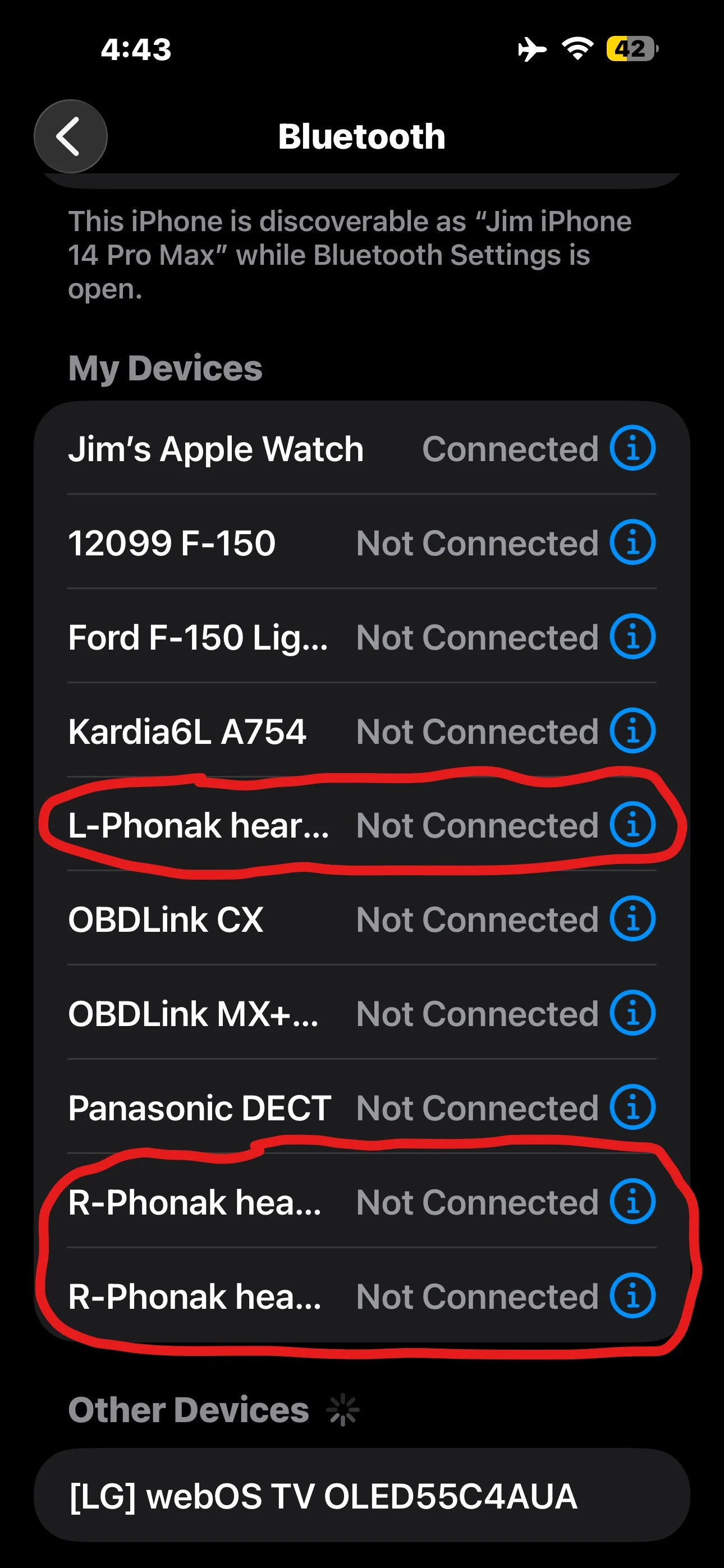
You’re ignoring this member’s posts.
Do they all show ‘Connected’ the same time? Maybe one is s leftover from before the upgrade?
Did you reinstall the Phonak App after the upgrade? I did, maybe my iPhone uses a new way of talking to the , whereas yours is in some kind of compatibility mode if you didn’t reinstall the app?
You’re ignoring this member’s posts.
Also, I had to re-install the Phonak app on my iPhone to reconnect with the HAs after the upgrade.
Did you reinstall the Phonak App after the upgrade? I did, maybe my iPhone uses a new way of talking to the HAs, whereas yours is in some kind of compatibility mode if you didn’t reinstall the app?
That could very well be the source of our differences. I didn’t have to reinstall the MyPhonak app to have connectivity after the Target firmware upgrade. I’d prefer to have the two master indicators, one to indicate the LE connection is working, the other to indicate I’m running or not running the classic BT connection, so I think I’ll leave it the way it is and not experiment with uninstalling/reinstalling MyPhonak unless someone comes up with a decided benefit for doing so.
You’re ignoring this member’s posts.

tenkanProvider
The other one doesn’t show anything, so that’s probably the BLE connection used by the Phonak App.
Yes is always used for the App.
Are these connections showing different in Android?
You’re ignoring this member’s posts.

 Hot Springs Village, Arkansas
I am someone that has always forgotten my aids and deleted all of the app data or uninstall and reinstalled the app anytime there is a firmware update to my aids or phone. Is it necessary may not but it sure makes things work smoother.
You’re ignoring this member’s posts.

OK, I did it.
I had to “forget” my devices in MyPhonak in order to re-pair the LE device. The result is that I now see two Bluetooth devices for my Spheres: R-Phonak (for streaming) and L-Phonak (presumably for all the MyPhonak control stuff).
I’ve got no idea if re-doing the Bluetooth connections actually improves anything - if anyone finds any good information on this, I’d love to know!
You’re ignoring this member’s posts.

 North West UK
Any of the new features are ported to the Lumity?
After doing the new feedback real ear, I’ve noticed my Custom Music programs have changed.
I’m referring to Naida L90 SP. I have them set using 2.0, but for the Custom Music, I set the and gains from DSLv5 Adult. In the car, prior to these changes, I got a pretty decent frequency mix, but after, the mids have overpowered the lows and highs. The other elements of Autosense seem clear. I shall make some changes.
I also have Sky Naida L70 UPs. I’ll see how things have gone with them tomorrow.
I see no new specific added features, but there are changes.
Peter
Update: I redid my Music and streaming programs today (24 Oct), and things were pretty much back to where they should be:
Naida M30 SP: Music good, streaming not as clear
Naida Sky M70 SP: Music good, streaming ok
Audeo P90: Music good, streaming awful. Probably to do with M receivers and slimtips, although the slimtips have much smaller vents
Naida Sky L70 UP: Music good, streaming more like it should be (same moulds as Sky M70 SP)
Naida Sky L90 SP: Music good, best of all. Some very fine tuning only needed, if I can be bothered.
You’re ignoring this member’s posts.
tenkanProvider
I see no new specific added features, but there are changes.
Yeah that’s interesting, as the update was for Infinio branded code name “Ultra” what about Autosence 7.0 is that being used by the Lumity.
You’re ignoring this member’s posts.

Are these connections showing different in Android
Mine are unchanged from before the upgrade
You’re ignoring this member’s posts.
I’d prefer to have the two master HA indicators, one to indicate the LE connection is working, the other to indicate I’m running or not running the classic BT connection
Well, I decided just to unpair and repair my Spheres with my iPhone without uninstalling/reinstalling the MyPhonak app. That did convert the three listings under iOS settings to two, as others have described. CLICK TO ENLARGE ANY OF THE IMAGES BELOW.
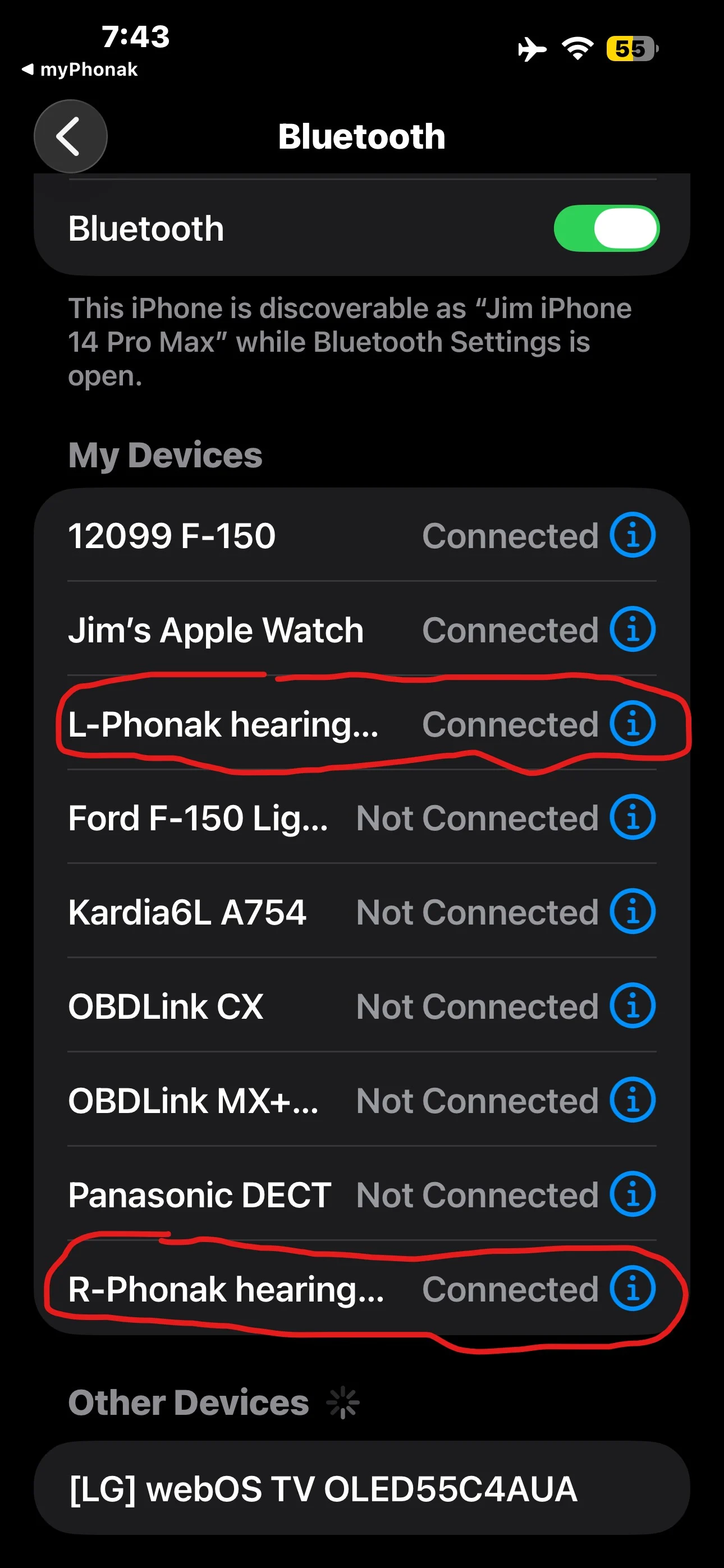
My concern previously was that I couldn’t readily tell from this listing whether classic BT streaming was turned on or not and I’d have to dig deep into the MyPhonak app to look at the status of the new streaming toggle listed on the Devices tab under the BT streaming option.
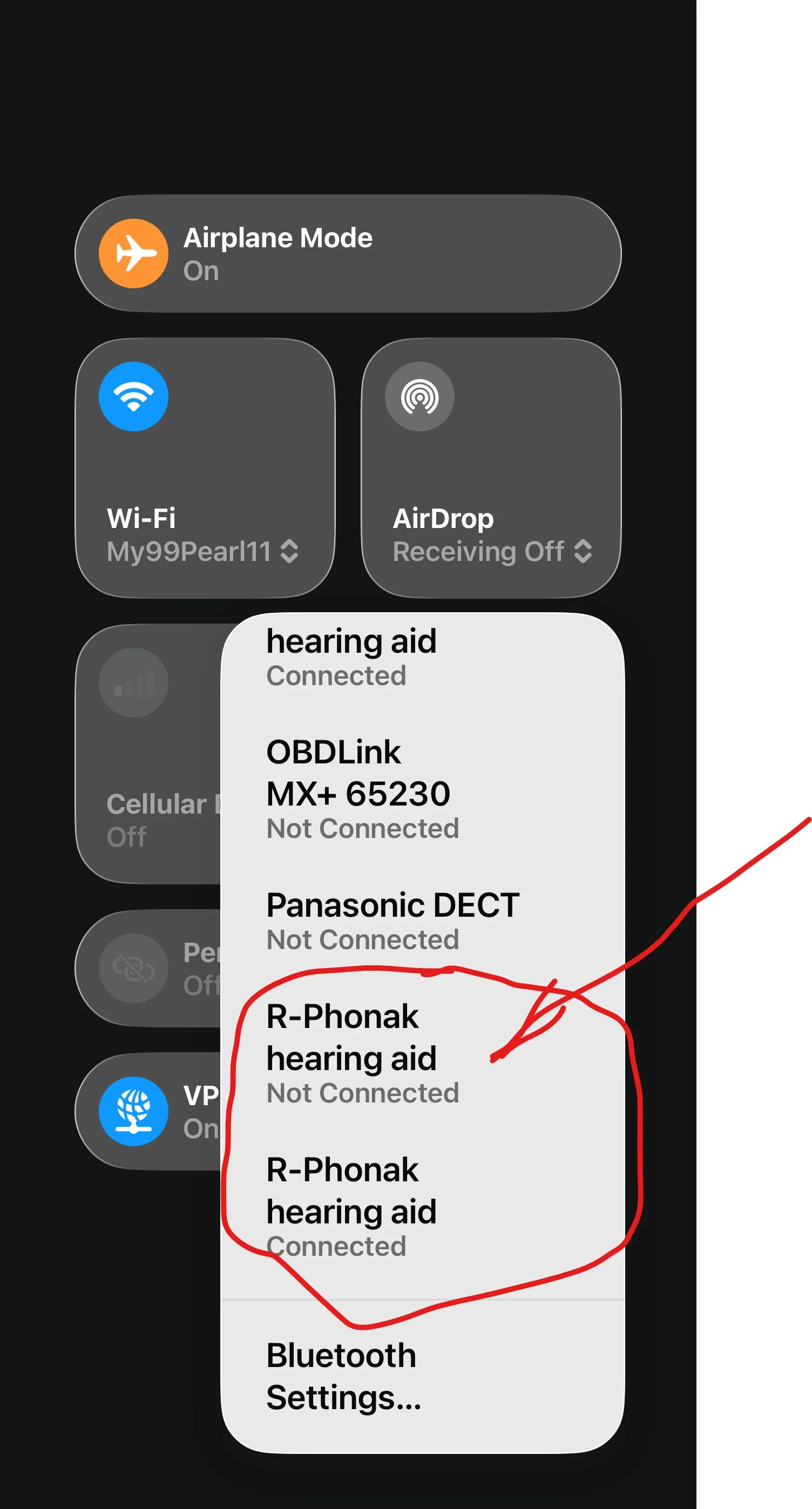
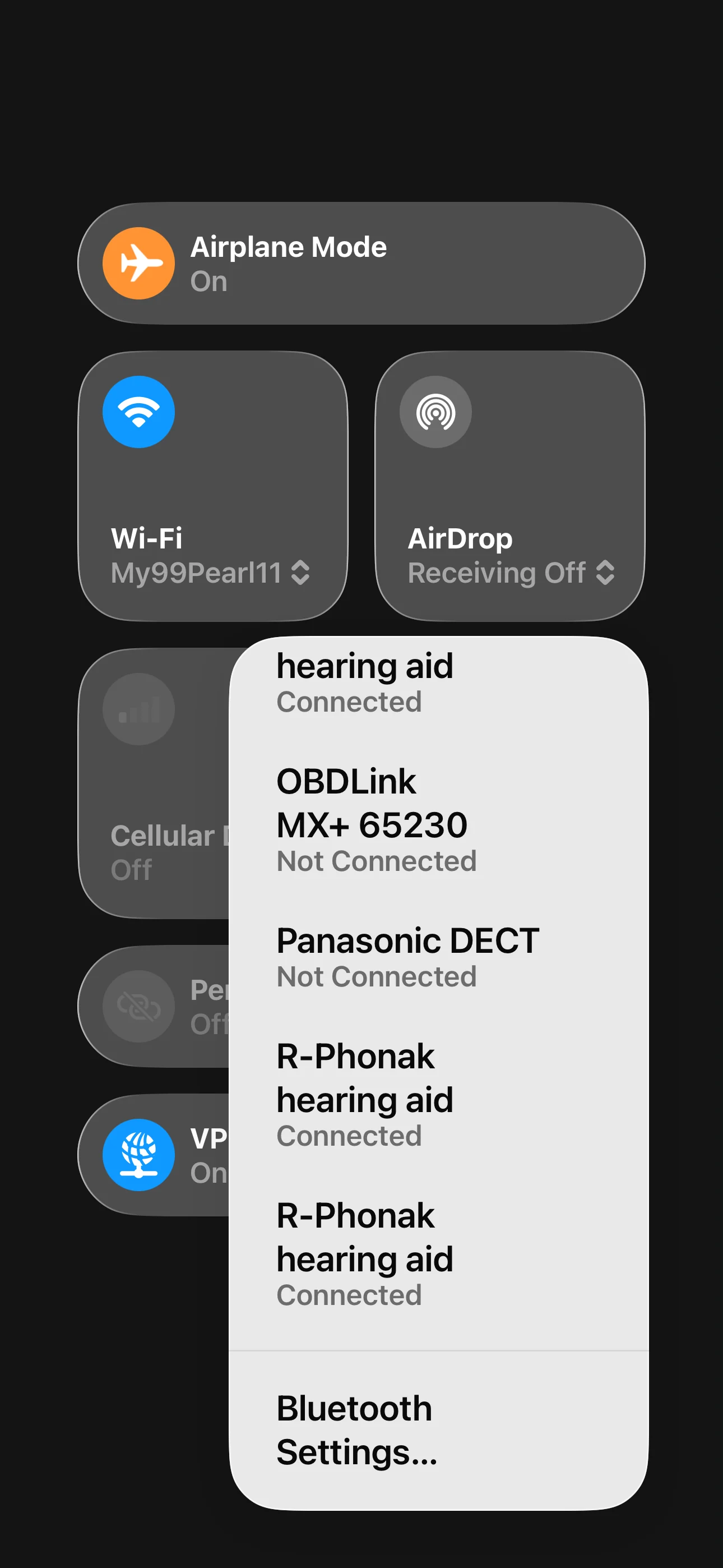
What I found, though, is using the iPhone Control Center, it’s easy to tell classic BT streaming status. If you swipe down the right side of your iPhone screen from the top right, the Control Center pops up (from any screen, if you’ve turned it on in iOS settings). If you tap on the lower edge of the Network Controls group (top left of the screen), an expanded Network Controls screen opens. Tapping on the lower edge of the BT group with that reveals the former three listings, including two for the master BT hearing aid, one for the LE connection, one for the BT connection, which will be CONNECTED or not according to your MyPhonak BT streaming choice. Not connected vs. connected shown in two images below.
The fastest way to check the status of your BT streaming connection, though, is the following. Open the Control Center by swiping straight down from the top right of your iPhone screen and check whether a BT symbol is displayed in the AirPlay icon in the Media Player group (top right of the screen).
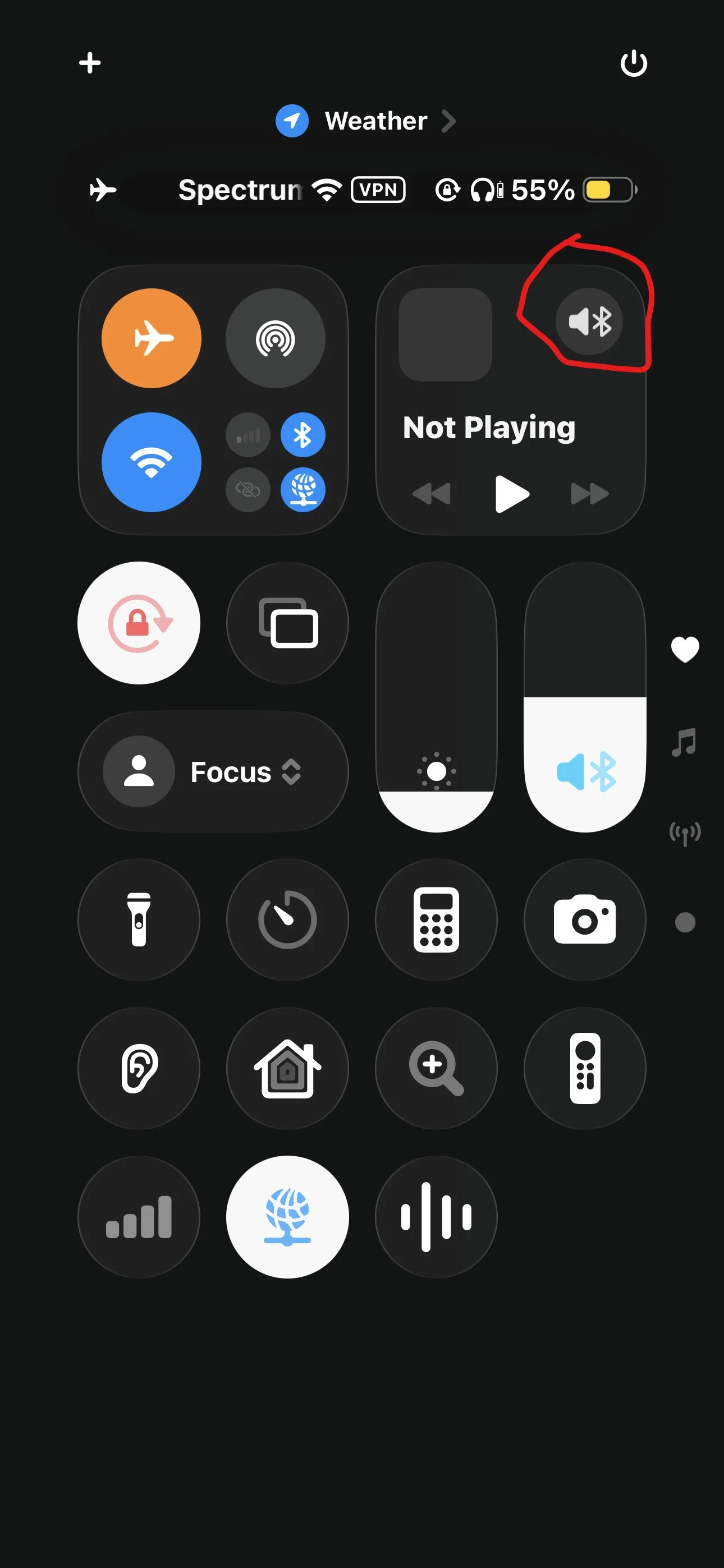
If the icon is displayed, your master BT is turned on for BT streaming.
You’re ignoring this member’s posts.
You’re ignoring this member’s posts.
Yeah that’s interesting, as the update was for Infinio branded code name “Ultra” what about Autosence 7.0 is that being used by the Lumity.
No, Lumity has Autosense 5.
The first Spheres came with Autosense 6, then Virtos had Autosense 7. I just guess they’ve brought that across. 
You’re ignoring this member’s posts.
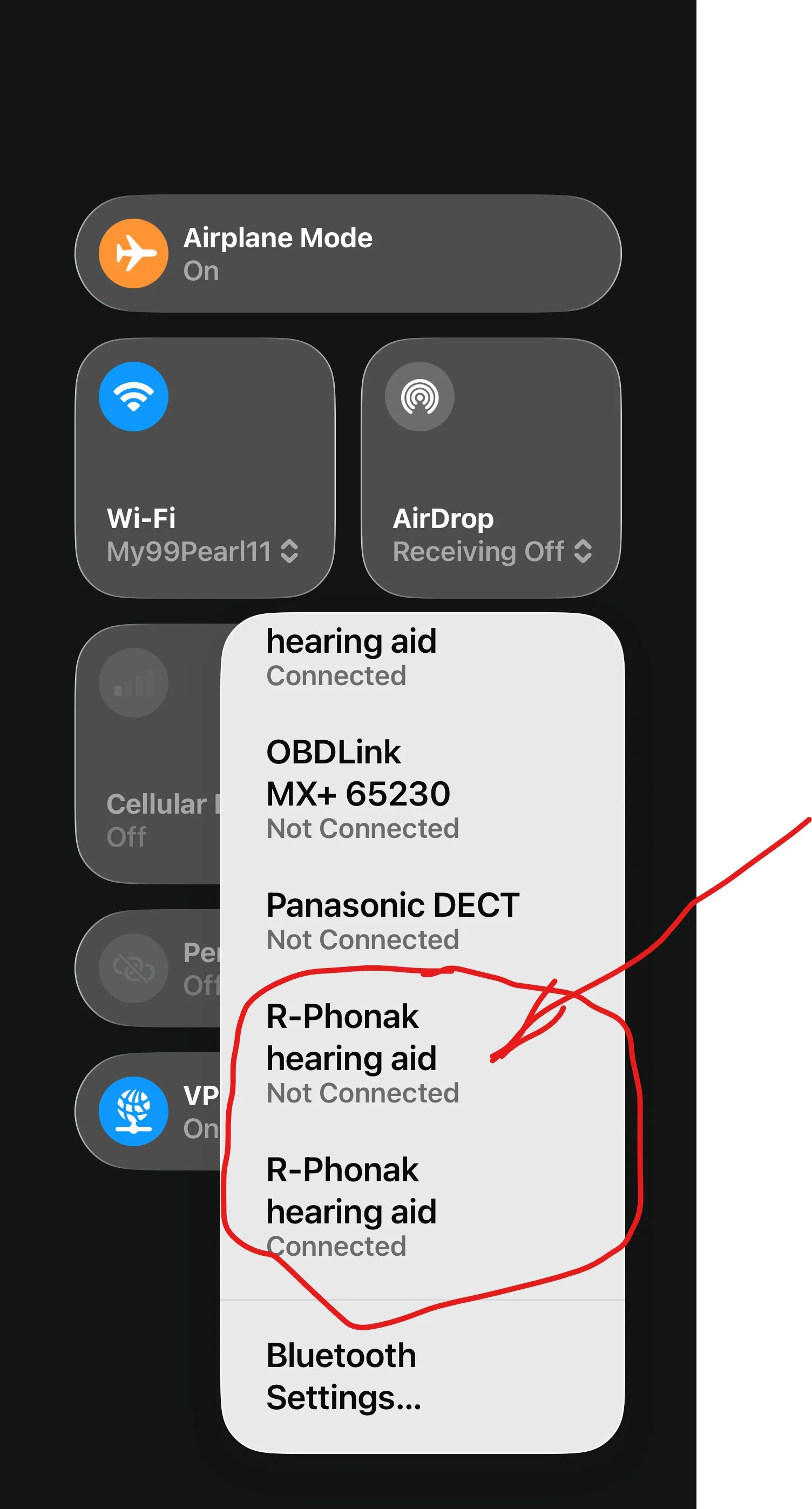
Tapping on the lower edge of the BT group with that reveals the former three listings, including two for the master BT hearing aid, one for the LE connection, one for the BT connection, which will be CONNECTED or not according to your MyPhonak BT streaming choice.
I also found in this widget list of devices that you can turn BT streaming on or off by tapping on the list item for BT streaming (which for me is always the FIRST R-Phonak hearing aid item). Using the Control Center list popup avoids a trip to the MyPhonak app and a deep dive into settings there. Although it’s convenient, I don’t know whether turning off BT streaming in the Control Center list on an iPhone saves hearing aid battery runtime.
You’re ignoring this member’s posts.
 The Netherlands
You’re ignoring this member’s posts.
EasyGuard is a new dome design, with some sort of acoustically transparent membrane that’s supposed to let sound in while keeping wax out - and thus eliminating the need for regular wax-guard replacements.
What information I was able to find yesterday was somewhat sparse. It appears that EasyGuard (at least the first version) is a “vented” dome, and thus maybe not a great substitute for people like me who use open domes. I didn’t see anything about how to order them, what they would cost if we could order them, or really anything else. I did see instructions about how to clean them - TLDR version is “very carefully”.
You’re ignoring this member’s posts.
You’re ignoring this member’s posts.
tenkanProvider
I wonder if it would be possible to give the streaming connection a different name in Target.
I think after adding a new/copy program you can change the name.
You’re ignoring this member’s posts.
Log in to reply to this topic.
Related discussions
Hearing Aids0 replies
Hearing Aids1 reply
Hearing Aids4 replies
Hearing Aids130 replies
Hearing Aids108 replies