So, whatever the firmware update did to my gain profiles, it made my own voice less muffled while maintaining an acceptable volume of room sounds and other voices. I should stop speculating and look at my frequency response curves before and after the update.
Strange, but in positive way, I see. Keep us informed about your gain curves before and after! Mine also changed (P receiver is even more powerful, especially over ~3200 Hz, which is very desirable), but I’ve just come back from shopping and preparing to sleep.
@Bimodal_user, getting off Cloud 9 here, I actually find the update didn’t change my fitting profile at all. So any sound differences I imagine I perceive must be in processing, not in frequency response settings. Edit_Update: See my correction starting above the final figure - the forum software fused two sequential posts by me together
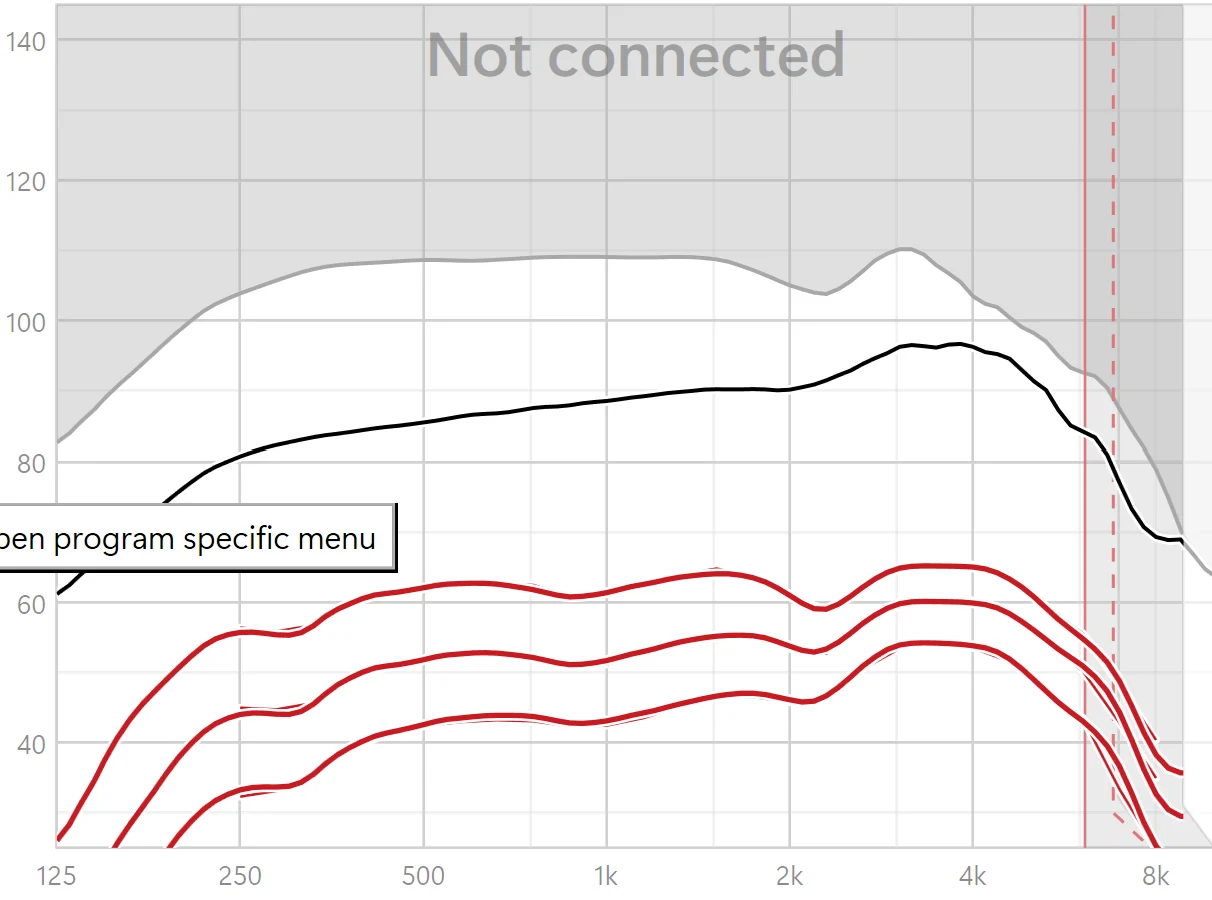
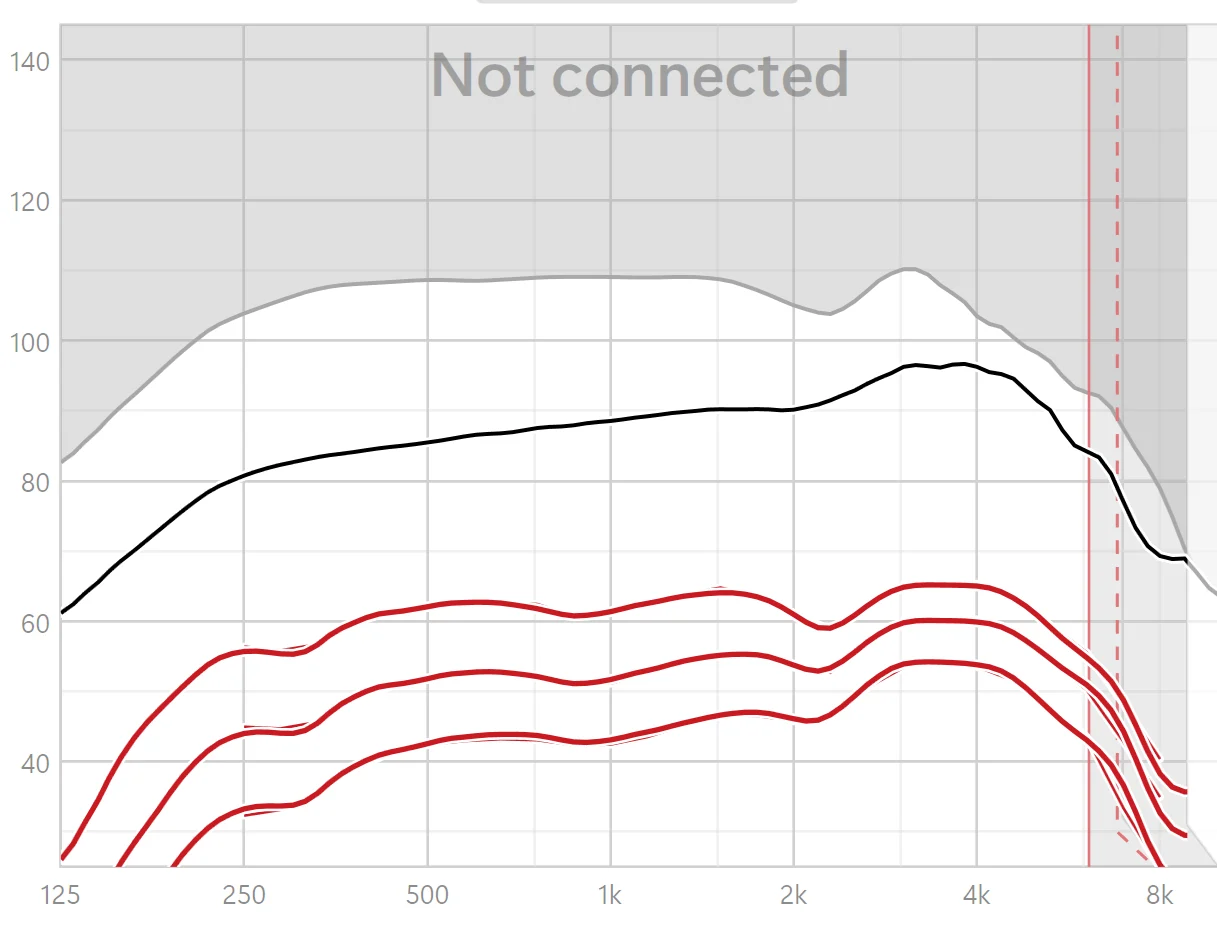
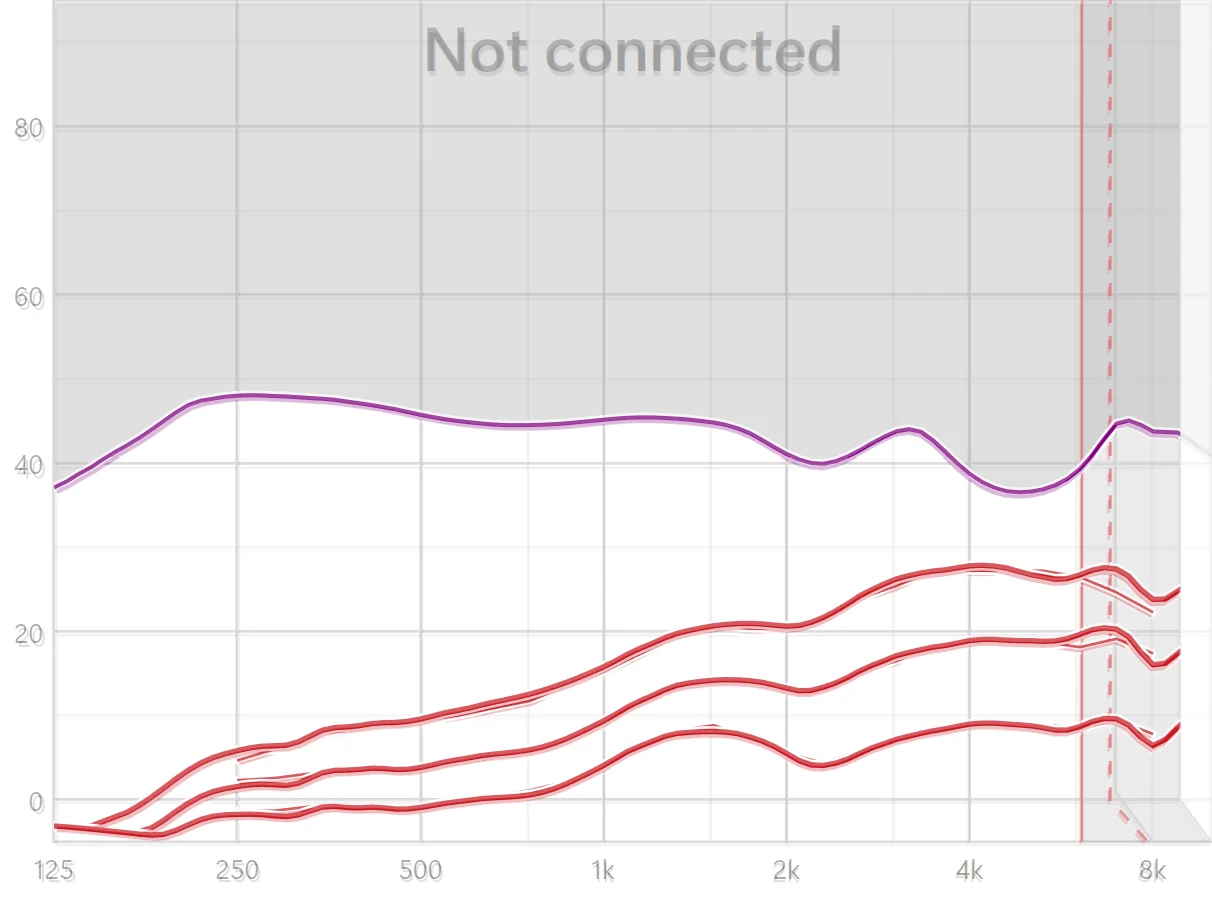
IIRC, I used Target 10.0 to initially fit my Spheres. The very first and last fitting sessions I saved before the Target 11.1 and firmware update show that I’d already fit the Spheres with 3.0. Here are output frequency response profiles of my fit before the firmware update and afterwards.
Before (click to enlarge):
After (click to enlarge):
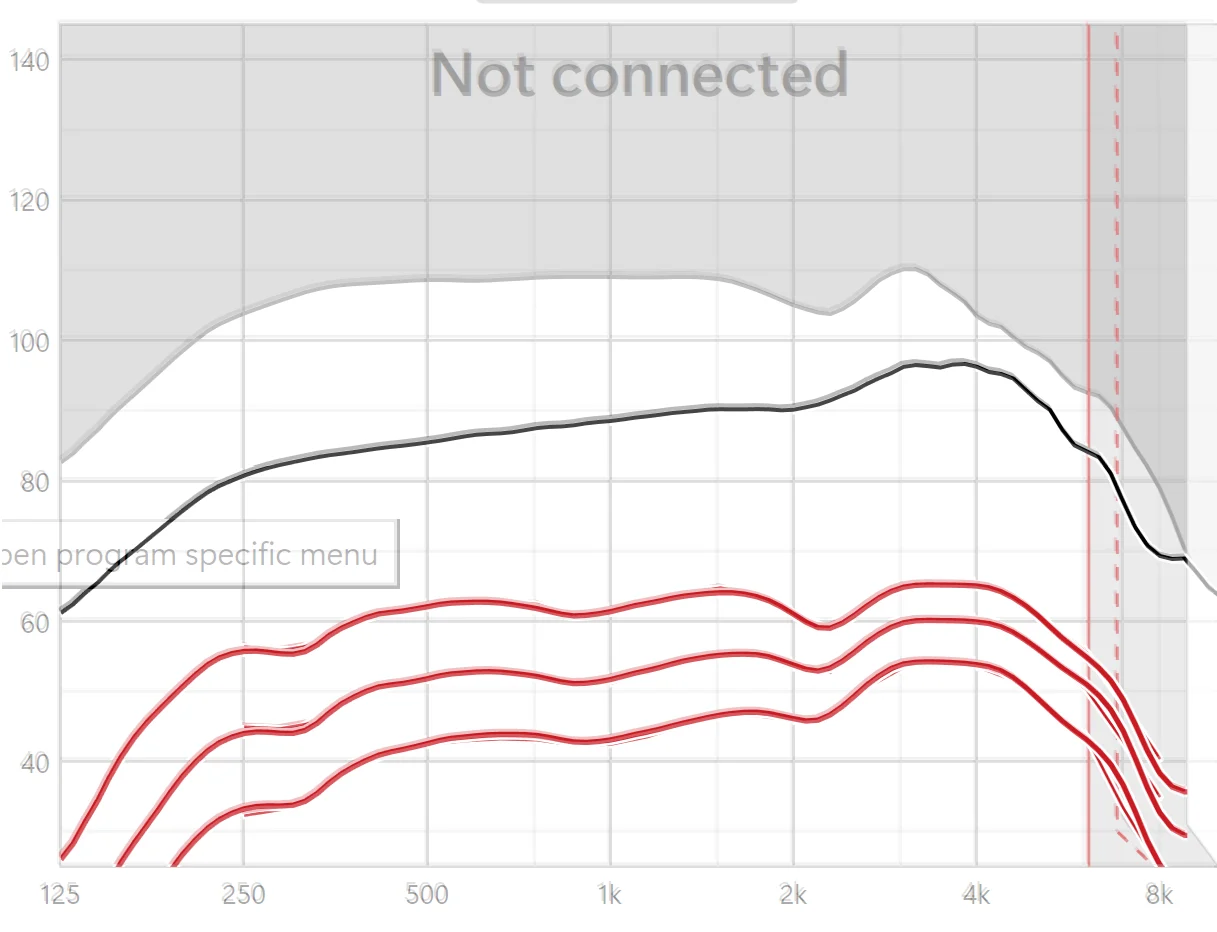
To show that there has been no change, I layered one image on top of another using Adobe Photoshop Elements 2024 and I made the transparency of the top image (the BEFORE firmware update) only 27% opaque to let the AFTER image underneath show through. So, the BEFORE lines will appear as light gray or pink and the AFTER lines will be solid black or red.
NO DIFFERENCE BETWEEN BEFORE AND AFTER JUST FIRMWARE UPDATE:
(click to enlarge)
Here is a description of how APD 3.0 improves over APD 2.0 from the Phonak website:
APD 3.0 features new frequency curves implemented across all acoustic and streaming programs.
Acoustic programs: The new frequency curve of APD 3.0 introduces a boost in the mid-frequencies with a slight reduction in the high frequencies. This change was proven to maintain speech intelligibility while providing comfort in noisy environments. When compared to a key competitor’s first fit, 93% of clients preferred the first fit of APD 3.0.
I actually find the update didn’t change my fitting profile at all.
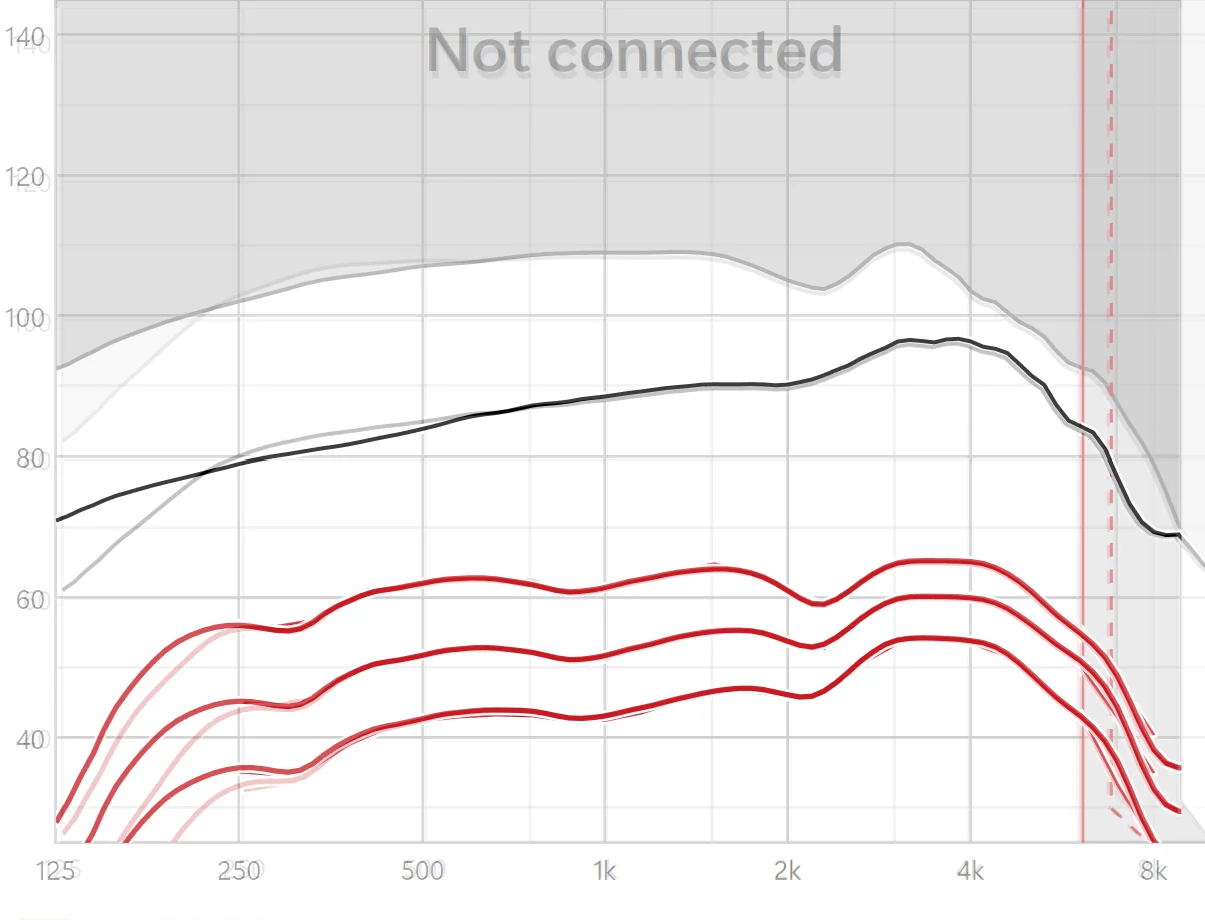
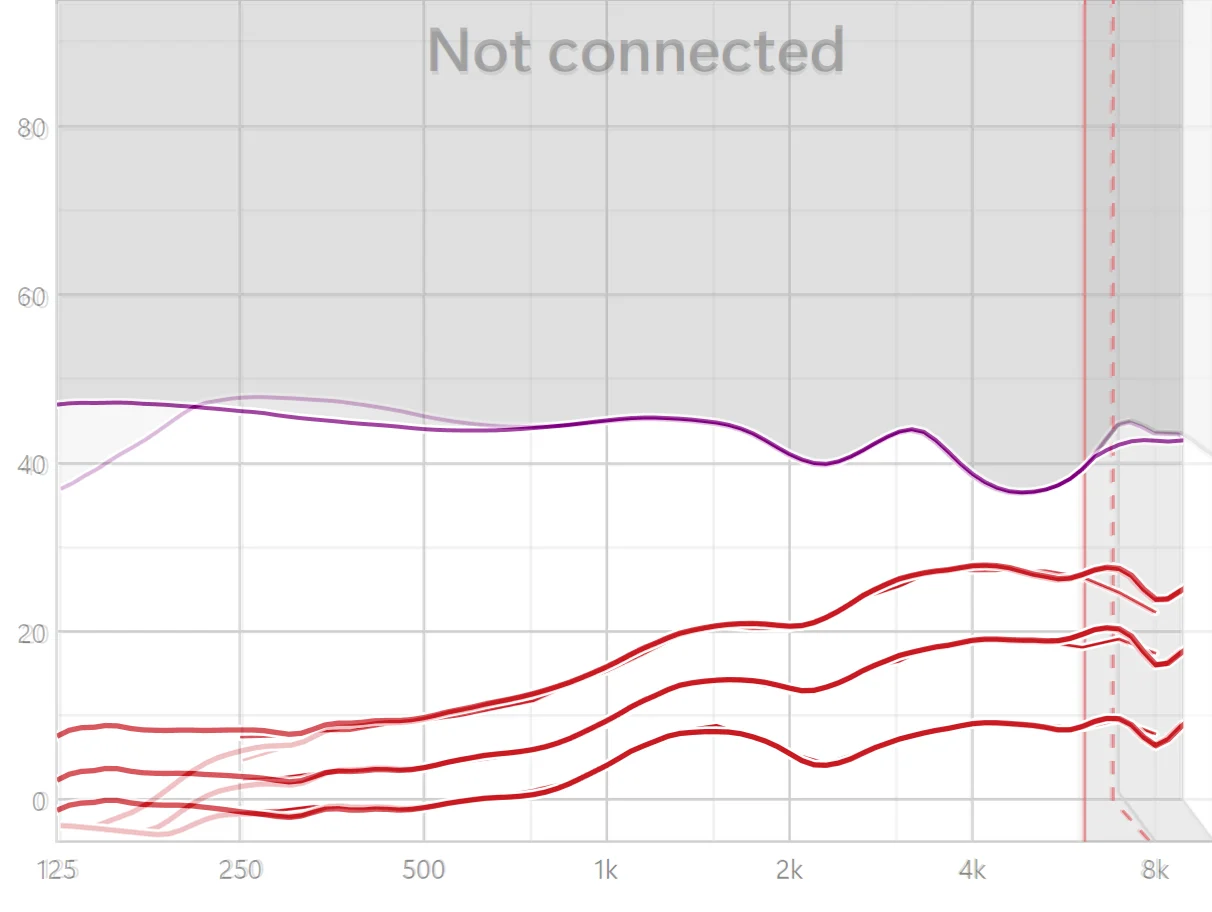
Have to correct myself. In the previous post, I had just done the firmware update without running the Feedback & Real Ear Test. After running the Feedback & Real Ear Test, Target sensed something different about the acoustics and raised the feedback threshold at the lowest frequencies, allowing greater gain to be applied there in my frequency responses profiles.
Here is an overlay of my output response profile just after the firmware update overlaid over the altered profile I get after subsequently running the Feedback & Real Ear Test. The lighter gray lines and pink lines are for the profile after the FIRMWARE UPDATE ONLY and the black and red lines are for the profile obtained after subsequently running the Feedback & Real Ear Test. (click to enlarge)
Given my ignorance, I find Google Gemini Flash 2.5 gives pretty good advice on how to program hearing aids in Target 11.1. I also was able to run the feedback test over the Internet by connecting to my hearing aids through the MyPhonak app (as if your provider were giving you telehealth care). I don’t know if all Target manipulations can be done through Remote Support, but it suggests that possibly one does not need to plunk down bucks to buy a Noahlink Wireless for ’ing.
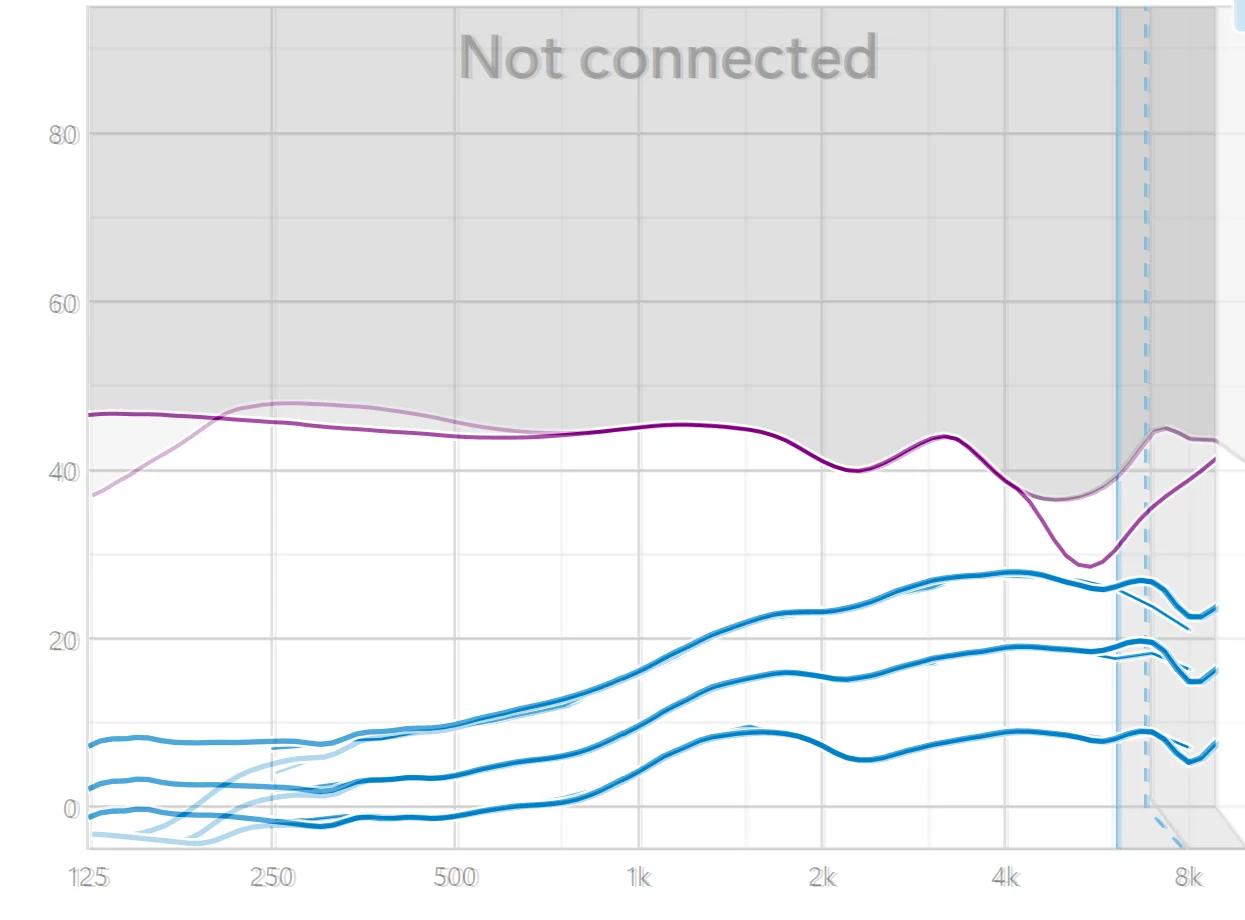
My just previous posts showed total output for soft, medium, and loud input sounds (50, 65, & 80 ) for my right ear at various stages during the update process. To make the gain changes at various frequencies clearer, the following graphs just show added gain response to soft, medium, and loud inputs.
The first image overlay is BEFORE and AFTER just the firmware update. Again, there is no significant gain change caused by just the firmware update (click to enlarge).
The second image is BEFORE and AFTER the feedback & real ear test following the firmware update (click to enlarge). The BEFORE is the fainter, semi-transparent light purple and pink colors, the AFTER the deeper purple and red lines. After the feedback test, Target increased my low frequency amplification but only below 500 Hz.
This third and last image shows that my LEFT ear gets its gain response similarly updated as my RIGHT ear after the Target 11.1 Feedback & Real Ear Test (click to enlarge)
The top purple lines show feedback thresholds. The lighter purple line in the BEFORE overlay is a many-month-old feedback test, at least from May 2025. The dip in the feedback threshold around 6 kHz in the 10/22/25 feedback test shows that my left cShell is no longer fitting as well, and indeed, I’ve experienced feedback from that receiver in everyday life.
The feedback & real ear test should be done after anything likely to seriously change the acoustic parameters of your hearing aids or ear canals. A firmware update could do that. In fact, when I updated the firmware and went to close my session, Target reminded me to run the feedback test, but I neglected to do so at the time because it wasn’t quiet in the house. @Bimodal_user asking me about doing it reminded me I’d been negligent.
What is Target that all of you are talking about? I’m 83 years old and a long-time hearing aid user. I’ve used Costco’s KS6, KS9, and all the brands Costco sells, but I was always frustrated when I went out with friends for coffee or dined with my family at restaurants. So I coughed up more money and, based on forum recommendations, bought Phonak Spheres at a discount through my Kaiser Permanente Medicare Advantage plan. They are a godsend and allow me to participate in conversations in noisy situations, but there are still situations where I would like improvement. I’ll ask my Kaiser audiologist to upgrade my to Ultra when I see him, but in all the times I’ve seen him he never told me anything about Target, so I’m curious. What is it, where do you get it, what does it do, and is it something that a non-expert can use? (To me, most of you seem much more technically advanced than I am.) IsTarget something you would recommend for me, and if I fool around with my settings using it, will that cause a problem with my audiologist, who has been making adjustments for me? I appreciate your experience and thank you for anything you can contribute to my understanding.
IsTarget something you would recommend for me, and if I fool around with my settings using it, will that cause a problem with my audiologist, who has been making adjustments for me?
It’s a gray area, as technically, only a trained and certified has the authority to prescribe and fit your hearing aids. They are medically regulated devices. However, recently, less powerful hearing aids for mild to moderate hearing loss were deregulated and are now available over-the-counter () for self-programming. My loss is moderate enough that it could almost be fit with OTC hearing aids. So, I don’t feel I’m going too far out on a limb by making adjustments myself. You lose the expertise of your HCP and tuning if you go solo. Staying with an HCP is the best choice in most circumstances. Most HCPs are unlikely to approve self-fitting, if for no other reason than liability. The audi I saw for my ReSound , though, had no issue with me doing so (she said I seemed to know what I was doing). However, when I bought my Spheres online from DirectHearing because my insurance coverage hadn’t rolled over, she didn’t want to provide warranty service if needed and told me to deal long-distance with DirectHearing, if necessary. Rather than have DirectHearing make adjustments over the Internet via Target’s Remote Support feature, I’d rather do it myself. My wife’s a retired MD and can check out my ears periodically with her otoscope. And when I really need professional help, I plan to visit AudioNova outlets in San Antonio (formerly, Connect Hearing, owned by Sonova). I had a clogged left HA receiver visiting London, Ontario this past summer, and went to a Connect Hearing outlet there. The HCP asked if my HAs were under warranty and fixed the left one for me at no charge. So, it’s good to have a workable plan on how to integrate any interest with professional help as advisable and needed.
Down at the bottom of the following Phonak web page under Resources and Downloads, you can find the Target 11.0 Step-by-Step Guide that gives you an idea of how complex HA programming is: Hearing Aid Adjustment Software - Target | Phonak16
Target is a Windows program. I don’t know about the Noahlink Wireless drivers. That could be a problem under Parallels. If you ask ChatGPT about it as I did, you’ll probably get an answer saying if you use emulation software that allows you to run an x86-based version of Windows on a Mac, you may get the Noahlink Wireless to work, but if you use an ARM-based version of Windows, it won’t work because Noahlink Wireless can’t be run on ARM-based PCs, according to ChatGPT. OTH, if you can use REMOTE SUPPORT in Target within limitations of what Phonak allows REMOTE SUPPORT to change fittings settings over the Internet through a MyPhonak connection in your smartphone to your , you might not need a Noahlink Wireless device - and certainly not just to play around with Target to see what it’s like.
Yes , you can run Target on a Mac with Parallels (I haven’t tested it with VMWare). If you have a Mac with a M processor , there is a simple workaround that is needed for Target to run .
Or you can get a cheap PC , it doesn’t require a powerful processor
Virtualization: Running an x86/x64 version of Windows (e.g., Windows 10/11) in a virtual machine (VM) on an ARM-based PC (like an Apple Silicon Mac using Parallels or UTM) and then connecting the Noahlink Wireless to the VM has been reported to work. However, this relies on the VM’s ability to emulate the necessary hardware and can be slow.
Gemini concludes, though: “For reliable, supported operation, you should use a PC with a standard Intel or AMD x86/x64 processor running a supported version of Windows 10 or 11.”
This is all way to much for me. As I said, I’m 83 and not super technical. So I think I’ll just stick with my Kaiser audiologist, ask him to install Ultra, and see how it goes. Thanks, everyone!
I enjoy reading your articles and advice on hearing tracker.com2. I called my provider today and they want $495.00 to install the update. It seems like a ripoff to me for free Firmware. Advice please.
That is indeed a ripoff, especially considering that audiologists advertise free bundled services when you purchase the aids. Updating the firmware takes 5 min.
You can shop around or do it yourself (). If you choose the later, you can review the DIY guides in this forum.
I don’t know if this firmware update will be available later via the phone app. Due to its size, this seems unlikely to me.
If you are able to use a Windows computer and most common software you can handle the update as . $495 more than pays for a new Noahlink Wireless or the cheaper used Airlink 2. And you’ll be able to do the next update and save another $495.
 Poland


 San Francisco