I’m trying to compare and contrast the Floogoo FM120 to the C82 avantree. I have read through the postings for each but I haven’t seen any direct comparisons. I’m looking for something to plug into my computer since I have LEAudio hearing aids and an Iphone 15 pro. They both cost the same but I kind of get the impression the Floogoo is a little more versatile. Looking for comments.
the c82 LEA is 30€ in germany. it sounds better than oticon’s easy LE adapter, which is 140€ here. So I kept the c82. in theory the floogoo has more bandwidth the question is if your will use that or simply cap at 16/24bit 48khz.
at the end of the day the sound quality of the c82 is impressive for me, I have a power mold 1.4mm collection vent with 105dB and intent 1.
I never tried the floogoo it was twice as much here and I never wanted something “better” when I tried the c82. pretty sure they cap the HA bandwidth rest is fitting setting in the hearing aids.
for a more versatile unit I would also buy the audikast 4 HA, because the analog connection to older electronics is important to me.
I have both the Avantree C82 (Aura) and the FlooGoo FMA120, which I use with Resound Enzo IA hearing aids.
Both are great products that I have used in the following ways
Avantree C82 Aura () - this is an easy-to-use Transmitter which I use to stream from both my laptop and Fire Kindle target. Good sound quality and very solid connection. The main limitation is that this is one way device i.e. whilst it enables me to listen to my laptop or tablet but cannot be used as microphone i.e. for Zoom of MS Teams
FlooGoo FMA 120 - this is not only an Auracast transmitter but can also be used as one to one transmitter i.e. it can be paired to an individual set of hearings aids/headphones/ear buds. It is a very versatile device, but more complicated to use/setup than C82 and probably more suited to the more technically minded user. However, the manufacturer offers great support including a detailed thread on this site and it is a highly configurable device which can also be used as a Auracast receiver.
Given the very modest price of both devices, I would recommend getting both and experimenting with them.
I also have the Avantree Audikast 4HAAvantree Audikast 4HA, which is a very easy to use TV streamer which can be used with Auracast enabled headphones/earbuds and hearings aids. The sound quality is excellent and whilst I have certainly better than the Resound TV Streamer 2 which I used with my previous aids.
I only have the C82 Aura, I am aware of the C82 LEA and whilst that solves the microphone issue my understanding it that the LEA only has the option to connect via Bluetooth and not so it is limited to only one set hearings aids/earbuds being connected whereas Auracast will only multiple users to pick up the sound simultaneously
I bought the C82 LEA and tried it on my PC and iPhone 15. I have Oticon Intents.
It did not work in both cases. On the PC it registered as a classic bluetooth connection (with flashing blue light) but I could not then connect to it via the Oticon Companion App. When I tried as an broadcast (with flashing green light), it did not register as a bluetooth connection, and I could not connect to it as well.
I tried connecting the C82 LEA to my phone, but again, could not connect to it, even though it seemed to be broadcasting via the device. It seems that the iPhone 15 does not support LE Audio, so I assume that’s why no broadcasts are being picked up.
Bluetooth connects to hearing aids/earbuds by pairing in a similar way to Bluetooth Classic. The companion app will only allow you to connect to a Broadcast. As i understand it the C82 LEA is not a Auracast Transmitter.
The flashing green light indicates that the C82 LEA is not paired with your hearing aids. The light will change to to a solid green light when paired. I suggest referring to the set-up manual on Avantree website for instructions on how to pair.
Whilst both Bluetooth LE Audio and Auracast are the latest Bluetooth standards for audio connection they are two separate methods of connecting.
Thanks for the heads up. I assume I have to get the C82 Aura then?
I think the flashing green light was because it would not pair with my laptop - not my hearing aids. When it was in bluetooth classic mode (blue light) it was pairing.
If you want to listen to audio from your laptop with your hearing aids, which I assume is the case then you don’t need to pair the C82 LEA with your laptop, you need to plug it into your laptop and pair it your hearing aids with the C82 LEA
I have upgraded my Oticon Intents with the new 1.3 firmware that enables , so I want to listen to Auracast transmissions.
With respect to pairing my hearing aids to the C82 LEA device, that is not possible as it does not appear as a bluetooth registered device and even if it did, there is no way to do that as it is driven via the Oticon Companion App, and the only way to connect is then as an Auracast transmission, other than the existing Connect Clip device, which uses standard bluetooth.
there is no way to do that as it is driven via the Oticon Companion App, and the only way to connect is then as an Auracast transmission,
you are mixing up LE audio and . it’s not the same. you don’t need to interact with companion app on c82 LEA, you pair to C82 LEA during green/white flash.
You use companion app to mute mics or change program, it’s only needed to detect and dial in a auracast, which there is no auracast with the C82 LEA.
As previously stated the C82 LEA is not a Transmitter. If you want to connect to an Auracast Transmission, then you will need the C82 Aura or an alternative Auracast Transmitter.
However, I understand that the Oticon Intent is Bluetooth enabled in which case it can be paired with the C82 LEA . Please refer to User guide for instructions on how to pair which can be found here C82 LEA user guide7
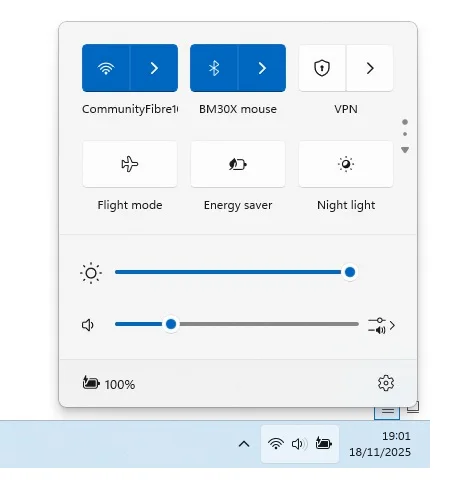
You should find that you can adjust the volume on your laptop in the same way as you would using the laptop speakers For windows 11 as per the screenshot below
Whilst many observers point to the fact that at the moment there are very few Auracast Broadcast in public and commercial venues, I am using Auracast and Bluetooth LE Audio on a daily basis to connect to my laptop, tablet and TV, with a much better sound quality, a solid connection and at a fraction of the costs of the previous connection devices provided by the hearing aid companies.
Given that Auracast Broadcasts in public and commercial settings will be accessible by anyone who has Auracast enabled headphones/earbuds rather than just hearing aid users I have no doubt that it won’t be long before this technology is widely adopted
Just to follow up from last night, after using the C82 Avantree for the first time.
It turns out that the C82 Avantree is a life saver on my laptop. I use the Oticon Adapter on my TV and work PC, but for my laptop, up to now, I have been using the Oticon Connectclip. It turned out, totally co-incidentally, that I actually needed the C82 Avantree as a replacement for my Oticon Connectclip, because following the firmware update 1.3 to my Oticon Intents, I can no longer pair to my Connectclip, as I am getting a double red flashing light. I have tried all the usual workarounds/fixes, but for love nor money, it will not connect. So, I realised that I don’t need to use it anymore, as I can use the C82 Avantree, and it has the advantage that I don’t need to charge the C82 Avantree, unlike the Connectclip.
Now, the C82 Avantree, although it has exceptional sound quality, and a pretty good connection once it gets going, has a couple of drawbacks. Firstly, one has to be careful when pairing (the people on this forum will know this) - you have to switch off bluetooth on your phone/any other devices. Once paired, it does not show as a bluetooth connection on ones laptop/PC, but one is able to stream audio and have a teams/zoom conversation (which I tested). Secondly, I found that if you walk out of range and lose your connection, you have to re-pair. It is not a connection that stays stable in this case. That seems to be my impression, unless anybody has any suggestions as to how to keep a permanent connection. Still, as my connectclip is not working following my firmware update (to the Oticon Intents), it’s a case of beggars can’t be choosers.
I did discover, strangely, that for the first time (maybe because I have a new laptop), my Oticon hearing aids were showing as devices that could be directly paired on my PC. However, once paired I was not able to connect. It turns out that my Dell 16 Laptop is awaiting a BIOS update before it will be compatible with , even though the bluetooth drivers are 5.3 or 5.4 and up to date, as I updated them directly and downloaded all the latest windows updates on Windows 11. So, I will await the BIOS update and maybe that will provide a more rock solid connection in the future.






 London