 Geneva, Switzerland
You’re ignoring this member’s posts.
APPLE AirPods 3 PRO hearing aid feature trick
41 replies2.5k viewsLast reply
In reply to @coastal_california
@Dr_Dr_please - OK I got ask was UFO part of the cause of your hearing loss?
hahahaha no my friend unfortunately not, my hearing loss is due because i’m stupid, not only is part of my DNA, but firing gun and rifle without ear protection is the main reason, in fact if you see my the left ear is more damaged than the right, due to the recoil.
talking about music i’m an hard rock, trash and heavy metal lover (Metallica, Pantera, Iron Maiden, \DC and others….) XD
You’re ignoring this member’s posts.

 San Francisco
Bruce Dickinson is one of my idols !
(But so is Gianna Nannini when she was a rocker) .
You’re ignoring this member’s posts.
I think this is doable. I live in the US, bought and activated a pair for my brother in law in Vancouver and he’s been using them ever since with no issues. Good Luck!
You’re ignoring this member’s posts.
NB I received some Comply foam tips. Improved comfort, and less slippage over time (5-6 hours and no need to adjust or reposition, otherwise it’s around twice an hour). No noticeable impact to sound and seal seems just as good. So far promising. Update: since you need to squeeze the foam a bit before inserting them this mostly means you need two hands free - not so handy if you need to scratch your ear.
You’re ignoring this member’s posts.
I’m an American living in Tuscany–getting older with moderate hearing loss in one ear that bothers me a lot. Just got a pair of Airpods 3 Pro specifically for the hearing aid feature, to find I can’t activate them here. I cannot tell you how much I appreciate your post regarding going to VC to make them work. I’m in the process of finding the fastest, cheapest way to get there and do as you have done. Hopefully soon. Thanks so much for posting your experience.
One question: when you say you only had to “restart” your phone–you are saying you powered off and then powered back on? (as opposed to some complicated factory reset action….)
You’re ignoring this member’s posts.
No factory reset needed – just reboot.
Trenitalia should be pretty easy: Firenze → Roma (St Pietro) is about 2 hours
You’re ignoring this member’s posts.

Yes- others have reported that a trip to the Holy See should do the trick. I thought you could use a VPN on your iPhone for this, but apparently Apple uses other localisation tricks (GPS, sniffing nearby Bluetooth and WiFi signals).
You’re ignoring this member’s posts.
Hi there, i m really happy to help you and share our experience, yes as wrote before you just have to power off and power on your iPhone when you are in st. piter’s square to make the geolocalizzazion faster. Let me know, cheers
You’re ignoring this member’s posts.
You’re ignoring this member’s posts.
Well, shielding from GPS signals is fairly easy. To prevent your device from sensing nearby WiFi sources you could wrap it in aluminium foil, but that would also cut off your own internet…
You’re ignoring this member’s posts.
You’re ignoring this member’s posts.
I did a hearing test prior just to have it ready to use because its impossibile to perform a hearing test in piazza San Pietro, then i did another hearing test at home( useless because the test was the same as before), but its the same, once you do the hearing test in good condition at home today/tomorrow/ when you want you can use it when you activate the feature. Apple healt save your records and you can switch them on the go when you want.
You’re ignoring this member’s posts.
Its not so easy my friend, some indians nerd created a faraday cage with a microwave oven to f***k the geolocalization but it is to much hassle to diy. However if you are McGuiver you can try it 
You’re ignoring this member’s posts.
Blocking satellite GPS signals is very easy, as any car driver going into a tunnel or under a bridge knows. Spoofing a GPS receiver, i.e., making a device think it is somewhere it ain’t (which I think you refer to) is much harder indeed, but a rather standard military tool.
So if you manage to get into a place with no GPS signal and the only WiFi signal available delivers the internet through a VPN, then this might conceivably bypass Apple’s geo restrictions imho.
You’re ignoring this member’s posts.
I won’t be able to go to the VC for several weeks–but I’ll sure let you know if it works for me, too. Thanks again.
You’re ignoring this member’s posts.
My dear @Clauduccia it Will work for sure, dont worry, I didn t se your to tell you if AirPods are gode for your loss, if you need anything else we are here for you.
cheers
You’re ignoring this member’s posts.
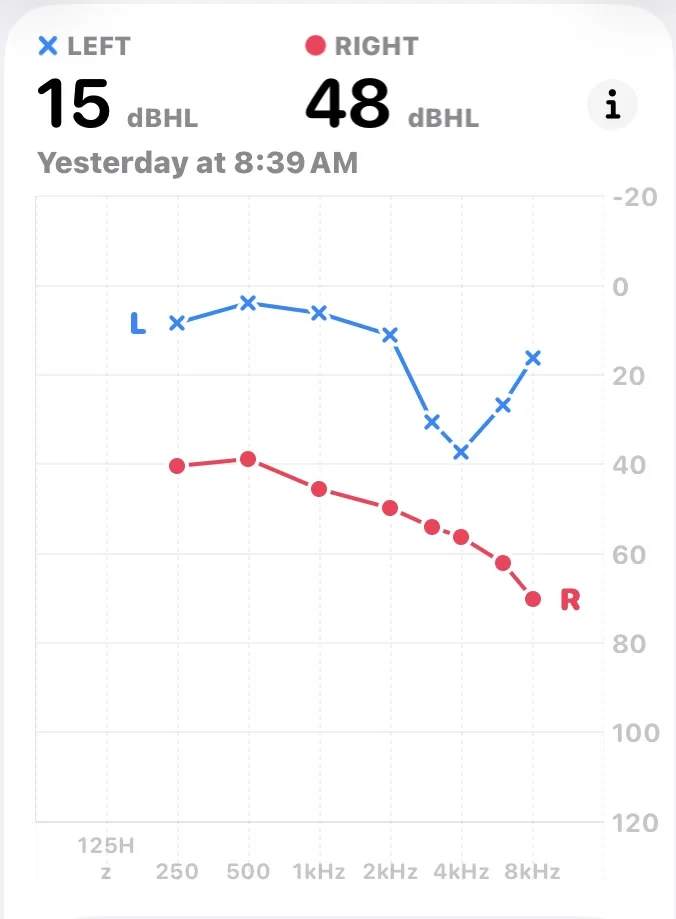
Left ear seems fine enough. Moderate hearing loss in the right ear it says.
One more question for when I’m standing in the piazza–are the iPhone and AirPods and settings feature smart enough on their own to connect my to the settings? I’m just asking for a comfort level. I’ll most likely be doing this on my own–I’m only quasi tech savvy.
You’re ignoring this member’s posts.
Well, in doing some further checking with ChatGPt–it seems my iphone (that is updated to IOS 26.2) is still too old to support the hearing aid feature. It is an iPhone SE (2nd generation). According to ChatGPT my phone is a hard stop on the use of the hearing aid feature. Is this correct? Do you know offhand? If not, I’ll call Apple Care (which I have access to still because of my laptop) and ask. If this is true–I am so bummed. But on the other hand, getting a new model of phone isn’t a bad thing.
You’re ignoring this member’s posts.
Update: After two calls to Apple Care: the iPhone SE (2nd generation) will absolutely accommodate the hearing aid assistance feature, as long as it is on the latest IOS, which mine is–that is IOS 26.2. NO PROBLEM. However, in a few months I may have a friend from Canada bring me a new iPhone 17. I asked the Apple Care tech if the settings on the SE, after taking it to the VC soon, would transfer to the new phone later via the Cloud, they could not absolutely guarantee me that would happen. That it SHOULD work, but they couldn’t guarantee it–and in which case, that is, if the settings did not carry over to the new phone, the only solution would be to go back to the VC. So, to be safe from having to make two trips, I’m going to wait until I purchase the new phone.
You’re ignoring this member’s posts.
Log in to reply to this topic.
Related discussions
Question and Answer14 replies
Manufacturer Support3 replies
Social7 replies
Uncategorized6 replies
Hearing Aids17 replies