I have severe flat hearing loss. Audi says SR would be counter productive–move from one bad area to another - basically - my words, not his. I did have SR enabled for a few days prior to an updated hearing test and reprogramming from the automatic / suggested Oticon program I hated. I am going to try SR again after we get these fine tuned a bit better, so many adjustments - complete new program created. I did not feel I could evaluate the effectiveness of SR this week.
My new question regarding the TV Adapter after some adjustments were made to program in Audi office – On my IPhone, TV adapter has 4 levels for volume. I am struggling to hear comfortably. I’m not sure what the first two - mic left, mic right refer to and how they are supposed to relate to the TV Box Volumes. I had the left mic at 100%, right mic 57%, TV box left 59%, TV box Rt at 100%. I wasn’t looking at what I was adjusting, just trying to make the movie sound reasonable. I was surprised at the imbalanced settings I settled on.
I am not sure what to tell Audi how to fix this or what to adjust. External Volume on TV was zero. Any suggestions? Sound quality was better, but maybe needs to be fuller?
I was watching on a TV input that I had not messed with the audio settings earlier, so it isn’t anything internal to the TV 's audio I don’t think.
I really had to fight not switching to my Epochs and Streamer Pro, but both are on borrowed time and I need to get used to the OPN’s sound & streaming freedom. Thank you.
Your audi is correct that with a flat loss the Speech Rescue is not useful or even desired. I wouldn’t recommend it now that you said you have a flat loss.
Regarding your TV Box question, you have the mic left and mic right because you had the “Adjust Independently” enabled in your MFI Hearing Devices setting. If you don’t need to adjust them independently, then disable this to keep it simple and only one volume control for both left and right. But if you do need to adjust them independently to achieve the right balance to your ears, then have your audi reprogram the left and right volumes in Genie 2 next time you see him/her so you only need to have a single AND BALANCED volume control next time.
The Mic volume on the iPhone refers to the mic volume setting on your OPN. The TV Box volume refers to the streaming volume from the TV Adapter. For example, if you don’t want your OPN mics to pick up any external sound while you’re watching TV then slide the Mic volume to the left most while have the TV Box volume at whatever is comfortable level for you. If you want to hear things normally around you while watching TV then have the Mic volume set to the default level (wherever you hear the default volume chime which is 3 short beeps).
The Mic volume slider not only affects the external mic volume control, it also has an effect on the volume coming from the TV Box as well. For example, if you increase the mic volume control to 100%, not only will the mic volume for external sounds be very sensitive, the TV Box volume will sound louder as well.
In short there are 3 different places to adjust the volume of the OPN mic for external sounds relative to the TV Box: 1) your manual buttons on your OPNs, 2) through the iPhone like you described above, and 3) via the Genie 2 software setting by your audi.
As for the TV Adapter volume, you can adjust it 1) from the source driving your TV adapter, 2) from your iPhone TV Box setting, 3) by your audi from the Genie 2 software, 4) your manual buttons on your OPN.



 NJ
NJ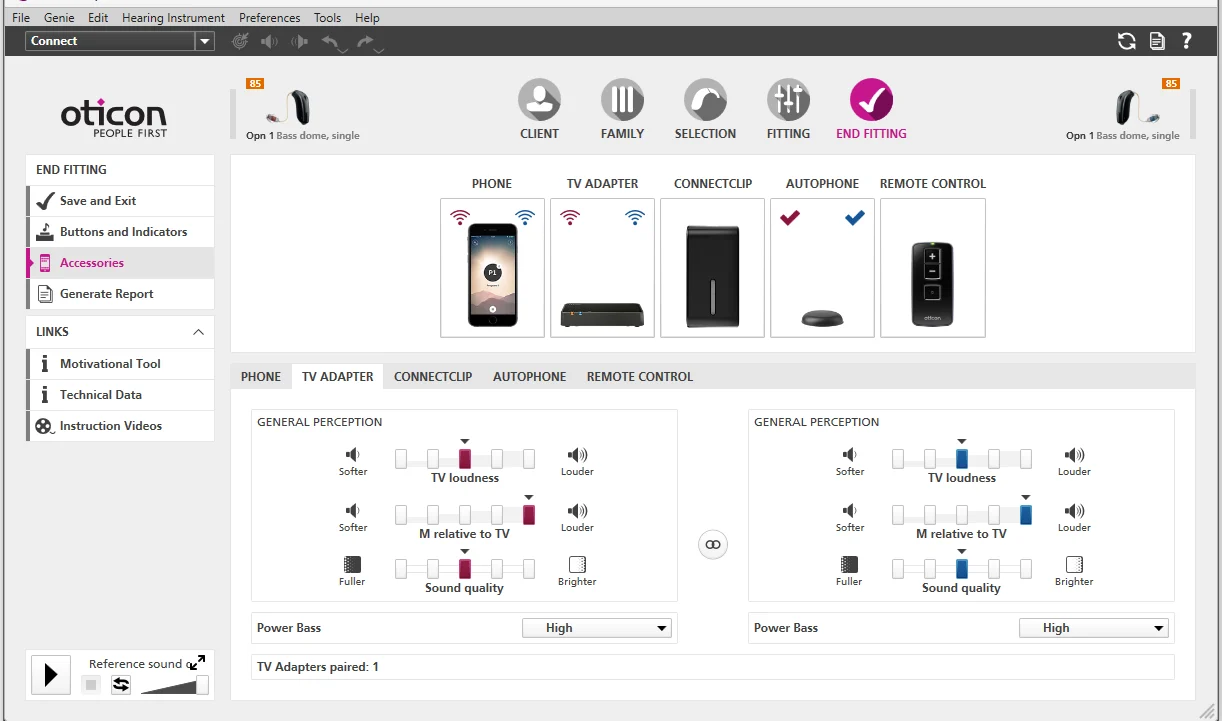


![[image]](/uploads/original/5268375177002fb5a4a60d69605caa72189b4974.png)
![[image]](/uploads/original/ab7f26de891d389bdb4eab35e3158161f109b6fd.png)