tenkanProvider
Yes that’s a good way to start, having your pro do the first fitting and then you could make your adjustments later(if you feel the need) at least you’ll be set up and ready to do so.
Good luck
You’re ignoring this member’s posts.
This topic is closed.
390 replies27.4k viewsLast reply
Yes that’s a good way to start, having your pro do the first fitting and then you could make your adjustments later(if you feel the need) at least you’ll be set up and ready to do so.
Good luck
You’re ignoring this member’s posts.

Thanks. As you probably surmised from the , I actually did see an audiologist (Au.D) for my diagnosis, but they do not service Resound, which I already own. That stinks because I like my and my . So I’m going back to her to see her instruments, what insurance, pays, etc. And I’ll likely make a 2nd appointment with another local audiologist she recommended that services Resound. Once I have all the data on the table (yep, I’m a geek) then choose a direction.
But… $4k vs Dr visit + $150 programmer will definitely influence my decision.
You’re ignoring this member’s posts.
Yeah that’s sucks they won’t offer programming of your ReSound’s, as any Audiology clinic could if they wanted to
(that business model of being locked into specific manufacturers only shouldn’t be allowed)
But… $4k vs Dr visit + $150 programmer will definitely influence my decision.
Absolutely, most would agree, also good that you’ll have everything if you wanted to “upgrade” to any later models or brands, the Noahlink wireless is a very handy tool to have indeed.
You’re ignoring this member’s posts.
Programmer arrived, it was a piece of cake. Smart fit defaults to Noahlink when installed, but you can change it.
Going into the fitting you can select an instrument or let it detect. Once detected you assign to either ear or both. It does not appear to be changeable post detection unless you go back to the selection screen. I didn’t know if I might brick them, so I did not try and select the wrong instrument.
Basically it’s idiot proof, except…
You can try to force the into programming/connect mode with the function button. That took a few tries and I was successful about half the time. I found the easiest way is to power them up and then immediately click “search”. For disposable batteries, keep the door open, close the door, scan. For rechargeable, place them in the base, remove them from the charge base, scan.
Mom’s fitting including was still in there from 2018 and 2020, and that was interesting to see. Ironically I used to fuss at her about not wearing them to the doctor, and even went with her to make sure she understood it all. Well… my hearing is worse than hers. 
So far so good. Now I have to see if I can rename programs and learn how to tweak gain sliders.
@PVC- If you have any resound questions, don’t hesitate to ask. I’m happy to go test whatever you need.
Thanks again!
You’re ignoring this member’s posts.
Thanks again. I had my pro fitting today (Phonak V90) and I was able to better understand and ask better questions. With a pricepoint of $3-5k, I’m going to have a pro fitting with the instruments I have).
Whichever path I take, you guys helped tremendously.
Regarding fittings: How does one determine which receiver (LP, MP, HP, etc.) to purchase/install into the ? Does it matter that much? For example, I have an MP and selected that in SmartFit. Will the software automatically tailor the output to the receiver I have?
I’m guessing that the SW can always lower the output, but that the lower power receivers have upper limits on output?
You’re ignoring this member’s posts.
You’re ignoring this member’s posts.
Regarding DIY fittings: How does one determine which receiver (LP, MP, HP, etc.) to purchase/install into the HA?
This is determined by your hearing loss, the more serious the more power required, so yes it matters a lot, including picking the correct acoustics (dome,molds, venting)
I have an MP and selected that in SmartFit. Will the software automatically tailor the output to the receiver I have
Yes the software as a first fit will tailor the requirements,and yes you can always make any changes to that( this is the beauty of )
but that the lower power receivers have upper limits on output?
Yes there’s a maximum power output for the different receiver’s.
Sounds like to me that you need to do a little bit more research on what you want to achieve, a good way to start is to install target software and have a play around to see what can be done, start a new topic on any questions you may have, there’s plenty of us to help you along.
Check out the user guide from here.
Hearing Aids and Solutions | Phonak2
Phonak is committed to improving the lives of the hearing loss community. Our hearing products and community resources emphasize total wellness through social, emotional and physical well-being. We believe that hearing well is being well and is...
You’re ignoring this member’s posts.
Are you asking about Phonak or ReSounds?
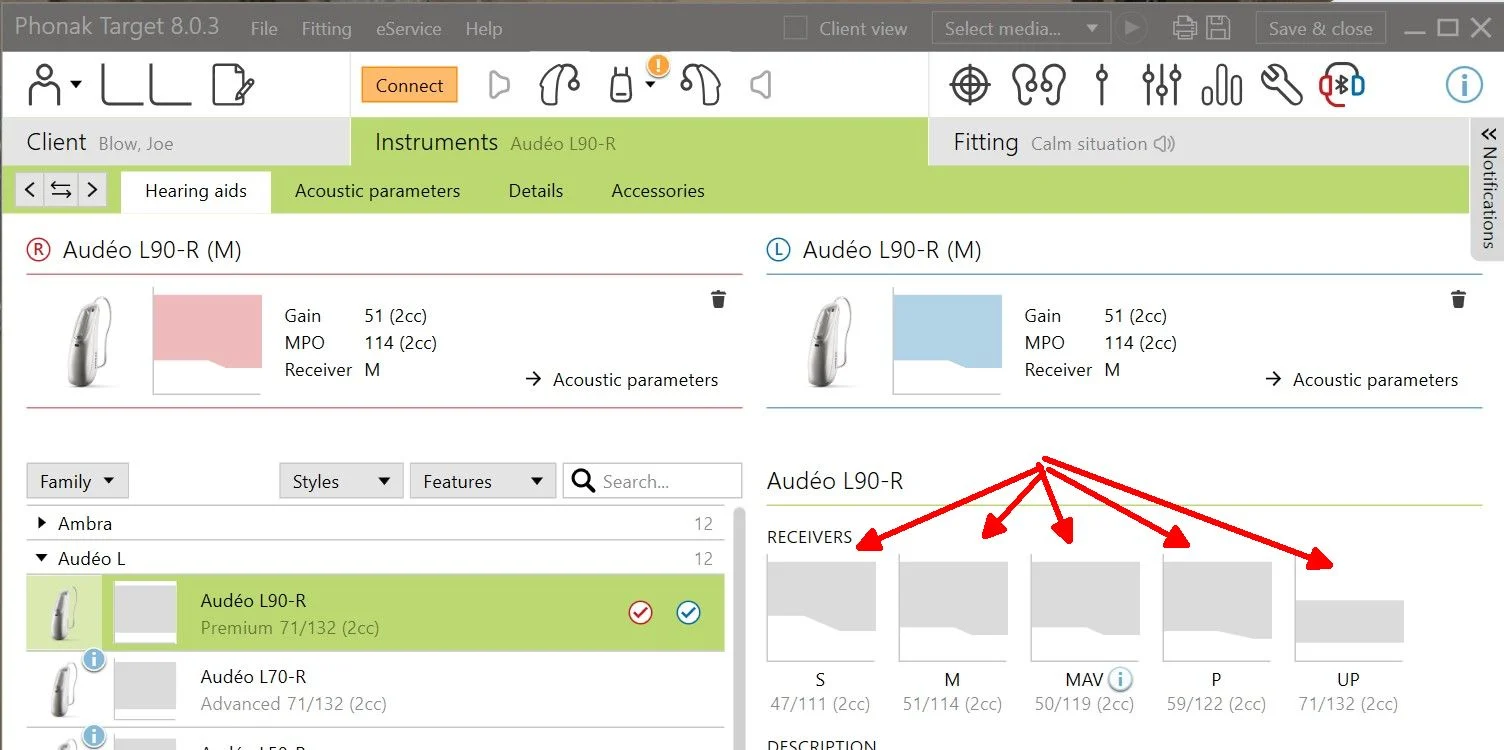
Sorry for the confusion. Phonak was what the audiologist dispenses. The diagram helps a good bit, I think. Is the grey area the gain capability of the receiver? In SmartFit I only see that one at a time, and then after equipment has been selected (in my case, detected)
Yes the software as a first fit will tailor the requirements,and yes you can always make any changes to that( this is the beauty of DIY)
Got it. So I probably need to re-run as first fit and pay attention to the Recommended “ribbon”
Sounds like to me that you need to do a little bit more research on what you want to achieve, a good way to start is to install target software and have a play around to see what can be done, start a new topic on any questions you may have, there’s plenty of us to help you along.
Definitely need to learn more. I searched the guide, but didn’t know where to look. Will start new topics.
Thx again!
You’re ignoring this member’s posts.

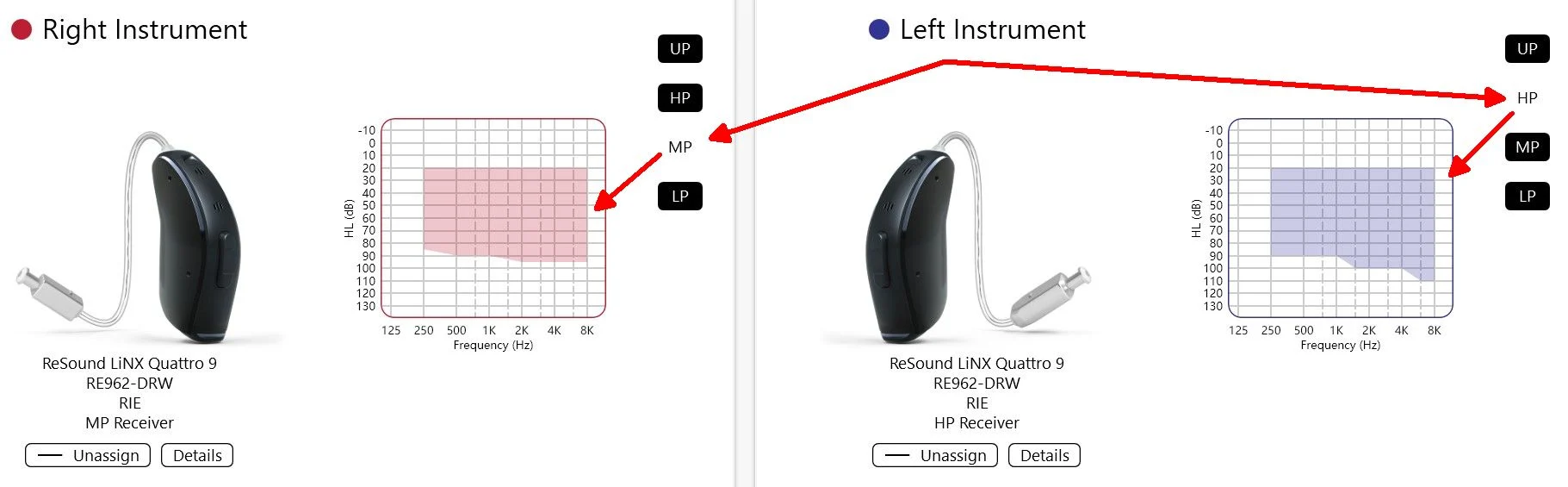
Just click some different choices and observe the range of different receivers;
Tip; Click image to enlarge.
You’re ignoring this member’s posts.
My low end should be inside (or close to) the shaded area, correct? I.e loss + receiver gain ~= normal?
You’re ignoring this member’s posts.
Yes and your higher frequencies as well for a perfect fit, but it probably won’t make a big difference if your just outside it, the HP seem a much better fit.
You’re ignoring this member’s posts.
I’ll look at HP.
By low end I meant , not Khz. Fit the shaded area to my curve.
You’re ignoring this member’s posts.
Sorry that you got hung up on that older version of School.
This is the new version DIY School - (v2.0)
Hopefully some recent changes along with a sign that says (we have moved) will help differentiate the two (old and new) versions of DIY School.
You’re ignoring this member’s posts.
You’re ignoring this member’s posts.
Sure but don’t forget you’ll need the correct programming device as well for projects.
You’re ignoring this member’s posts.

Thanks, I’m going to get the Noahlink after I confirm it works with the Paradise 90. I have the Phonaks coming and currently use the Starkey Halo 2 i2400s.
You’re ignoring this member’s posts.
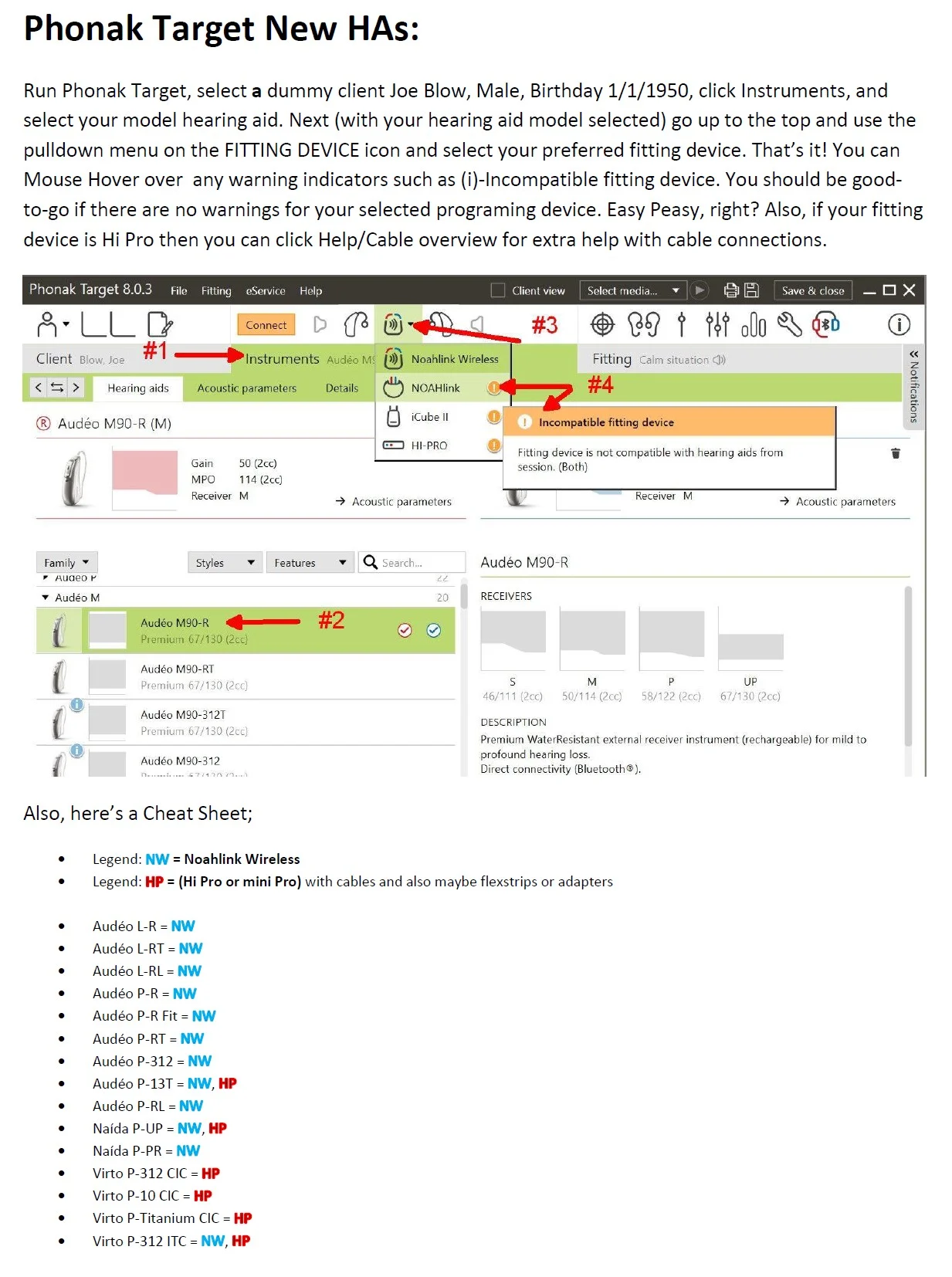
Yes, Noahlink Wireless works for Phonak Paradise. Here’s a clip from a School PDF file named (Choose a Hearing Aid Programming Device); Tip: click the image to enlarge.
You’re ignoring this member’s posts.

Good day all. I am absolutely a newbie at hearing aid programming. I have my Noahlink wireless and am looking for a copy of the software that will allow me to read the programming off of my Signia Pure 312 7X so I can copy it to a set of 13X C&G, also something that will break the programming on my Costco Bernafon
You’re ignoring this member’s posts.
HMm; Let me try to unpack that??
You cannot directly copy the settings from one technology level to another. The two technology levels will have different features. I suggest that you read a School file named (02 How to Program Your Hearing Aids), and more specifically ( Step 3 – Choose (1 of 3) origins for your hearing loss settings).
I don’t think that you want to “break” the programming on your Costco Bernafon because it will be broken. Do you want the fitting software?
You’re ignoring this member’s posts.
Maybe a good starting point/origin for your Charge&Go settings would be your paper (if you have one) or an in-situ version of your audiogram which you can build yourself from within the fitting software by listening for tones at each frequency, and for each ear.
You’re ignoring this member’s posts.
Hearing Aid Self-Fitting (DIY)10 replies
Hearing Aid Self-Fitting (DIY)322 replies
Hearing Aid Self-Fitting (DIY)4 replies
Fitting Software Requests1.1k replies
Hearing Aid Self-Fitting (DIY)302 replies
 Atlanta, Ga