Hi,
I am a new user of hearing aids. Do you know where I can find a description of how directionality works for Signia Silk 7 IX? A directionality diagram maybe?
You’re ignoring this member’s posts.
32 replies2.8k viewsLast reply
Hi,
I am a new user of hearing aids. Do you know where I can find a description of how directionality works for Signia Silk 7 IX? A directionality diagram maybe?
You’re ignoring this member’s posts.
You’re ignoring this member’s posts.
Yes.
It adjusts volume and, if I understand correctly, the frequency profile. There is nothing on directionality. Do I understand correctly?
You’re ignoring this member’s posts.

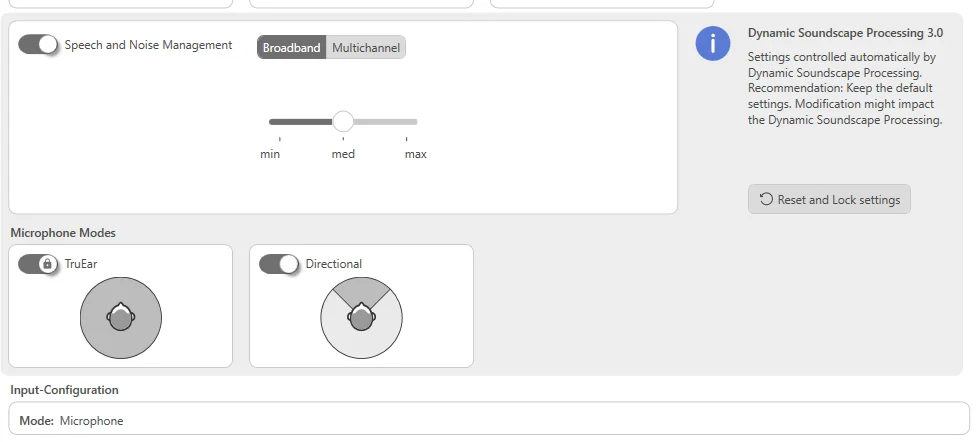
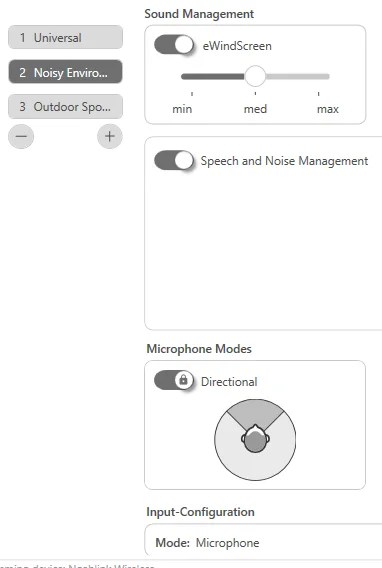
All I could find was that you don’t have Augmented Focus in the silk as they are single mic (OneMic) so your limited on this, but you do get the directional for front focus (Signia claim they are the only one offering this in form factor?) here’s a couple of screenshots, I couldn’t find a white paper for you that would explain exactly how it works.
You’re ignoring this member’s posts.

Yes, they are single mic, but they do have directionality as a feature, using mic of each , making it a two mic configuration.
You cannot manipulate the focus via app though as it’s a limited version of directionality.
It saddens me to say but going with the Silks you lose all the cool features of the IX platform.
I’ve used HAs as a newbie, because I was worried about the looks, which was really dumb in retrospect and a huge mistake, for me.
You’re ignoring this member’s posts.
Thank you tenkan. It is much clearer for me. What I should focus on is to understand which are the directional adjustments compatible with that can be done only by the hearing professional and (may be in the future) also by the hearing aide owner. By the way on which applications have been done the screenshots?
You’re ignoring this member’s posts.
Thank you Reginald, it means that directionality is designed in. Hence the questions are: what can the hearing professional adjust? What can (now or in the future) be adjusted by the owner of the hearing aid? Looks: well, my wife insists about the looks, so that I comply for the moment 
You’re ignoring this member’s posts.
The app that he’s using is called Connexx, it’s used by hearing pros to program the (you also need a special device to connect the HAs to the computer).
Going with Completely in Canal model you lose all directionality settings, you can just turn it on and off.
You also lose OwnVoice processing where it knows your voice and “protects” it from over amplification (amongst other things, it also helps to detect when you’re talking with someone).
Plus you lose their new, advanced speech in noise processing, where it can track and pull in front of you multiple voices.
What’s left, is multiple programmes (6 max) for various situations, each can be customised.
Dynamic Soundscape processing where you can decide how much of the environment should be let in (sounds further from you) which in turn will put sounds closer to you more in focus (meaning conversations).
Speech-In-Noise management strength can be changed per programme.
And of course amplification of sounds can be adjusted quite precisely (20 'bands").
All of this can only be done via Connexx.
My advice would be to get some “frequency generator” app, where you can go through whole frequency range up to 10khz and listen to any significant dips in legibility, then correct them.
You’re ignoring this member’s posts.
You’re ignoring this member’s posts.
You’re ignoring this member’s posts.
Thanks, Reginald, I see the picture. I shall schedule an appointment with the hearing pro, which I am not. However, I worked on audio signal processing and in IT, which will help me prepare for the appointment. Do you know if the Connexx user manual is available somewhere online? A detailed description of the 6 programs would improve my clarity in the discussions with the hearing pro.
You’re ignoring this member’s posts.
This is what’s avaiable to you, most of them are self explanatory:
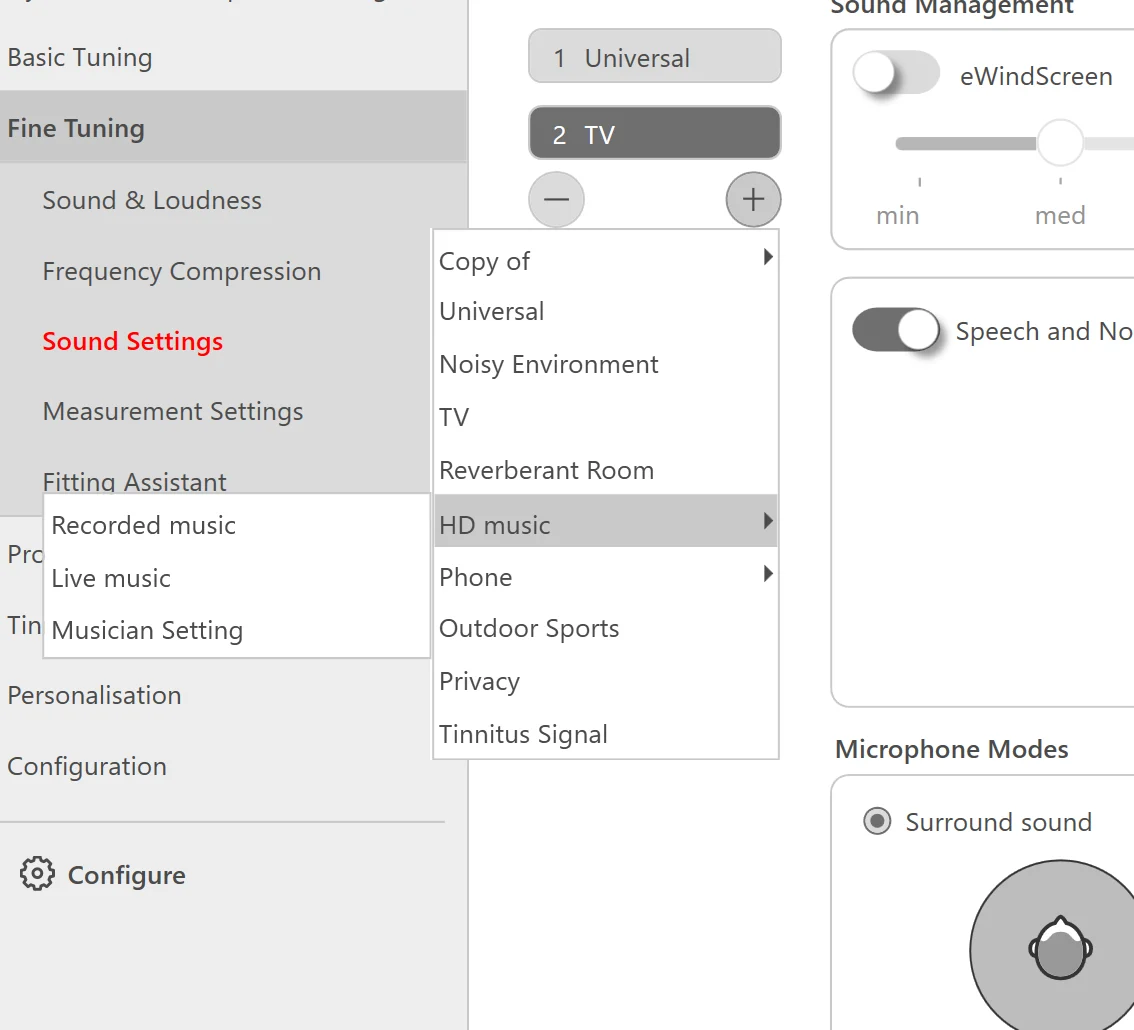
Bear in mind that fitters nowadays are advised to limit their use and stick to Universal as it should be smart enough and adapt (it is not). Plus they will adapt via Dynamic Soundscape processing, which has 4 automatic modes: Quiet, Music, Noisy and Car.
Another thing is that some programs work with directionality, which in your case is limited, so I wouldn’t focus on them too much.
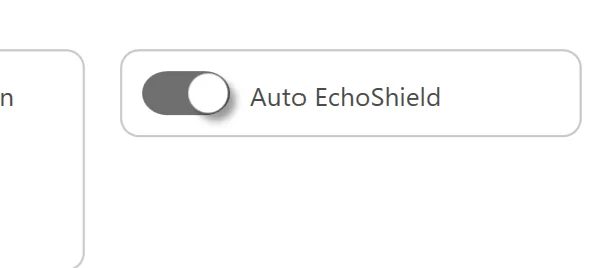
Some of them are actually redundant and unnecessary, for example “Reverberant Room” as 7AX levels and Costco’s’ offering have it built in for all programs nowadays.
You’re ignoring this member’s posts.
@tenkan, I see you have the Connex program. In light of what I’m writing about, here’s the link:
Hi all, Signia officially says the Silk Charge&Go 7IX (also 3,5) has no directional microphones, however it has OneMic Binaural hearing function. When I manually pair my Silks and enable the “Directionality” option in the Signia App, after narrowing in front I clearly hear: significant reduced low frequencies & reverberation significant clearer speech from in front more “direct” sound The effect is spectacular, better than dedicated reverb (echo) reduction. It feels like a mild psychoacousti…
in which I describe a significant improvement in hearing from the front using the ‘Directionality’ feature, which theoretically shouldn’t work in the Signia Silk C&G 7IX hearing aid, although it does at least partially work,
I have a question: Is it possible for a hearing care professional (audiologist), using Connex, to add also ‘Directionality’ option to the six dedicated programs in the Signia app (along with ‘Volume’ and ‘Tone Control’)?
You’re ignoring this member’s posts.
Good question, I don’t know off hand, I’d need to look in Connexx to see, but it shouldn’t because they don’t actually have directional mic’s so it’s just mimicking the effect of directional microphone in the app. Google OneMic directionality.
You’re ignoring this member’s posts.
Hi tenkan,
Glad to see the issue discussed again. I’ve been a Signia Silk C&G 7IX user for two years now, and I truly think it’s a beautifully engineered device — both mechanically and electrically.
That said, there’s one major limitation in my experience: directionality. In noisy settings like restaurants, I often end up removing them, because I actually hear better without. It’s a bit frustrating, given how good the rest of the design is.
If anyone has tips, settings tweaks, or workarounds to improve this, I’d be very interested.
You’re ignoring this member’s posts.
The StreamLine Mic is the only thing that comes to mind, it could help, but expensive tho!
You’re ignoring this member’s posts.
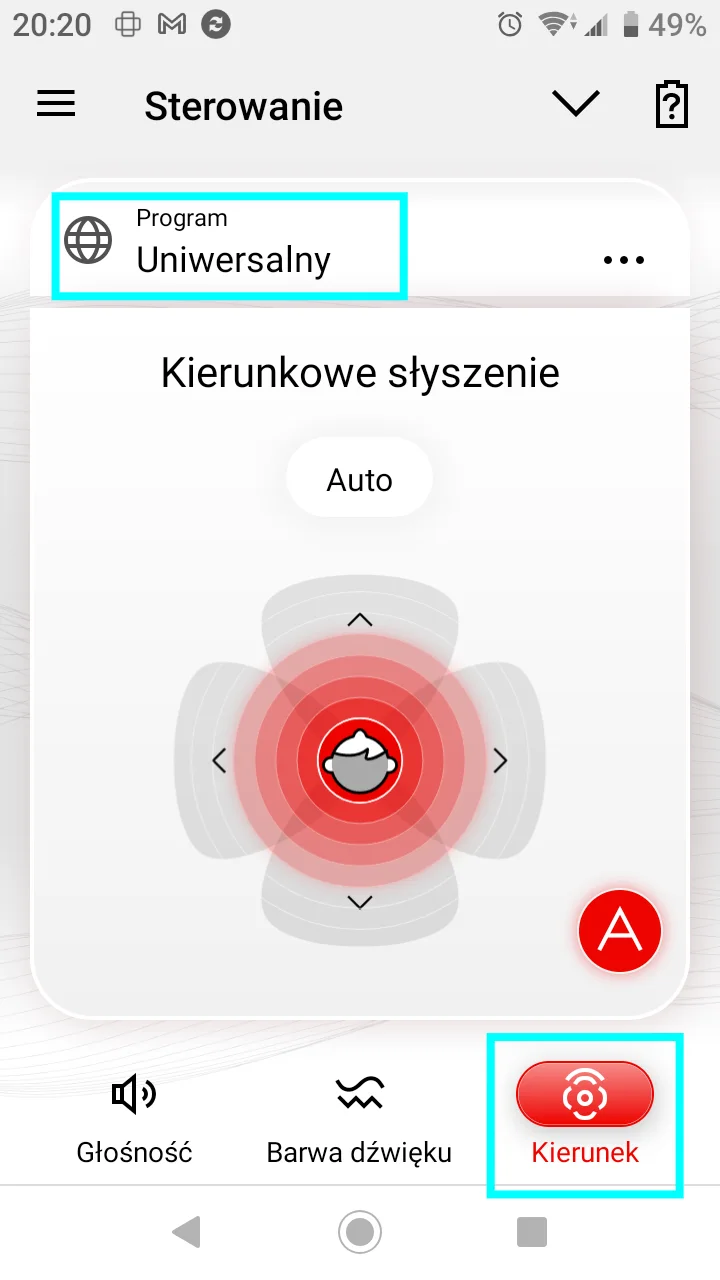
@tenkan, for your information, I just received the following information from Signia UK Customer Service:
This seems to finally confirm my observation that the directional control feature in the Signia app works, and works brilliantly, albeit only in the main app (‘Universal’).
PS: My provider tried to convince me that I was imagining things 
You’re ignoring this member’s posts.
Yeah very interesting, only on that one program tho, you’d think it would be on the “noise program” which would be beneficial as well.
You’re ignoring this member’s posts.
@tenkan , to finally dispel my doubts, can you check on your Connex whether the Directionality feature can be placed in the QR code for the Main program? (also for additional programs, although for these Signia - as they wrote - they do not recommend because it does not work there).
You’re ignoring this member’s posts.
Hi there, I also have the Silk C&G 7IX (), I am a so I play a lot with my , I can confirm that the directional feature works only with the universal program but I don’t know what the feature do, anyway it works. with the QR code I can only split the R L volume, never be able to add the directional feature. with the manual pairing the directionally function appear but i have only one fader to control the volume, R and L together. very strange.
That said, there’s one major limitation in my experience: directionality. In noisy settings like restaurants, I often end up removing them, because I actually hear better without. It’s a bit frustrating, given how good the rest of the design is.
In noisy environment, with closed and power sleeves i noticed that the is too strong, really too strong. sometime I’m not able to hear the peole near me so like you I remove them. A thing that helped was, in connexx, to add the program for noisy environment, the stock one you find in the drop-down menu and in this program completely disable all the DSP feature. This way you have the universal program with the DSP on and the noisy program with the DSP off but with a frequencies curve made for noisy environment. It worked for me, let me know.
cheers.
You’re ignoring this member’s posts.
Log in to reply to this topic.
Hearing Aids10 replies
Hearing Aid Self-Fitting (DIY)14 replies
Hearing Aids3 replies
Hearing Aid Self-Fitting (DIY)10 replies
Hearing Aids3 replies
