You’re ignoring this member’s posts.
Directionality in Signia Silk 7 IX
32 replies2.8k viewsLast reply
i bought connexx air for 285€ online, from hearingshop12
You need connexx software too, a member of this forum could send you the link for free.
It works like charm.
You’re ignoring this member’s posts.

>with the QR code I can only split the R L volume, never be able to add the directional feature
@Dr_Dr_please, is it really not possible to add the directional feature to the Main programme by QR code? Confirming appreciated as the UK Signia Customer Service adviced me to obtain a new QR code from my provider to get.
You’re ignoring this member’s posts.
@Janeo for what I remember i’ve never been able to add the directional feature by the qr code (in the Universal program off course), but maybe I’m wrong, I’ll give another try this evening and let you know.
You’re ignoring this member’s posts.
@Dr_Dr_please, is it really not possible to add the directional feature to the Main programme by QR code? Confirming appreciated as the UK Signia Customer Service adviced me to obtain a new QR code from my provider to get
My dear friend @Janeo I just checked, If I want to have the directional feature for my signia Silk I have to choose the manual connection to the app when pairing the aids and when asked answer yes my aids have the directional function, next tell the app how many programs your aids have memorized (from 1 to six) and the tell the app if you have a tinnitus dedicated program. In this way you have your silks programmed like they have to, with the directional function selectable next to the volume and the balance selection, unfortunaly the programs are called : universal, program 1, program 2 etc. you have to rename them manually. This way you can select the volume of the aids separately.
on the other hand if you pair your aids with the qr code, you don’t have the directional function selectable, the volume of the aids is not splittable in L,R but the program are named as they have to…
I don’t know why it work this way but it’s like this.
So if you want the directional function try to pair your signia silk to the app in manual mode and follow the instruction, you don’t need a new qr code. If you need help, i’m here for you.
Remember: the directional function is only selectable with the universal program, not selectable with the other five.
Cheers
You’re ignoring this member’s posts.
with the QR code I can only split the R L volume
Not true sorry…with the qr code the only good thing is that programs are named as they have to…the best way to connect the aids to the app (to have more features) is the manual pairing.
with the manual pairing the directionally function appear but i have only one fader to control the volume, R and L together
not true part 2: with the manual pairing you can split the volume in L and R
You’re ignoring this member’s posts.

tenkanProvider
Remember: the directional function is only selectable with the universal program, not selectable with the other five.
Yes we have established this already, but @Janeo wanted to know how to have this feature OneMic on all the programs, so it’s confirmed by you and thank you for sharing and taking the time to find out.
You’re ignoring this member’s posts.
on the other hand if you pair your aids with the QR code, you don’t have the directional function selectable […] Remember: the directional function is only selectable with the universal program, not selectable with the other five.
I did not mean OneMic Directionality 2.0 feature working I think everywhere automatically, but a special directionality adjustments designed to 2-microphone Signia IX models. I think @Dr_Dr_please meant (or I’m wrong:-)), that the QR code can’t force the directionality adjustment to be displayed in all additional programs. It can only be manually enabled in the main program, if necessary.
In my opinion, all this points to Signia using the same program in all Silk IX hearing aids what is obvious (including those with two microphones). Our single-microphone model somehow partially utilizes this feature, and to good effect but Signia—understandably—wants to avoid officially communicating it.
You’re ignoring this member’s posts.
Good morning guys, sorry for my english i use google translator and maybe sometimes is not clear what i write.
what I have experienced with my signia silks 7IX is that if you want to see the directional feature in your smartphone app you have to pair your manually, no qr code, no bluetooth (SILKs don’t have bluetooth). If you pair the HA to the app with the qr code the feature doesn’t appear in the app. So asking for a new qr code to your audiologist is useless.
Repeat : manually pairing the directional feature is selectable in the main program, qr pairing no directional feature selectable in no program, not even in the main.
The directional feature is activated to the main program by default so if you want to see the directional feature in your main program you have to:
open signia app on your phone, go to settings, app settings, configure app, unpair your HA. Then restart your HA and in the SIGNIA app select manual pairing, tap NO when the app asks if you have a RUN model, tap YES when asked for the directional feature, tap the number of programs your HAs have registered (if your audiologist added other programs) and you have your HAs configured with the directional feature. You don’t need your audiologist to do this.
Cheers.
You’re ignoring this member’s posts.
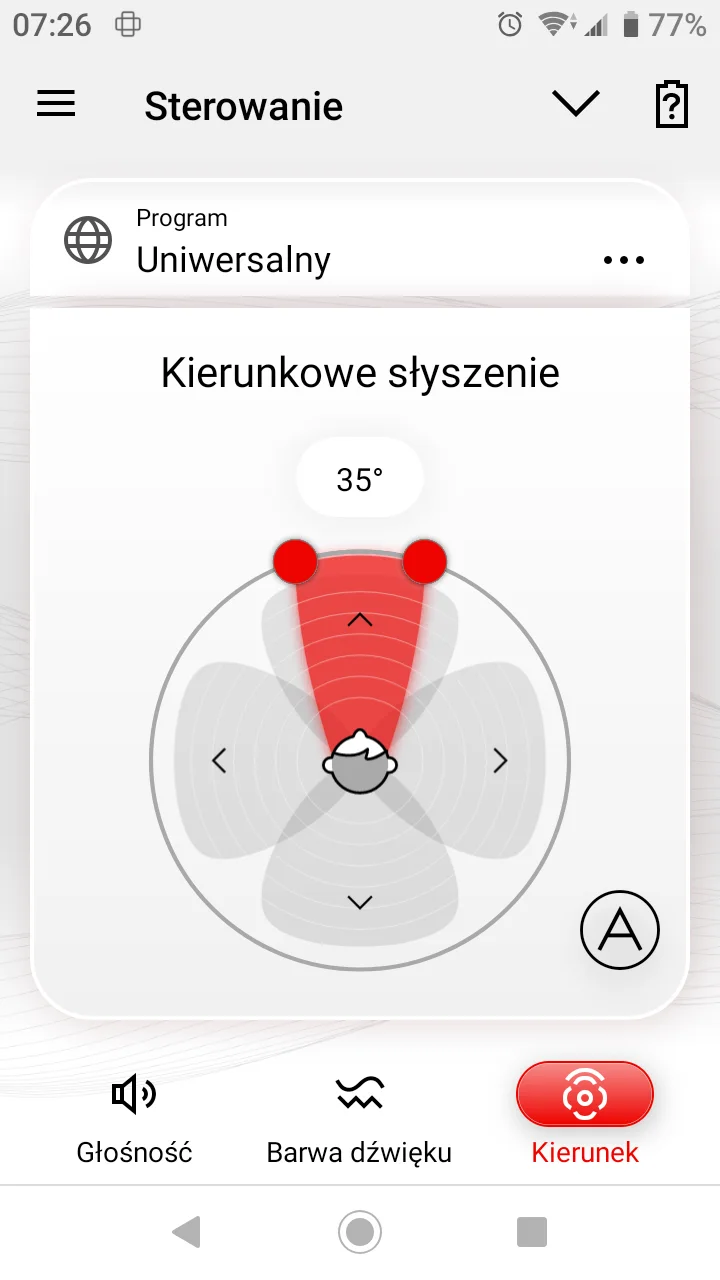
@Dr_Dr_please , taking advantage of the fact that you have the same Signia Silk C&G 7IX hearing aid, can you describe your hearing experience if, for example, while sitting in front of the TV, you set your hearing aid to directional hearing as in the example screenshot?
You’re ignoring this member’s posts.
Good moring guys, @Janeo as I just wrote I don’t know how directionally works with our silks but it really works. I can’t make a comparison with others aids but If i set the app like the picture you posted I have the sensation that sounds who comes from the selcted direction are clearer ( but absolutely not natural) than other sounds coming from other directions that seem more muffled. using this setting for watching tv is not the best sensation but if you have people in front of you, you ear them better for sure, expecially in noisy environment. Anyway keep in mind that with all this technology activated your earing is far far far away from a natural earing, but it really helps.
cheers
You’re ignoring this member’s posts.
I have the sensation that sounds who comes from the selcted direction are clearer
It was not about stating real directionality, but feelings. :-).
I definitely agree – it’s reduced reverb and bass what makes voice clear. I experience this effect as a strange sensation, as if someone were speaking directly into my ear. Best regards.
You’re ignoring this member’s posts.
I can’t seem to get two volume sliders with my Silk 7IX configuration. I did the manual setup with directionality as outlined in this thread. But I still only have one volume slider. Help.
You’re ignoring this member’s posts.
Log in to reply to this topic.
Related discussions
Hearing Aids10 replies
Hearing Aid Self-Fitting (DIY)14 replies
Hearing Aids3 replies
Hearing Aid Self-Fitting (DIY)10 replies
Hearing Aids3 replies