Of Google’s Pixel phones, only the Pixel 8 and later (excluding the Pixel 8a) support
I am very unclear how much I want Auracast support but figure going forward would be a good idea to have on a phone I might want to keep until 2030! I’ll knock around some and see about the Pixel 8 (does support Auracast with Android 15, which was out in October 2024), and various flavors of 9 too I guess.
Auracast support
Google plans to enable Auracast on the Pixel 8, Pixel 8 Pro, Pixel 9, Pixel 9 Pro, Pixel 9 Pro XL, and Pixel 9 Pro Fold. The Pixel 8a, Pixel 7 series, and older Pixel phones do not appear to be supported.
Do you know the firmware version number I need to be able to have 2 way phone audio on my Pixel 8 (Android 15) with my Reach Lit 80 from Costco. Mine have firmware version 25.0.902.3
I agree with you. We spend a lot of money. Why rexton don’t made the reach hearing in the same way of the iPhone bluetooth that we can use the hearing mic . They focus just on the IPhone and forgot the anndroid user.The question is, IPhone paid to rexton for the exclusiveness? There more Android user than iPhone user.
My Costco Rexton Reach aids are fulling “Hands Free Calling” with my Pixel8 pro phone and Android 15 as of Jan 1, 2025 and also working well with the bluetooth Reach App. These have been wonderful aids for me coming from Kirkland 10’s.
I was unfortunate to have decided on a Samsung Note 20 Ultra and there is no support Samsung gives on it now after just two years
I switched to a Google Pixel 9 Pro which has 7 years support. I shall never trust Samsung again.
I have the Rexton Reach software update but I am unable to turn on on my Pixel 4a even though I have enabled Developer Mode turned on under System. It is greyed out on Android 13 - no update available. Is this hopeless or is Google going to update my 4a to be able to turn it on? Anyone here kmow?
Thanks for your reply. If I choose to upgrade now do you happen to know which Pixel already includes ? Also, since Samsung seems to be offering “iphone-like” “hearing aid accessibility” would you happen to know which ones work fully with the Reaches? Right now, my phone keeps switching from Hearing Aids to Speaker during phone calls.
You need to have firmware version 25.5.972.3 on your Rexton ’s. Also you have yo wait for Android 16 for the Pixel 8 and more recent phones (coming June-ish 2025 time frame). I spent all day trying to figure that and a couple of things out.
You need to have firmware version 25.5.972.3 on your Rexton HA’s. Also you have yo wait for Android 16 for the Pixel 8 and more recent phones (coming June-ish 2025 time frame).
Wow! Thank you for spending all day for the rest of us! I’ve got 25.5.972.3 on the app but now I will try to relax and wait for June-ish before jumping on Pixel 8 or 9, maybe even more discounted by then. I was about to jump on the P9 but at its current price I would have been more than a little disappointed if it hadn’t immediately improved the reliability of my Reaches sticking to “Hearing Aids” instead of slipping over to “Speaker” as they now do more often than not!
You can apply for the beta test on Android and get the beta version. I did and I just installed Beta 2 of Android 16 ( your mileage may vary and you may run into problems with this). I had to turn on the audio share feature and I am stuck. Android says connect compatible headphones. and does not recognize the Reach ’s. l’ll create a ticket with android and see what can be done.
One issue I had was I could not turn on the Audio sharing at all. After setting the developer oprions to turn this feature on and rebooting the phone a few times. I realized I needed to forget and pair the hearing aids again because most likely the hearing aid profile had changed. The adventure continues.
FYI If you are considering the Rexton Reach and have gone down the path of checking the Rexton website’s Compatibility Checker, you will see that Samsungs Galaxy is only shown compatibe thru the S23 models. I called Samsung and they advised that Galaxy are now compatible to includes S24 series and S25 series.
I have an S23+ and the Reach set is not able to reliably connect for phone calls. Great aids except for their unwillingness to play nice for phone calls.
I’m running Android 15 on my Pixel 8, which I setup the same day I got fitted with my 1st , Rexton Reach (Dec. 5, 2024). I have the impression this all supports , have it set up on the Pixel.
I’ve only done phone calls a few times with the Pixel (wearing the Rextons) and the audio came streaming through the HAs, sounding fine. I did speak into the phone. Mostly I use my landline (cordless) when I make/take calls.
There is some confusion on my part. I think with Android 15 you can enable LE audio. I was after . With the newest firmware on the Rexton Reach is supported but they did not include Auracast as part of that firmware Upgrade. So I am back at square one.
This said with all the questions I asked Rexton they refused to tell me this until I asked the question point blank TWICE! Very infuriating.
The advantage of LE audio is that the phone uses audio from the hearing aids when you talk and not the microphone in the phone. So I doubt you are using LE audio.
One issue I had was I could not turn on the Audio sharing at all. After setting the developer oprions to turn this feature on and rebooting the phone a few times.
I have Pixel Pro 8 version 15 and new Rexton Reach ’s with firmware version 25.5.972.3. Configured for me at Costco 2 days ago. So far, I love them. These are my first HA’s.
I found similar advice in my initial research regarding Developer mode and Audio sharing, though Audio sharing seems to be for something entirely different. The Audio sharing option says:
“Let people listen to your media along with you. Listeners need their own headphones.”
So IMHO, advice to turn that on seems incorrect. I would maybe use this feature to share a flight movie with my hubby, right? IDK
I found I could turn on my LE Audio setting by going to Settings >> Accessibility >>> Hearing devices. Yes, I had to “forget” my initial pairing they did at Costco for me, restart both my phone and my HA’s. Then find my way back here and toggle “LE Audio.”
And now, despite the Accessibility screen showing “no connected hearing devices,” it’s in there. See the screenshots.
I added the Accessibility shortcut to my screen to make this easier to find later, but now, my HA settings show that I am connected to LE Audio in both the Settings >> Connected devices and Settings >> Accessibility >>> Hearing devices.
I already have the ability to make calls using the Google Assistant, just not answer, so there is just one final step for me and that is to enable Google Assistant Quick phrases. Just Google it. With Quick phrases enabled, you can say “Answer” or “Decline” when a call comes in to either accept or reject the call.
Overall, in just two days, I am very happy with my first set of HA’s. I don’t think my audio specialist at Costco knows that LE Audio is possible with Rexton or my phone model, so sometimes you either have to know a few things or find someone who does.
OK, that was a long-winded way to say:
Unpair your device.
Enable developer mode (look this up for your model phone).
Restart only your phone.
Enable LE Audio in the accessibility settings.
Re-pair your HA’s. Then check that wheel cog next to the pairing to see if LE Audio is toggled on.
The LE Audio toggle is s/b available in both places, Connected devices and Accessibility/Hearing Devices with slightly different options.
Audio sharing is turning your phone into a broadcast transmitter for audio. So you could share your music or podcast by broadcasting it. However, they will need a device that can receive an broadcast.
You should be able to turn an older phone into an Auracast receiver by using one of the Floogoo usb devices. It’s a bit clunky, but it should work.
You should get the broadcast/Auracast option on your phone when you upgrade the OS to android 16.
Samsung Electronics is bringing people together through sound. The company will showcase the capabilities of Auracast technology by partnering with hearing-aid provider GN on a groundbreaking event at St. Paul’s Cathedral in London on May 16 to mark...
INTRODUCING Auracast™ broadcast audio is a new Bluetooth® capability that will deliver life-changing audio experiences. It will let you share your audio, unmute your world, and hear your best…

 Michigan
 l’ll create a ticket with android and see what can be done.
 IDK
IDK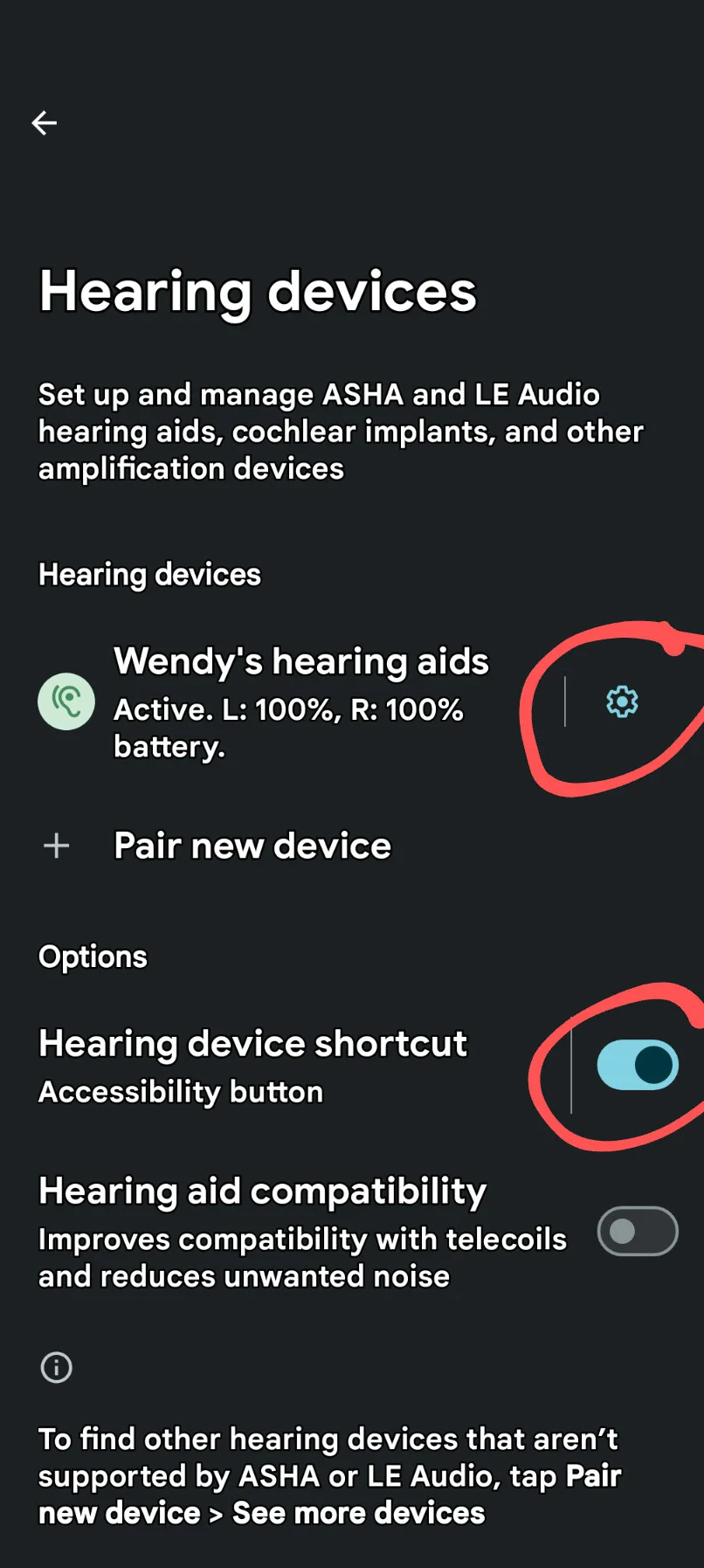
 With Quick phrases enabled, you can say “Answer” or “Decline” when a call comes in to either accept or reject the call.