I found that I had to disconnect using the Pixel disconnect setting to get so it didn’t reconnect.
You can always plug into a power strip to shut it off.
You’re ignoring this member’s posts.
451 replies21.4k viewsLast reply
I found that I had to disconnect using the Pixel disconnect setting to get so it didn’t reconnect.
You can always plug into a power strip to shut it off.
You’re ignoring this member’s posts.

https://www.digitaltrends.com/home-theater/how-to-enable-auracast-on-sonys-wh-1000xm6-headphones/3 has anyone tested the FMA120 or FMA121 with the Sony-WH 1000XM6 headphones?
You’re ignoring this member’s posts.
I found that I had to disconnect using the Pixel disconnect setting to get Auracast so it didn’t reconnect.
Can you walk me through the steps you are using please?
@Deenovan Thanks for the USB suggestion. We have an early model Sony Bravia. I thought the USB was used to upload pictures from a USB thumb drive. Time to go back and read the manual.
You’re ignoring this member’s posts.

We already have a large user base for this Sony headphone,
and it was also included during testing in the Frankfurt airport deployment, where the FMA120 was tested with various devices before the rollout. In fact, in the photo from the news, the headphone shown is the XM6.
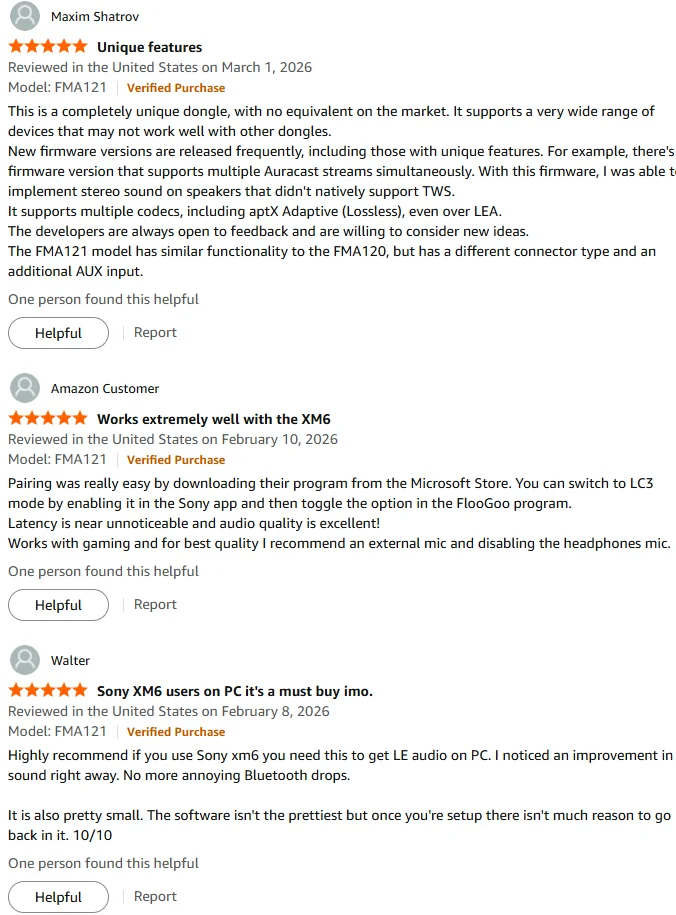
You can also find confirmation in some Amazon reviews.
You’re ignoring this member’s posts.
We’ve updated the packaging for the FMA120 to a simpler, more compact box, making it neater for transport. This change was also partly based on user feedback, as some users wanted a convenient way to store and carry the FMA120 when it is not in use.
Packaging was different than the blister pack shown. Interesting is that it said Made in Australia.
You’re ignoring this member’s posts.
Note that I am using a Pixel 10 phone and Phillips 9050 hearing aids.
You’re ignoring this member’s posts.
I’ve been powering down because I’ve found that even though I’ve stopped the Auracast streaming it will reconnect on it’s own. That is one thing I want to bring up with Jabra tech support.
If you have turned off the connection in either the Jabra app or the Bluetooth menu on your Android phone, the hearing aids should no longer connect to the broadcast automatically.
In the meantime, you may also want to take a look at the multi-channel broadcast function on the FMA120/121 if you are considering an Auracast transmitter for TV applications. We are currently testing this with some JBL speaker users, and our solution will allow you to add high-quality Auracast speakers later. In contrast, many other transmitters can only broadcast 24 kHz streams to those high-quality speakers.
You’re ignoring this member’s posts.
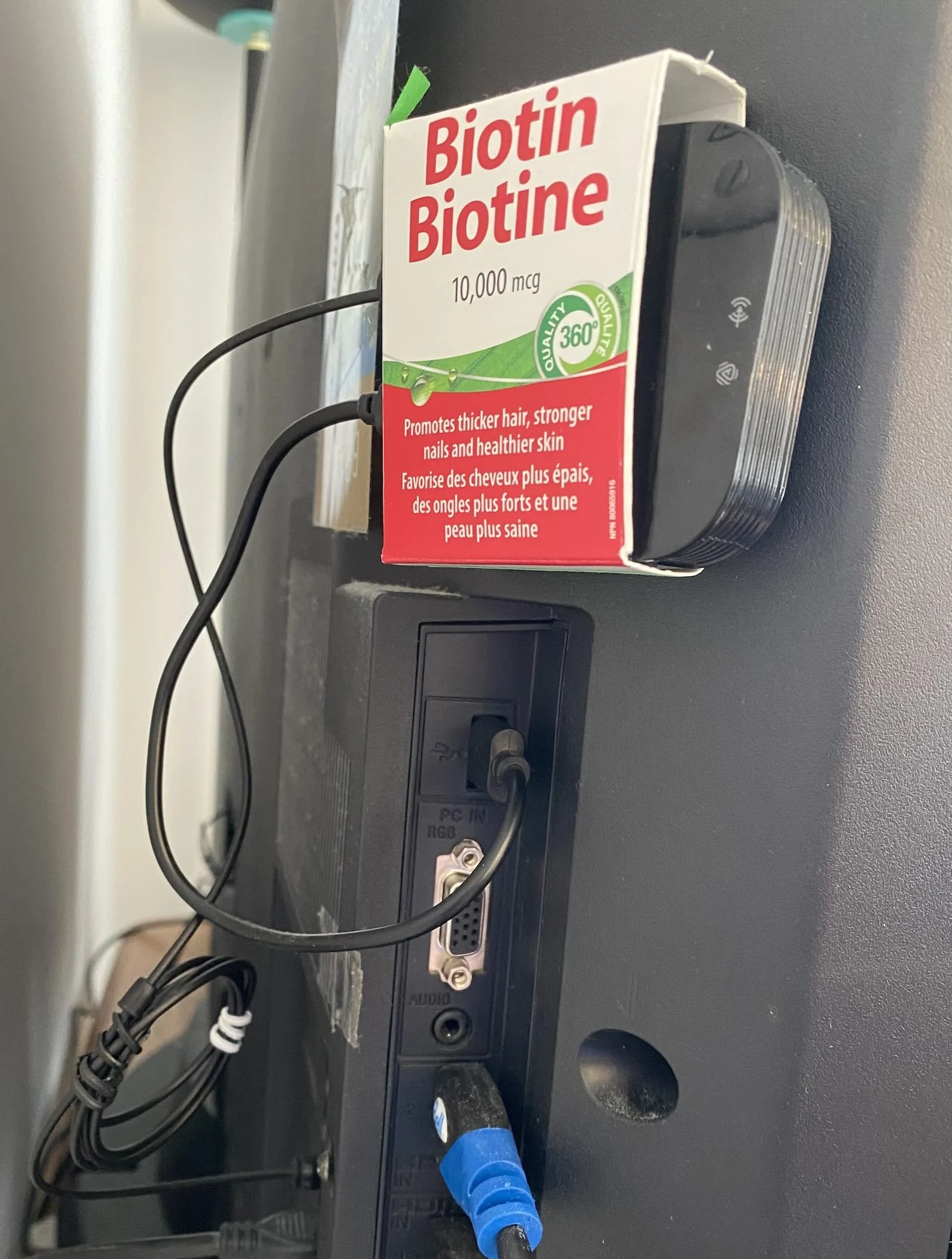
My parents have a Sony KDL-52VE5, not extremely old but still pretty dated. Right, its USB port was designed for playing media files on USB drives. But it can still be leveraged as a power source for BA210. Switching off the TV disconnects the connection nicely, so, there is no need to manually power off the BA210 to disconnect the Auracast stream. I have also tried Audikast4, and it worked. I don’t have FMA121, but I assume it would also work as well.
My parents wear Jabra EP20 and Starkey. They have paired their aids with their iPhone and iPads (under ). Not hearing any complaint from them about switching audio between TV and smartphones.
Btw, I have noticed one good thing about Starkey. They can manage two simultaneous LE connections (MFi also uses LE, although not the standard-compliant ). This means they can pair and connect with both a smartphone and an iPad at the same time. That makes life much easier, especially for my mom who is not tech savvy. For Jabra and ReSound, we need to manually disconnect them from one device, before another can connect.
You’re ignoring this member’s posts.
If you have turned off the Auracast connection in either the Jabra app or the Bluetooth menu on your Android phone, the hearing aids should no longer connect to the broadcast automatically.
I have to disconnect in the Pixel 10 settings to stop it from reconnecting to my Phillips 9050.
Apparently, the Pixel 10 phone setting overrides the Phillips app.
You’re ignoring this member’s posts.
I’ve been tinkering with (monkey punching) with different ways to end a broadcast on my Pixel 8 Pro. Last night I found a way that seemed to work and I was able to repeat it today.
I typically connect using the Broadcast Assistant in the Hearing Aid App. In my case it is the Jabra Enhance Pro App. I use the search button above the symbol. I found that once I want to disconnect I can swipe down from the top of the screen and see a box from what appears to be the Android Broadcast Assistant. Shown below.
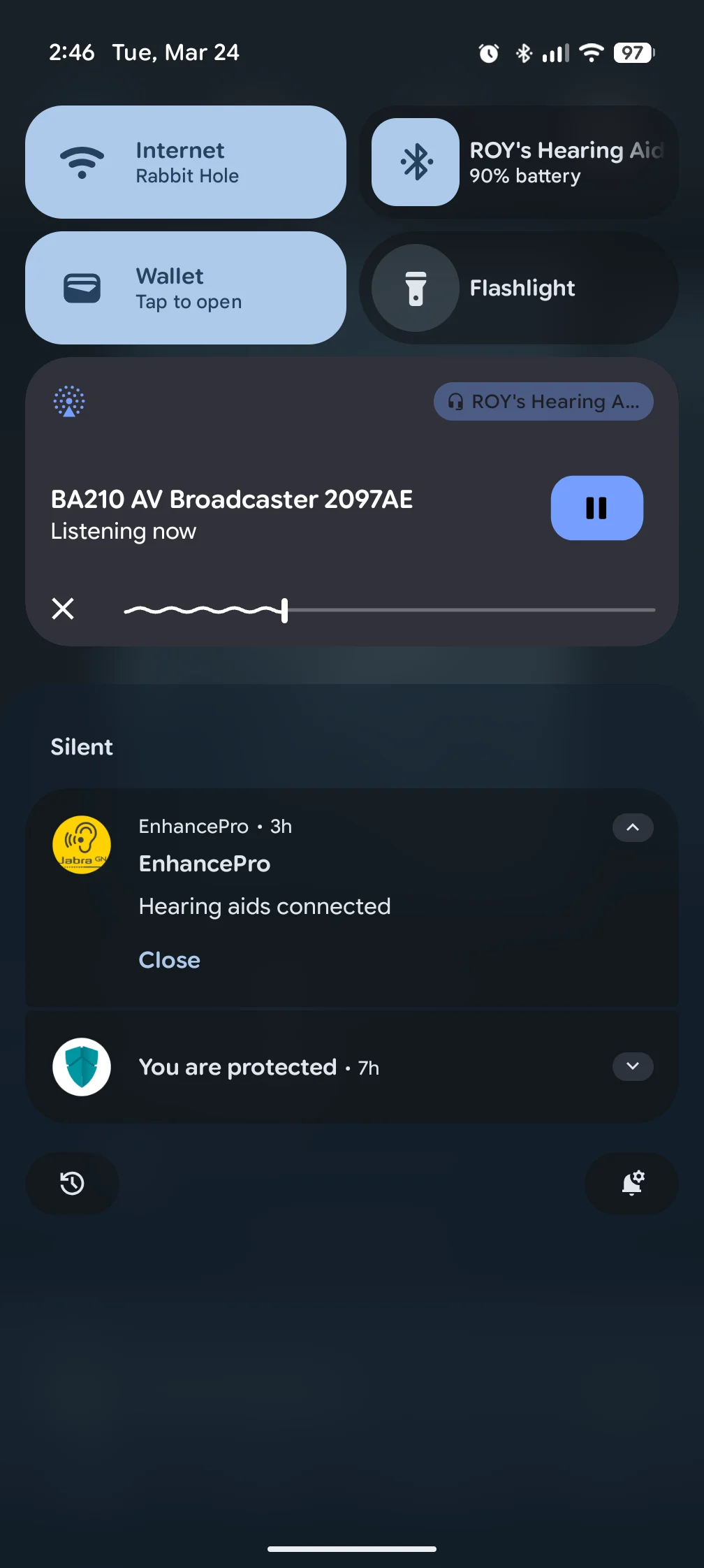
If I click on the small X in the bottom left hand corner, the broadcast will end and not automatically reconnect. Switching to the Enhance Pro App, the status screen shows that there is no longer an Auracast connection. On occasion the app won’t let me search for another broadcast because it thinks the phone is streaming sound.
In that case, I can only get the app to recognize there is an Auracast Broadcast by going into the Bluetooth settings for the hearing aids and tinkering with the Broadcast Buttons. After that, I can see an available broadcast by going back to the Enhance Pro App. Connecting to that will start streaming again, but the 2 Broadcast Assistants seem to be trying to control the streaming.
One stream will shut off and a second will take over. The broadcast names fluctuate between these 3: All Around, Auracast and BA210 AV Broadcaster.
All this sounds confusing because I am confused. If I was to hazard a guess, for lack of the proper terminology, it would be how the hearing aids themselves are negotiating the handshakes with the broadcaster. For some reason, they are not releasing a disconnect.
You’re ignoring this member’s posts.
Versions
1.1.7 — Main release for both G and non-G variants.
@Ranson,I couldn’t find any reference on the website to ‘G and non-G variants.’ Which of the two .bin files should I use to update my FlooGooFMA121?
Edit: Sorry, I found the answer in an earlier post on this thread. It might be helpful to clarify the difference on the website.
The non-G firmware was for the first 80 units we sold through Amazon in late 2023, so essentially all FMA120/121 units shipped afterwards use the G version. The FlooCast app will automatically choose the correct firmware depending on the device you plug in and apply it accordingly. Even if you select the non-G firmware, it will still use the G version provided both files are located in the same directory.
You’re ignoring this member’s posts.
Thank you for the suggestion — we’ve added a note on the support page accordingly.
You’re ignoring this member’s posts.
You’re ignoring this member’s posts.
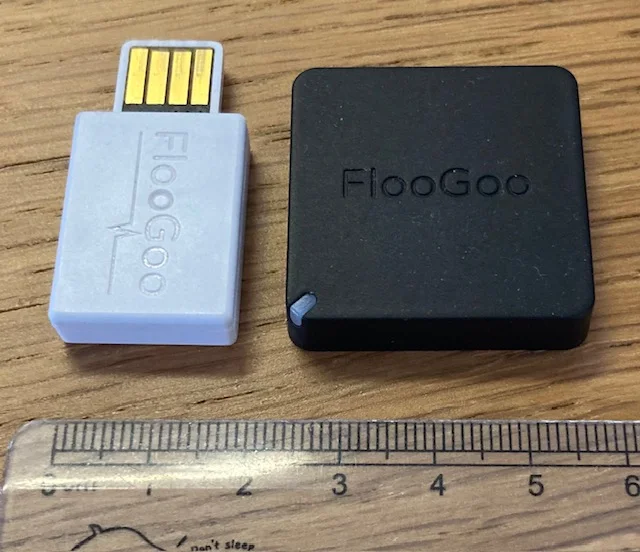
They are similar in size and have the same build quality. The main difference is that the FMA121 uses a USB-C (female) port and also supports 3.5 mm headphone input.
You’re ignoring this member’s posts.

I am thinking of returning the FMA120 for FMA121. Reason being is that when I plug it in and start the Floocast app on Window 11, it takes about 2-4 mins for my on Beltone app (iOS) to find it. The State takes a while for it to start up!
You’re ignoring this member’s posts.
The two models run the same firmware, so they should behave identically (assuming there’s no hardware issue — and since you can still see the broadcast in the app, that doesn’t seem to be the case).
The slow detection is likely related to iOS. Since iOS doesn’t support natively, hearing aid vendors have to implement scanning on the device side, which is generally slower. That said, 2–4 minutes is definitely not normal.
You could also check whether “Simultaneous standard and high-quality broadcast” and “Broadcast high-quality music” are turned off in FlooCast.
You’re ignoring this member’s posts.
I really like the FMA121 - but wish it was somehow integrated within my Window 11 laptop so that I don’t have to plug a dongle every time. Is this possible?
You’re ignoring this member’s posts.
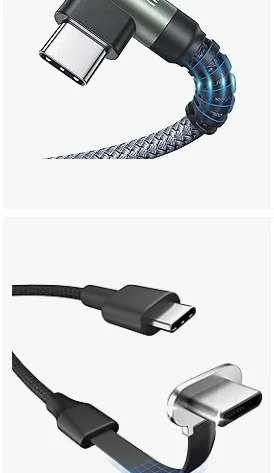
Some users have used tape to secure the FMA121 to the back of the screen, along with an L-shaped USB-C adapter and a short cable. That might be a useful reference.
Alternatively, if you can access a spare USB port inside your laptop, it may be possible to mount the PCB of the FMA120 internally by soldering or attaching it directly.
You’re ignoring this member’s posts.
If one soldered or mounted internally it could be a headache to perform the equivalent of an unplug and plug back in?
Perhaps the dongle could eventually be smaller (so as to stick out minimally) and still have sufficient RF?
You’re ignoring this member’s posts.
Designing something like this for USB-C is actually quite challenging. We’ve seen plenty of “plug-and-forget” adapters on USB-A ports, especially for wireless mice, but because USB-C is much smaller and has tighter design constraints, this kind of design is far less common.
That’s also one of the reasons we chose a female USB-C port for the FMA121. We know many products simply use a fixed USB-C plug, but in our opinion that approach is still relatively fragile. If excessive force is applied, the dongle body itself can be damaged, whereas with the FMA121 it’s usually just the cable or adapter taking the stress while the main unit remains intact. Using an L-shaped adapter further reduces the risk by minimizing leverage on the connector.
We’ve actually seen real-world cases that support this design choice. One user sent us a photo of their FMA120 with the USB-A plug broken after leaving the dongle plugged into a laptop while carrying it in a backpack. It’s a completely reasonable use case — for example, streaming from a laptop while hiking — and in situations like this, we would always recommend using an L-shaped adapter.
The advantage of this design is that it preserves the best possible RF performance. One Starkey user even bought the FMA120 specifically for outdoor streaming from an iPhone because the phone’s own wireless connection would become weak and unstable when kept in a pocket.
You’re ignoring this member’s posts.
Log in to reply to this topic.
Hearing Aids0 replies
Hearing Aid Self-Fitting (DIY)0 replies
Uncategorized1 reply
Classifieds1 reply
Manufacturer Support1 reply
 London