Hi, I’ve just come back from lunch with a friend and tried to use my Roger On 3 by asking my friend to clip it to her lapel. The restaurant was extremely noisy, Roger didn’t work and neither did the settings on my phone. In the end I gave up, took my aids out and switched everything off. I’m trialling the Roger On 3 at the moment, any suggestions from anyone?
Have you tested the Roger On at home? Are you sure that it works in other circumstances? What do you mean by settings on your phone? The MyPhonak app on your phone should show “Roger Direct + mic” when the Roger is connected. Your Phonak aids should switch automatically to Roger Direct + mic without changing anything on your aids. Did you have Bluetooth engaged in your phone? I find that Bluetooth which has a connection to my aids will overpower the Roger signal so I turn off the Bluetooth streaming option when using the Roger. If clipped to your friends lapel, you should see a significant benefit from the Roger especially in a noisy restaurant.
There’s also a “My Roger mic” app that allows some control. To OP. Seeing your would help (Click on your avatar in top right corner, then the bell, then my Audiogram) If you’ve got good low frequency hearing and you have an , it’s going to be a challenge in very noisy situations. There’s nothing any tech can do to prevent noise coming into your ears through open domes. As raylock1 mentioned, have you played around with it at home to make sure it works? Also you’d want to use the app to eliminate environmental sounds so you’re just getting amplified sounds from the Roger mic.
Have you had the receiver licenses installed into the aids? Then paired the aids to the mic? Don’t really have much to go on here without knowing if it was ever set up or ever worked.
Yes, I’ve tested the Roger On at home with just the two of us and it seems to be fine. The MyPhonak app on my phone does shoe ‘Roger Direct + mic’ when Roger is connected. I did have Bluetooth engaged in the phone and I didn’t know about turning off Bluetooth when using the Roger. I gave my friend the lanyard with the Roger but as I say, this was a most horrible experience. So next time I’ll turn off Bluetooth and see if this makes any difference.
I would hope that the audiologist would have the receiver licenses installed into the aids. I don’t know enough about how these things work so can’t ask the question. I feel that I am struggling too much with hearing aids and am feeling ready to call it a day. Has anyone else felt this?
If it works at home then you have the codes installed and should be good to go as far as the aids receiving the signal from the Roger. I wouldn’t worry about shutting off bt on your phone as I’d next recommend the myroger app to watch what is going on in the mic. When wearing this in the lanyard it should show the presenter icon on the mic and in the app. I’d next be concerned the mic wasn’t locked in some other mode by pressing the button on the mic.
I had no idea there was such an app. I’ve had the Roger for a long time, but it never worked well for me. I’ve just download the app, paired it, and will give it a try. Do you know if the pairing remains even if I turn off the Roger?
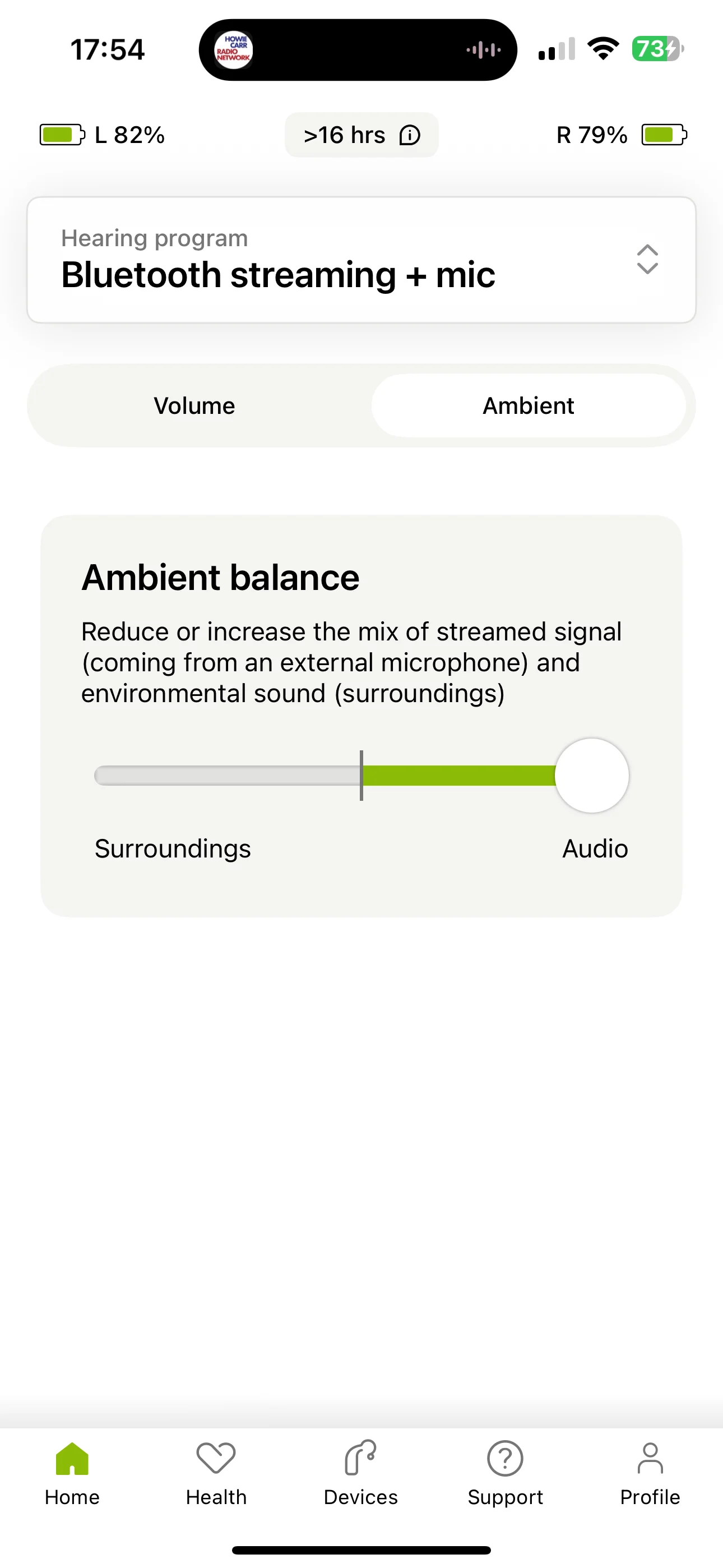
I apologize in advance for my “dumbness” concerning all of this. I don’t understand what is meant by “set the slider maximally to the Roger side …” etc. Is there somehwhere online for me to go to get some detailed instruction with regard to all of this?
In the setting for the streaming protocols, including Roger & tv connector, there is an “adjust” screen where you can adjust the balance between the sounds picked up by the mics and the source of the stream (ie bt, tv connector, or Roger). In many circumstances you want to maximize that source. Sometimes you want to be able to hear your spouse, too.
In the myphonak app, hit the program name at the top (Rogerdirect + mic), then the “adjust” button at the bottom. Interestingly, that button does nothing on my phone right now. I wonder if they broke it? The buttons still worked, however. Pushing the up button pushes the balance toward Roger. Pushing down turns it more toward the ha mics. A short press over and over until you get the sound that you reach the max.
I would go back to the audiologist who provided the Roger On and discuss the problem with them. Possibility there is a problem with the Roger On since you should have noticed a significant difference while in the restaurant. I would ask to try a different Roger On before you give up on the device. If you posted your under your icon, we may have some other thoughts.
The myroger app lets you lock the mode to one of the modes, adjust the directions around the table that get sent, and the width of the beam when pointing. Other than that, a mic mute button and the stereo/extended range setting are about it. Are you reading this in a document somewhere? The functionality in question (if I’m not cray here) has always been on the adjust tab for the program. If this was an announced change, I missed it.



 New Jersey
 Poland