@PhoebeY The C82 LEA is not available on your website. Any idea when it will become available again?
You’re ignoring this member’s posts.
55 replies3.3k viewsLast reply
@PhoebeY The C82 LEA is not available on your website. Any idea when it will become available again?
You’re ignoring this member’s posts.
You’re ignoring this member’s posts.
You’re ignoring this member’s posts.
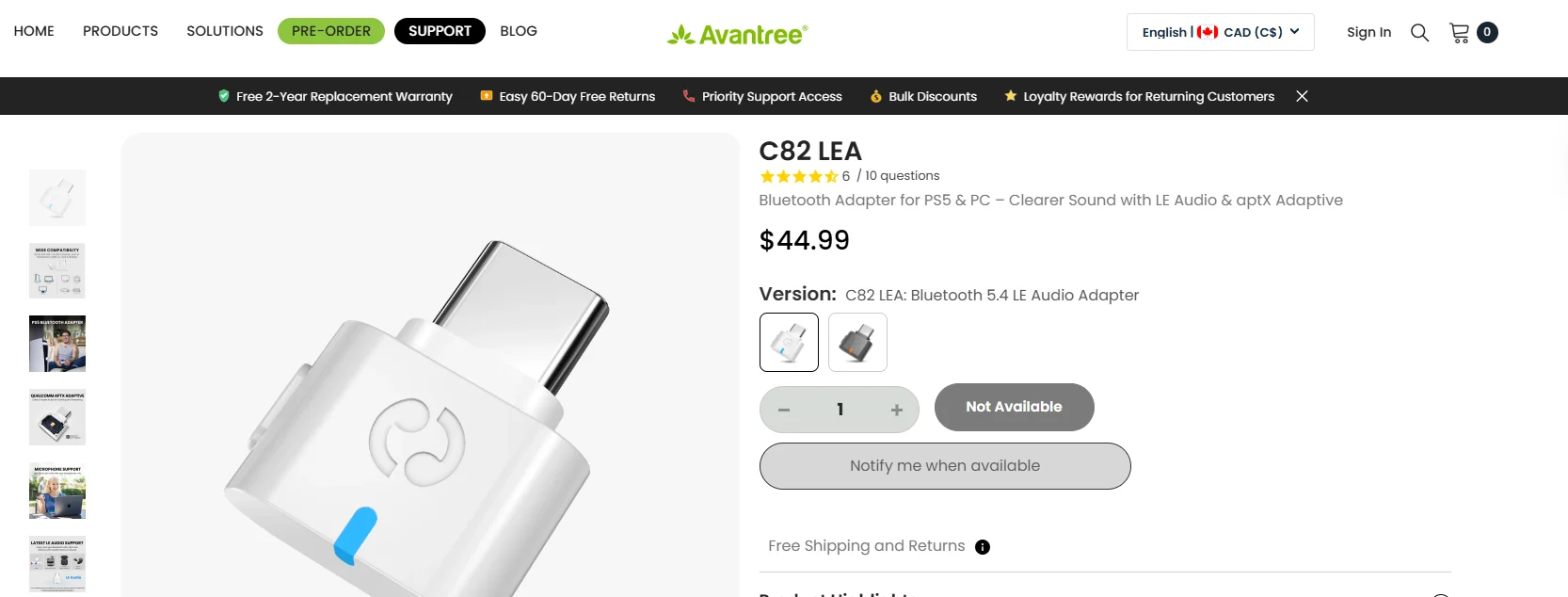
@PhoebeY The C82 LEA shows as unavailable to me.
I ordered the C82 Aura and received it yesterday. It works well with and my Jabra 30
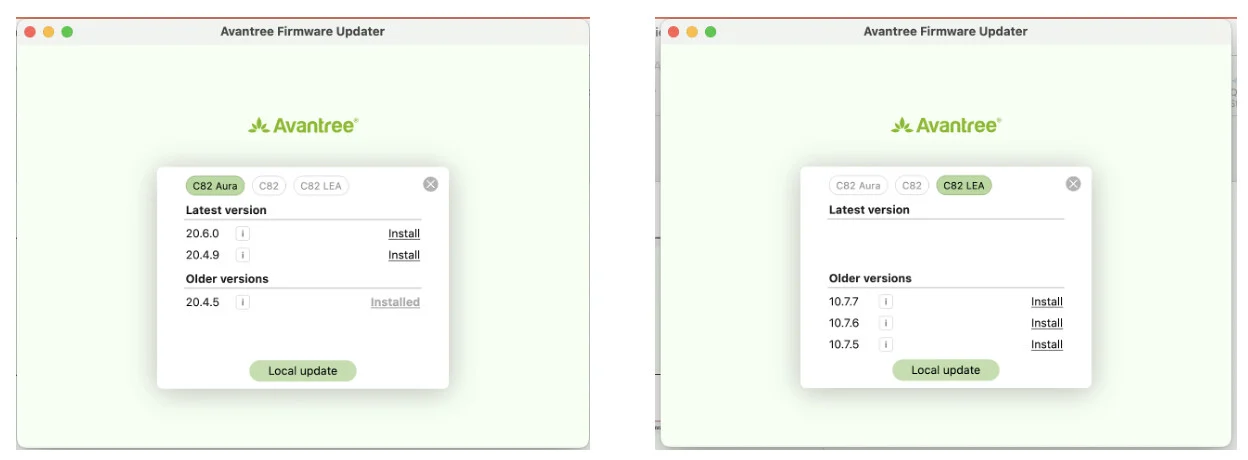
How do I switch the software to LEA so I can do some audio calls?
You’re ignoring this member’s posts.
EDIT: Much of what I originally posted here about needing a streamer to connect Jabra Pro 30s to receive PC sound or TV sound in the aids is wrong, so I’m removing it. It’s easier to do this with Jabras than I knew. See posts from OcramSagev, PhoebeY, and Ranson below for better information on how to make this connection.
You’re ignoring this member’s posts.

e
I disagree with some of the points you made:
(1) The Jabras 30 can connect directly to a Win 11 PC if that PC has .
(2) There are TVs that can stream to the Jabras directly (without an accessory). For example, the LG C5 OLED TVs.
(3) If the PC does not have LE Audio, a simple USB-C LE Audio adapter can work as others have mentioned (Floogoo for example). It is not required that that adapter has to have AFAIK. Not all devices that have LE Audio support Auracast (Example: Signia IX has LE Audio but will never have Auracast per Signia FAQ on their web page).
(4) Jabras are designed to work with Auracast/LE Audio, not the other way round as you said.
You’re ignoring this member’s posts.
You’re ignoring this member’s posts.

there are now dedicated USB transmitters designed specifically for hearing aids.
When used with LE Audio–enabled Jabra / ReSound hearing aids, they allow a Windows 11 PC to stream audio directly to the aids without a TV streamer or external microphone.
This is different from (broadcast) and works as a direct LE Audio unicast connection. You can try Avantree C82 LEA
You’re ignoring this member’s posts.

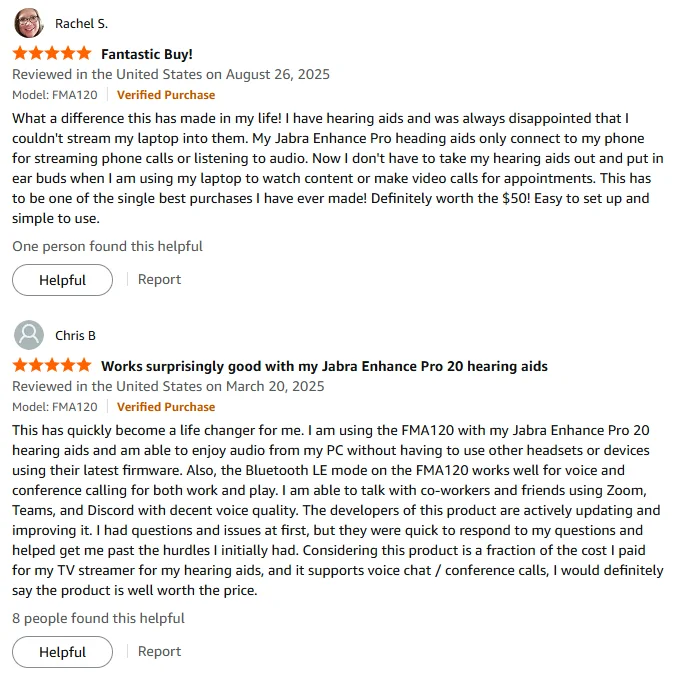
Just add some supporting materials as mentioned by @OcramSagev. We’ve received plenty of feedback from Jabra users. One point worth highlighting is that we’ve been collaborating directly with ReSound to ensure compatibility since June 2024.
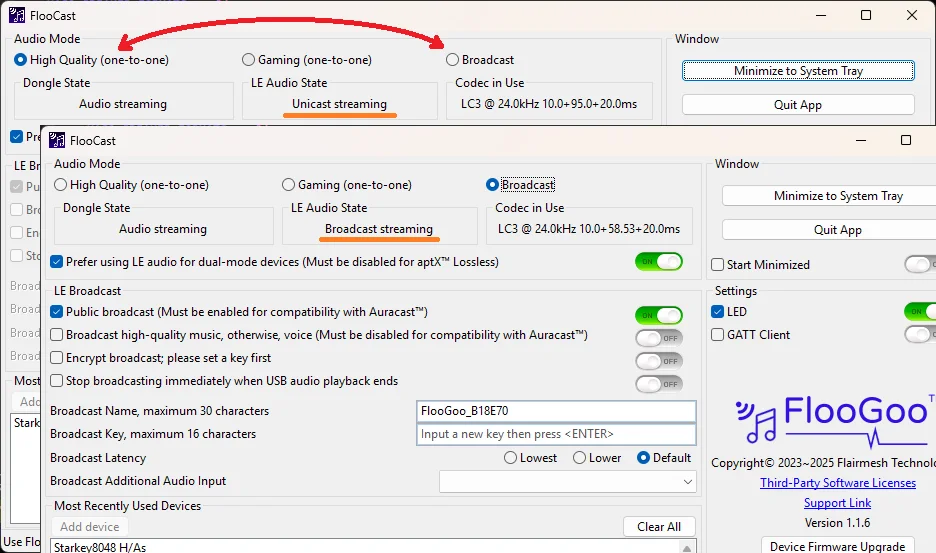
Tip: One-click switching between unicast (with mic) and broadcast (no mic) on the FMA120. You can set a broadcast password, but if your hearing aids are paired directly with the FMA120, there’s no need to enter it on a phone or app—the dongle automatically provisions it to the hearing aids. The audio remains encrypted, but as the owner, you don’t need to enter the password manually.
You’re ignoring this member’s posts.
I’d like to share my experience so far with the Jabra Enhance Pro 30 hearing aids and the C82 AURA transmitter.
I was looking for a way to listen to audio from my computer (movies, games, music, etc.) while still being able to hear people around me, without feeling isolated like I do with regular headphones or earbuds. My goal was to keep environmental awareness while streaming content.
My first attempt was to upgrade my older computer with a newer motherboard and Windows 11, which are supposed to support Bluetooth . Unfortunately, even though the hardware is compatible, the software side (drivers, codecs, etc.) isn’t quite there yet, so I couldn’t get my computer sound in my Jabra 30.
In this post @PhoebeY mentioned the Aventree C82 USB dongle.
I ordered the C82 AURA, and it arrived with the latest firmware (v20.6.0) already installed. Setting it up was straightforward: plug the dongle into a USB port on my PC, search for the Auracast from the Jabra app on my Pixel 9, and it connected right away (Bob’s your uncle). The C82 AURA comes pre-set without a password — you can choose and set your own via the Updater tool (link available in the interactive setup guide after scanning the QR code).
Note: After adding a password, the app still showed it as connected but there was no sound; I had to rescan for Auracast broadcasts. The password-protected one now shows with the same name but with a small lock icon — select it and enter the password to get audio flowing again.
So far, the combination has worked very well for my use case — reliable streaming with low latency and clear sound while maintaining ambient awareness. If anyone else is trying something similar, this setup is worth considering.
You’re ignoring this member’s posts.
 Dallas Ft. Worth Texas
Thanks for your reply. I decided to not spend any money buying attachments to my company Windoze PC. My company will not permit me to download anything that they didn’t approve, and I can hear just fine through my hearing aids by just listening through its crappy speakers. I can listen to anything I want easily through my iPad or iPhone 13. At this point it’s just not worth my time, effort, nor money to make this horrible Microcrap tool connect with my hearing aids. If Microcrap doesn’t think it’s useful to give us Bluetooth that works directly then anyone with hearing aids should not by their junk software nor any computer running that crap.
You’re ignoring this member’s posts.
Ocram, Phoebe, and Ranson: Thank you for the corrections! It’s easier than I thought to connect the Jabra Pro 30s to a PC or TV, then. I edited my post above to remove my inaccurate advice and refer people to your better advice instead.
You’re ignoring this member’s posts.
Once you set it up on a computer, you don’t have to install anything when you plug the C82 AURA into another computer.
I just tried it on my office computer, and it’s plug-and-play. I just had to use my phone to look for an broadcast and connect to it.
You’re ignoring this member’s posts.

I have Jabra enhance pro 20s and a surface pro 11 with intel chipset. Its getting closer but still not functioning correctly. I now can get it installed and got Bluetooth to work with my right ear only but then it stopped and could not get either ear to connect even though they both show up on the screen.
You’re ignoring this member’s posts.
Last year Samsung and Jabra finally figured out their bluetooth issues. I am now pleased to report that Jabra and Microsoft now have a workable bluetooth solution for my Surface pro 11 (running on the intel chip) with their Jan update of their preview edition. It still requires me to physically turn off my phones bluetooth to connect to the windows machine but it finally works. Prior to the update I could only get my windows computer to connect to my left . With that fixed I am finally ready to encourage my spouse to update her 5 year old HAs and I may upgrade to the enhance pro 30. I am hopeful that Microsoft will have already implemented their bluetooth fixes for their surface pro 11 with the Snapdragon chip.
You’re ignoring this member’s posts.

It still requires me to physically turn off my phones bluetooth to connect to the windows machine
may upgrade to the enhance pro 30
I think Resound might have some firmware to be released soon that makes dual connections possible for the Vivia. Just don’t hold me responsible if it doesn’t happen for the EP30.
You’re ignoring this member’s posts.
Log in to reply to this topic.
Manufacturer Support4 replies
Hearing Aids2 replies
Hearing Aids2 replies
Hearing Aids50 replies
Hearing Aids5 replies