

You’re ignoring this member’s posts.
LE Audio and the Future of Hearing
1.3k replies80.3k viewsLast reply

tenkanProvider
Absolutely we will, every manufacturer will be in on this, but Phonak… well they’ll probably drag their feet a bit.
You’re ignoring this member’s posts.

 Scottish Highlands
Aye @tenkan that’s a given, and unless Phonak can make money out of , they will most probably stick with Roger ’s… Cheers Kev 
You’re ignoring this member’s posts.
Is the latency of going to be less than or ? - I understand it is significantly better than standard Bluetooth (Phonak). Has anyone published any comparisons?
I have been looking into latency a little bit, and it appears a tricky subject for streaming and can vary widely between different streaming devices and from software delaying video signals etc. Apparently even standard Bluetooth has a delay reporting feature which allows /headphones to report a delay to the streaming device, so the apps can acquire the number and use it. (But that is not helpful in situation where broadcast is simultaneously outputting sound to speakers and streaming to hearing aids.)
My experience with MFi on my hearing aids vs bluetooth headphones (various models) has been that the latency is much lower with MFi. Will it be better still with LE Audio?
You’re ignoring this member’s posts.

 Bucharest, Romania
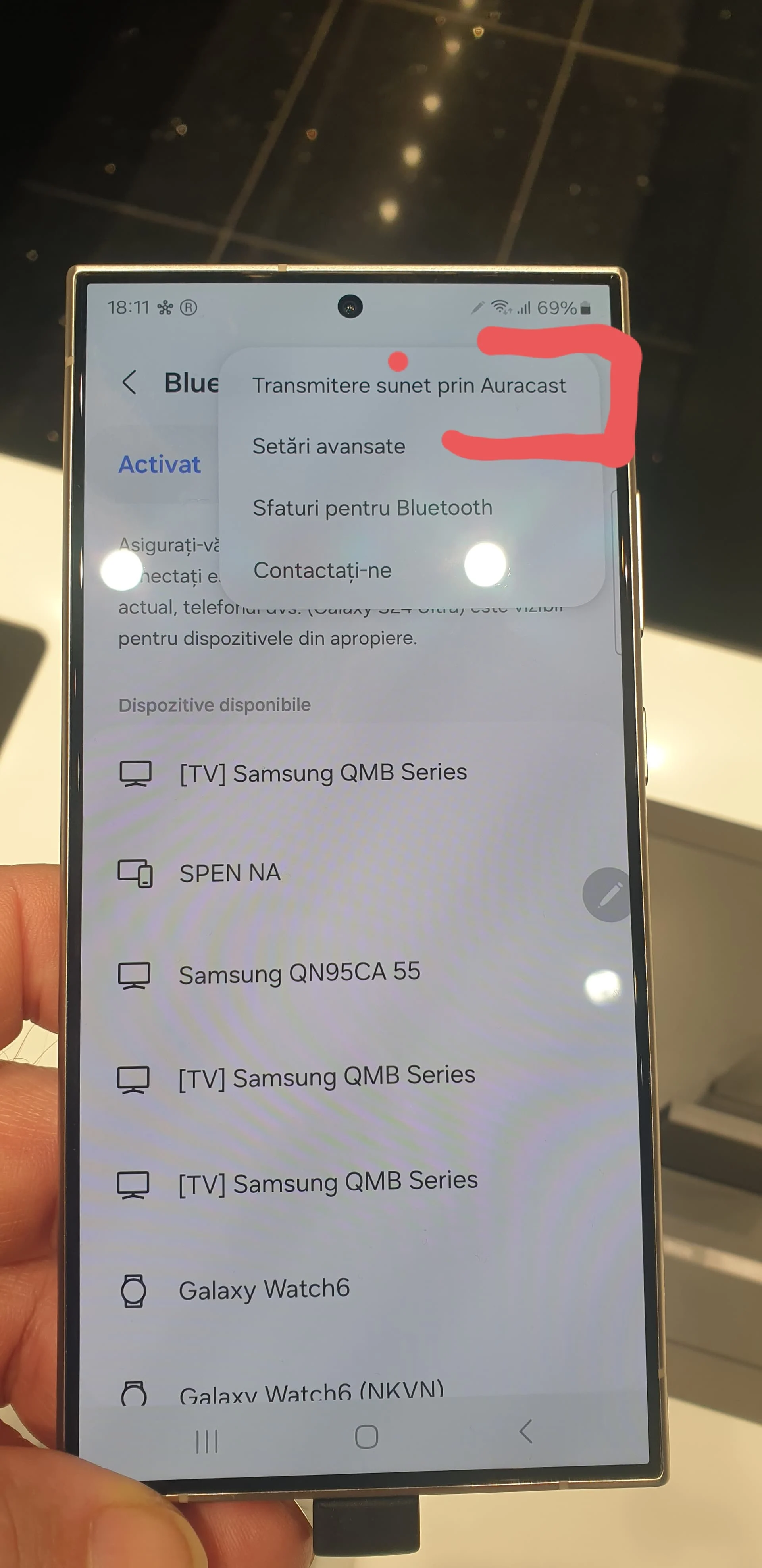
i just went to some Samsung store and played with S24 Ultra and S24+
They have already.
in the pic upper right corner
You’re ignoring this member’s posts.
tenkanProvider
My experience with MFi on my hearing aids vs bluetooth headphones (various models) has been that the latency is much lower with MFi. Will it be better still with LE Audio?
It’s one of the main features about , the latency we will not notice, and be much improved.
Introducing Bluetooth LE Audio - The Use Cases | Bluetooth® Technology Website5
Now available for digital download, a new book from Nick Hunn, Chair of the Bluetooth SIG Hearing Aid Working Group, Vice Chair of the Generic Audio Working Group, and a key contributor to the…
You’re ignoring this member’s posts.
 Tucson Arizona
My experience with MFi on my hearing aids vs bluetooth headphones (various models) has been that the latency is much lower with MFi. Will it be better still with LE Audio?
Hard to find documentation of MFI and Roger that specify latency but the technical data sheet for the Oticon () TV adapter gives a latency of 25 milliseconds for input to the adapter to the output of the hearing aid receiver for an analog input to the RCA connectors. For input to the optical (TOSLINK), the latency is 28 milliseconds for stereo and 45 milliseconds for Dolby. I found a Phonak doc that claimed latency for Roger devices was no more than 25 milliseconds.
I’ve tried reading some bluetooth docs and I found that the specified latency changes depending on the settings of the LCC codec. Some devices that others have posted about specify the latency as 60 milliseconds. So I’m not at all sure what latency to expect for devices - it may depend on the devices and how they are set up.
Hopefully others know and can comment …
You’re ignoring this member’s posts.

Hard to find documentation of MFI and Roger that specify latency
Not sure why you’re bringing Roger into the comparison. For Phonak , the proper comparison would be classic Bluetooth latency. The latency in classic Bluetooth audio devices is 100 milliseconds. And most Phonak connectivity with smartphones, TVs, computers, etc., will be by classic . As you pointed out, even if you used Roger as an intermediate device, you’d still be adding additional latency in the connection from your device, e.g., your computer, to your Roger device to stream to your HAs. And no one will use a Roger device with their smartphone to stream to their HAs. It’s going to be classic BT all the way. When BT gets going, just like now with classic BT, there will be low-latency LE Audio streaming directly from a wide variety of devices direct to your LE Audio HAs. And since it will hopefully be a universally accepted standard, there will be very capable devices that are much cheaper than Phonak’s costly Roger devices. And if one switches HA brands, one hopefully won’t have to throw out all accessories and buy new ones as generic standard LE Audio promises interoperability. Hope it delivers on that promise.
You’re ignoring this member’s posts.

Some devices that others have posted about specify the latency as 60 milliseconds. So I’m not at all sure what latency to expect for LE Audio devices
“What’s more important is that lowers the audio latency of the wireless stream. According to Bluetooth SIG, the latency is between 20 to 30ms. In comparison, the SBC codec operates between 170 to 270 ms” (Source1)
You’re ignoring this member’s posts.

@Baltazard said: (unavailable)I think you will still need your smartphone, it needs to be Bluetooth 5.2 or higher with Bluetooth LE and Auracast enabled.
Smartphone/Tablet/Laptop will be the main hub for selecting Auracast Bluetooth stream (public or private).
HLAA Showcase Webinar: Resound - Auracast™ Broadcast Audio and Hearing Aids - December 6, 2023
Auracast Demo: Accessibility & Audio Sharing LIVE from EUHA Conference [Part 2]
How will users be able to find and select an Auracast™ broadcast to join? What will the user interface (UI) be?
Auracast™ assistants, such as smartphones, smartwatches, or hearing aid remotes, will scan for Auracast™ advertisements and provide a user interface (UI) to enable users to select an Auracast™ broadcast to join, similar to the UI commonly used to connect to Wi-Fi networks in public spaces. Once an Auracast™ broadcast is selected, the Auracast™ assistant provides the Auracast™ receiver (e.g. headphone, earbud, hearing aid, etc.) the information it needs to join the Auracast™ broadcast. The UI on an Auracast™ assistant can be part of the device’s operating system and/or a third-party app like those that come with earbuds or hearing aids.Auracast - FAQ | Bluetooth® Technology Website
===============
Your phone (tablet, PC, etc.) in Bluetooth SIG parlance, is now acting as an Auracast Assistant — an intermediary device that is used to find Auracast broadcasts and configure your Auracast-capable audio product to receive the stream.
From there, you have a choice: If your headphones are Auracast-compatible, they’ll tune into your selected broadcast and your phone is no longer necessary to keep listening. You can even turn it off. If you use wired headphones, you’ll be able to use your phone as the Auracast receiver. If your headphones are wireless, but not Auracast-compatible, you may be able to use your phone as the Auracast receiver. I say “may” because this scenario would require your phone to receive and then re-transmit the Bluetooth broadcast — a capability that might not be supported by all Auracast-capable phones or tablets, etc.https://www.digitaltrends.com/home-theater/bluetooth-auracast-le-audio-lc3-codec/
==============================
Small segment from Dave Fabry:
The Future of Hearing Aids and Hearing Healthcare
Wait s second, does this means you can get Starkey Genesis in custom colors?
They don’t have blue in their catalogue.

======================================================
Link to the post:
https://forum.hearingtracker.com/t/jabra-enhance-pro-20-now-supports-/82691/55?u=baltazard (unavailable)
You’re ignoring this member’s posts.
FWIW, my experience in 30+ years in software product design and development is “support” usually has a specific meaning with two parts: 1) We’ve tested the “supported” component and it works or the component adheres to standards our component also adheres to so we agree to “support” it. 2) If something goes wrong with the “supported” component, we will use a test environment to figure out why it’s not working and accept the problem as a “defect.”
Using a non-supported environment means we haven’t tested and you, the consumer, are completely on your own if it doesn’t work.
I’m not saying vendors don’t play fast and loose with “support” terminology but when I was writing support statements I was always extremely careful to outline what was “supported” (tested and available for defect support) versus “not supported” (don’t even bother calling us).
As always, YMMV. Just wanted to provide some context that I believe most reputable vendors still take seriously.
You’re ignoring this member’s posts.
Not sure if I’ve understood it right!
You could potentially use your enabled Smartphone/Tablet/PC to stream Auracast station (feed) to your , even if your HA aren’t Auracast compatible, (In this case you will need your Smartphone/Tablet/PC), is this correct?
For example, someone could get an S24 with Auracast enabled and audio stream any Auracast feed to his/her Audeo Marvel?
Thx
You’re ignoring this member’s posts.

Pretty sure this is incorrect. To stream one would need compatible “Assistant” device (smartphone, etc.) AND compatible hearing aid (currently only Resound Nexia and related hearing aids)
You’re ignoring this member’s posts.

It seems that the new Samsung S24 series indeed has . Not only that, the phone can act as a transmitter as well as a receiver! Furthermore this capability may come down to earlier models (according to the linked video) it seems.
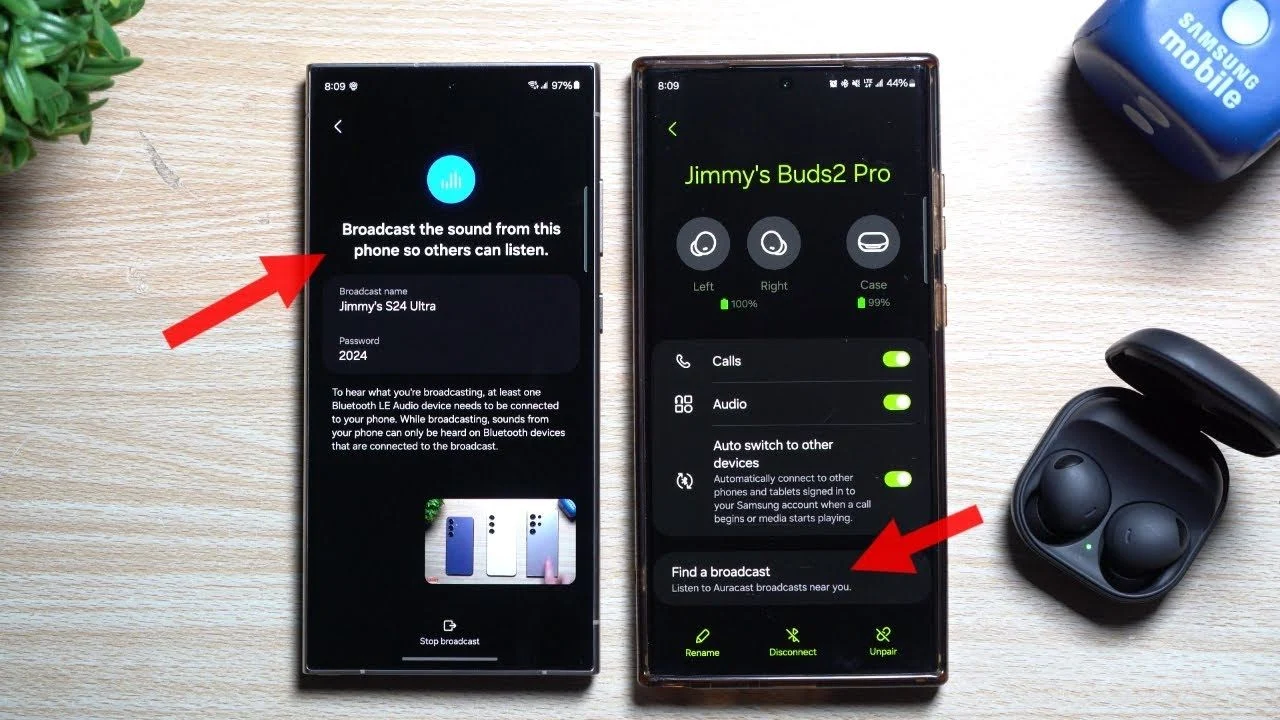
I expect to get mine in the next couple of days - will be able to see if this is true! I wonder when I will encounter a public Auracast broadcast - I suspect it will be a while…
You’re ignoring this member’s posts.
You’re ignoring this member’s posts.
What is “ Assistant” inside the smartphone? Is it “dispatcher” for hearing aids or “repeater”? What receives the Auracast signal - hearing aids or a smartphone?
You’re ignoring this member’s posts.
I think of the Assistant as like a radio tuner. It lets you select what broadcast your hearing aids get. Probably what you mean by “dispatcher.”
You’re ignoring this member’s posts.

What is “Auracast Assistant” inside the smartphone?
It sends the hearing aids the details that they need to listen to the broadcast. Once the aids have that information and are receiving the broadcast, it is no longer necessary. You could turn the phone off at that point.
On a related note, I was reading a piece on the booth at CES 2024. According to the writer who attended, when they got there they were handed ear buds and Apple phones with Auracast assistant apps. I found that interesting.
You’re ignoring this member’s posts.
You’re ignoring this member’s posts.
They must have been or the whole ‘demo’ was faked. The iPhones might be 5.2 or 5.3, but are not certified for as far as I know.
You’re ignoring this member’s posts.
Log in to reply to this topic.
Related discussions
Hearing Aids16 replies
Hearing Aids25 replies
Hearing Aids20 replies
Hearing Aids95 replies
Hearing Aids174 replies