Using the Bluetooth connection to the FMA120 and then to the hearing aids may result in unacceptable latency.
My TCL smart TV has Bluetooth. If I use it to connect to a set of headphones, the latency varies depending on the audio/video source (such as YouTube or Prime Video). When I use the optical audio to connect to an broadcaster, there is no noticeable latency regardless of the source.
Bluetooth LE Audio has much lower latency. I use the FlooGoo FMA 120, the Avantree Audikast 4 and the Avantree C82 Aura. All of which provide high quality sound, stable connection and no noticeable latency
Using the Bluetooth connection to the FMA120 and then to the hearing aids may result in unacceptable latency.
It may not as well. I think @Ranson explained that many recent model TVs adjust the streams to compensate for classic audio’s latency. My TCL TV does that quite well. Yes, the connection adds a bit more latency but that latency will be added even there’s a direct LE Audio connection to the TV.
My TCL has the ability to adjust latency on Bluetooth classic. However, the latency varies depending on the source (YouTube, Prime, Live TV, etc.). This is strange, but still a problem. It appears that my TCL is older than yours and doesn’t work with Bluetooth as well as yours. Since I’ve gotten a broadcaster working with optical audio, I’ve no need to explore further.
I agree that if yours manages latency better, you’ll be able to use the method that Ranson describes. It doesn’t work for me.
I am using Jabra Enhance 700 wiith a Pixel 9 phone. I attend a monthly community lecture series at the local civic center where the speaker’s voice is amplified by a microphone wired to a loudspeaker. Sitting in the audience I have trouble understanding most of what the speaker is saying, probably because the speaker is sometimes unfamiliar with using a microphone.
The lecture is also recorded by a sound technician using a small mixing board. I talked to her about using an Avantree Audikast 4HA transmitter that I recently purchased. We plugged the transmitter into the mixing board and the technician had a small wireless microphone the she placed on the speaker’s lectern and the transmitter showed that it was receiving an audio signal.
The Jabra app is not Auracast capable, but I was able to access the transmitter through the Pixel’s Setting>Accessibility>Hearing Aids>Settings menu. I could control the volume with the phone, and I could understand everything the speaker was saying. I immediately donated the transmitter to the civic center so that other HA users could tune in at the next lecture as long as they have Auracast enabled phones.
I ordered another Audikast 4HA for myself at home. It comes with an optical cable that connects to my not so smart Samsung TV. The transmitter has good range and extends throughout the house even through a couple of walls. I am hoping Avantree soon has a microphone that will interface wirelessly with the transmitter so that I can use the setup in other venues.
Hi Thauri - I’m from Avantree and I’d like to respond to your suggestion of having a wireless mic interface with our Audikast 4HA transmitter.
We’ve actually been looking at 2 different solutions to stream voice over :
Solution 1- Add a wireless mic accessory to the transmitter (as you suggest).
The wireless mic would have 2 parts - a small clip-style mic would be attached to the speaker’s clothing and a separate receiver dongle would plug into the AUX port on the back of the Audikast 4HA (to pick-up the mic audio).
Solution 2 - develop a clip-style Auracast portable mic.
This is a ‘self-contained’ solution and doesn’t need to plug in to an Auracast transmitter like the Audikast. users would connect directly to an Auracast stream broadcast by the mic itself.
Of these 2 solutions which would better fit your needs at the other venues you have in mind?
Hello Howardi- I think the ‘self-contained’ solution is much simpler and would be better, especially if the mic were self-powered (rechargeable battery?). My current setup requires a power supply and a nearby electrical outlet to power the 4HA transmitter, something that is not always available. Your self-contained solution would work better as well in smaller groups, such as round table discussions, board meetings, etc.
I’m not very tech savvy, and there are people on this forum who are much more qualified in these matters than I am. I’m hoping they will bring more to the table here. Your very quick response to my post is encouraging. I’m hoping Avantree will come up with a product that is both cost effective and reliably easy to use.
Hi Thauri - thanks very much for your response and feedback. It’s very helpful for us on the development side of things to hear back from users such as yourself.
Yes- the mic product we have in mind would have a rechargeable battery and be self-powered. But due to size limitations the actual ‘play time’ (broadcast time) would be in the vicinity of 4-6 hours. Hope this is enough?
I will regroup with our product managers and hopefully have a more solid idea of features and timeline in the next week.
Thanks again!
Hi user490,
The current Audikast transmitter is designed to take the audio signal from one input source only (i.e. either the optical port or the AUX port). However, if multiple-input audio streaming is a feature you’re interested in, we have an upcoming product which will be able to to do this - and you’ll also be able to adjust the volume of the different audio streams.
For example you might want the background music to be softer than the audio from an attached mic.
This transmitter will be available Q3/Q4 of this year.
Thanks!
A self-contained battery powered clip on mic and transmitter would be what school classrooms and small presentation areas would love. As in those places there is no PA system but often it’s still hard for people to clearly understand. Of course children tend to have newer model hearing aids so more likely to have Auracast.
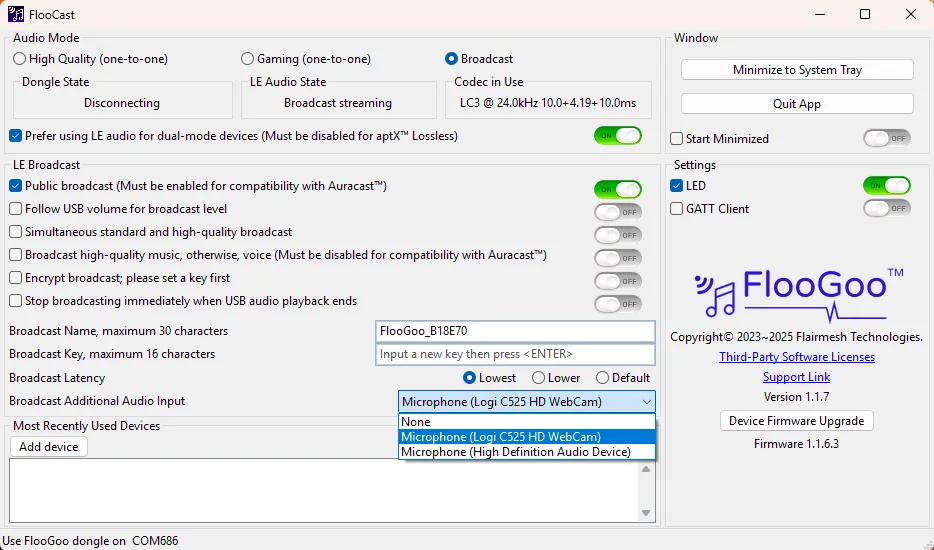
Many users have requested an Auracast™ microphone solution. We’ve released an iOS and Android app that lets you broadcast your voice by simply plugging in the FlooGoo FMA120 and tapping a single button.
[IMG_58A19E6EF211-1]
A standalone microphone would certainly be a great solution.
However, if teachers are already using a computer in the classroom and the computer has a built-in or external microphone, the FlooGoo FMA120/121 can still be used to add Auracast capability to the existing system. The FlooCast desktop app allows the microphone input to be mixed and broadcast together with other PC audio.
This makes it possible to integrate Auracast without significantly changing the current classroom setup.
While some people are tech savy a lot of the world is like my 92 year old mother and would not want to touch any “setups”. I like the ability to add more advanced features to any broadcast system but any system should have as many automatic features and setups as possible.

 London

![[IMG_58A19E6EF211-1]](/uploads/original/0c119bf425ef28c6fceadd4de47ba4003a336120.jpeg)