The only thing that works to reduce it is turning the moresound booster down but then it is not giving me the amplification I need so what is the point of expensive HA’s.
You said when you turn down the MoreSound Booster then the hiss goes away. I thought I already explained to you that the MoreSound Booster IS the FULL DIRECTIONAL setting on steroid. You WILL get the low frequency floor noise if you enable the MoreSound Booster. You DON’T need to enable the MoreSound Booster in order to get the amplification you need. You would only want to enable the MoreSound Booster in the ON app if you want to enable the aggressive beam forming, which will give you the floor noise. So you want to make sure you turn off the MoreSound Booster in the ON app ALTOGETHER, not just turning it down.
You also keep mentioning that turning down MoreSound VC helps removes the hiss. What is MoreSound VC? I never heard of MoreSound VC before as a feature in the Oticon More.
ll be a noticeable difference, they will sound a lot “brighter” then the 85dB you are currently working with, I think you’ll notice the circuit noise (floor noise) more with the 60dB as it’s hard to imagine that both 85dB receivers are at fau
Thanks,
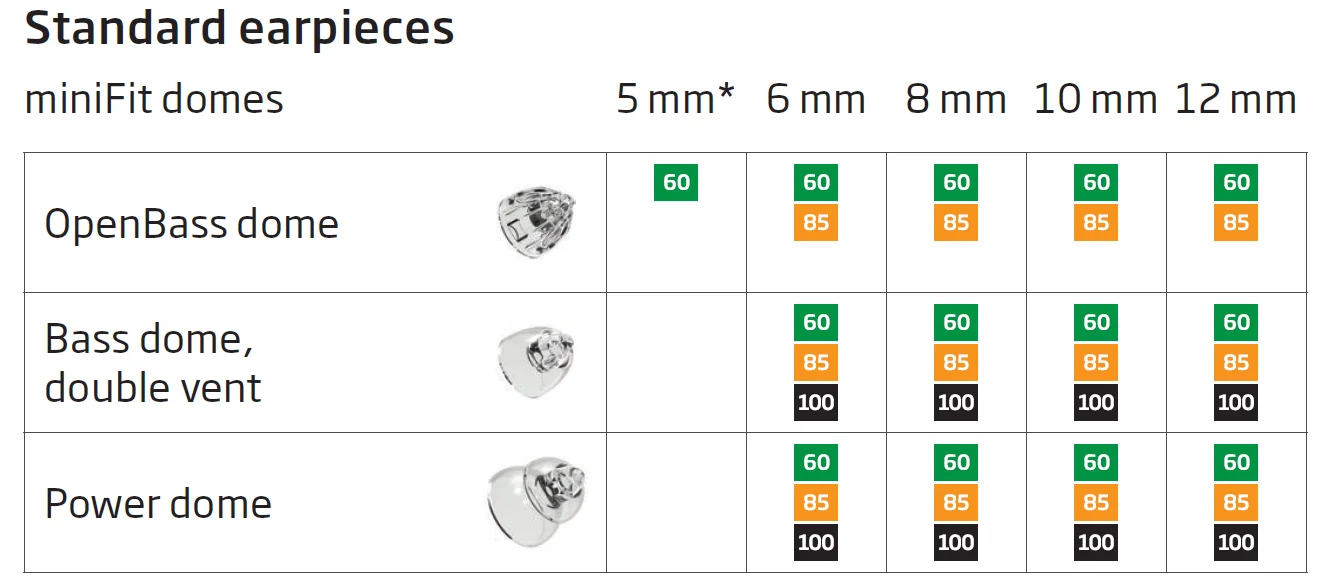
I can only choose ‘openbass’ as that is the only ‘open’ option that I have. See attached picture for my options. I presumed this was for ‘open domes’.
Yes my wife can hear the noise. She likened it to a speaker on full with the static hiss.
I said I’d try the 60db just for elimination.
I also have run the feedback analyzer after all changes.
It’s just any amplification in the soft settings seem to increase the hissing. Anything near the target gain line gives a very noticeable strong hiss.
I also have the Bose ’s and any increase in amplification in those has no hissing. They don’t hiss at all until I turn the world volume up to a really high level. The hiss is similar to the Oticons when I set it to 100% volume which is ridiculously loud.
Yes is I don’t use the moresound booster in the app for amplification at all. If i do it increases the hiss. If i enable the moresound booster in the app and turn it down using the VC buttons on the hearing aid itself or in the app it reduces the static hiss.
Sorry if I am confusing you, and again thanks for taking the time to help.
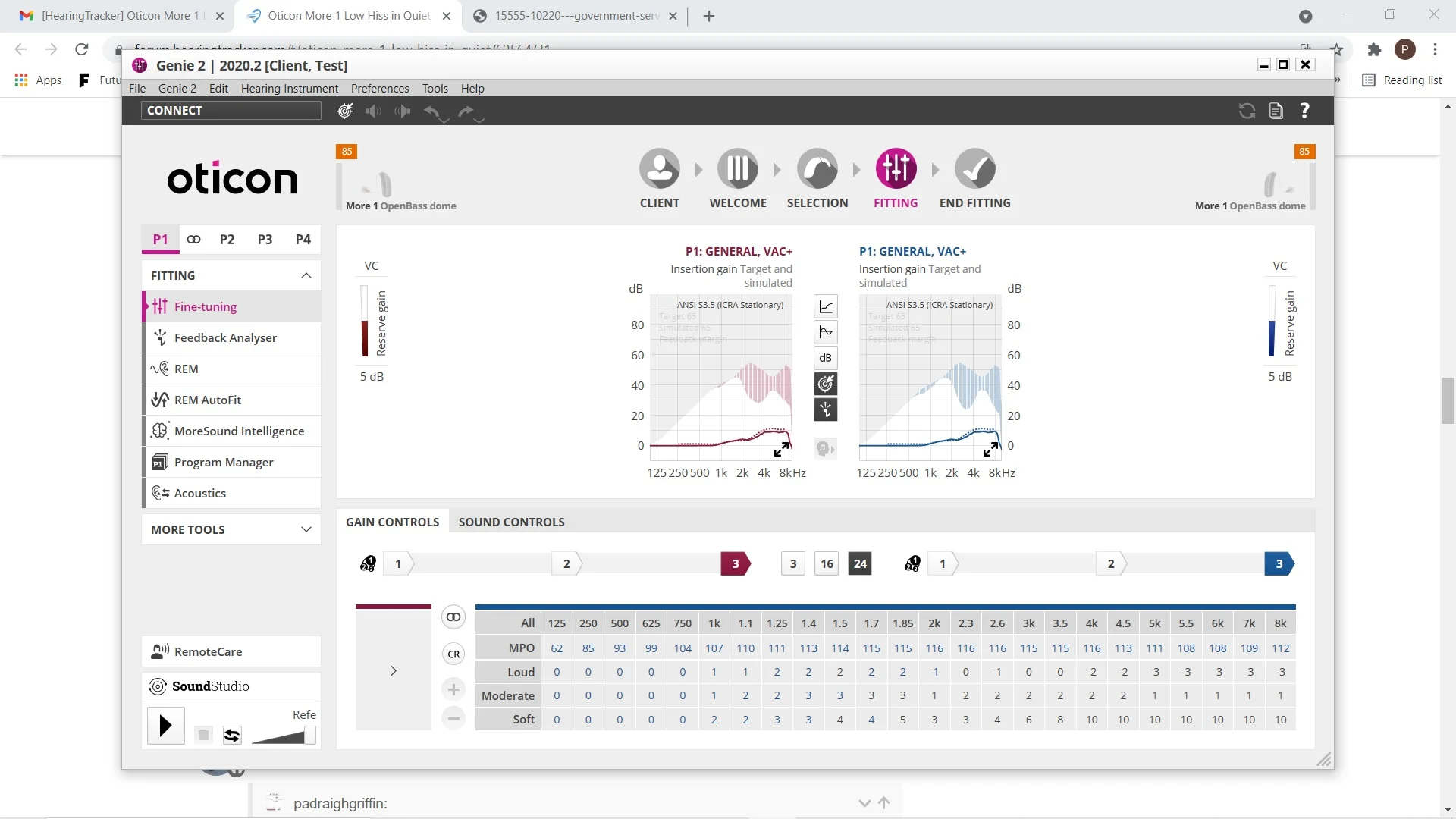
I just did exactly what you suggested and think i have got the best result yet as regards the hissing volume. I am using Open domes, but as I said above the only option with open is ‘openbass’. I presumed that was the correct choice as the seller programmed them with this choice as well and provided the domes. I have attached a picture from fine tuning just for you to have a look. Thanks
I received the double bass domes and did a fitting. It really amplified the soft gains and the hiss was like a mini waterfall.
It seems that the ’s can’t handle any increase in soft gain. Any move up in the soft gains increases the hiss and any move down decreases it. It is 100% based on the soft gain levels in fine tuning.
Is this the way it should be? I bought these HA’s in order to increase the amount of sound coming into my brain as advertised. I shouldn’t have to under amplify?
Choosing the OpenBass dome is the correct choice as it is what the open dome is called for the More. See the screenshot below.
It does make sense that the Bass dome double vent would amplify the hiss further, like I mentioned in a previous post. I assume that you already changed the acoustic setting in Genie 2 to match with the Bass dome double vent when you switched to it.
You kept saying MoreSound VC but there’s no such feature that I’m aware of. I assume that you’re just talking about using the volume control, either on your rocket switch or on the phone app, or maybe you mean in Fine Tuning → Gain Controls and decrease the Soft (gain) values across the board.
Just for kick, I went into my Soft gain control in Genie 2 and increased my Soft gain across the board by 10 clicks (10 ), and while my ambient volume level was greatly amplified, I don’t notice any hissing sound that stood apart from the greatly amplified environmental sounds. But then I don’t know what your hissing frequencies are at, at least I know it’s not the low to 1 KHz range because my left hearing is still OK (but not great) in that range. As soon as I switched my OPN to the Full Directional setting, I could hear the low frequency floor noise right away like I expected to.
The fact that Full Directional in your case takes away the hissing, which is counter to the norm, and that your Soft gain is only 13 dB to begin with in order to reach your target level, and you already hear the hissing at your target level, which is not that much amplification by the way, I’m beginning to think that it may be the that are defective, although I do admit that the chance of both HAs being defective is very low.
The fact that when you increased the Neural Noise Suppression to a higher value as suggested by @flashb1024 seems to help with the hissing is interesting. I think you also changed the Virtual Outer Ear setting, as well as the environment slider. I would suggest you try to tinker around with these separately to see which direction each of these individual parameters will take you in terms of reducing the hiss, so you can isolate the parameter with the most effect better. That is not to say that the values opposite to the helpful parameter value are bad, but in a debugging environment, the first and foremost objective is to find out what helps and what doesn’t.
Thanks. It really does seem like defects which I agree is a very low percentage. The new fitting assistant in Genie 2 suggest maybe interference maybe. How do I deactivate the telecoil if it is on without my knowing.
As far as I can tell, the Tcoil modes are activated in the Program Manager page where you assign different modes to each of the 4 available programs. Then you’d also have to be in that program to activate the tcoil.
One simple test is to mute the mics and apply a set of headphones (preferably the large over-the-ear type headphones and not the on-the-ear type) and play something to see if it activates the tcoil automatically or not. If your mics are muted but you hear the headphones content nice and clear, then it’s activated the tcoil without being in a tcoil program.
By the way, when you mute the ’ mics, is the hissing still there or not?
Yeah, I believe that’s the only way you can mute the mics for the More. It would have been nice to give folks an option to mute via the rocker switch but apparently they don’t.
No hiss when mics are muted. Don’t think it’s a problem either. Pity no tweak seems to eliminate it at all. I’ve pretty much tried everything. Will wait for 60db receivers and try those. Unless any more suggestions are forthcoming. As I said the Bose can do some serious amplification of noise and no hiss and they are a fraction of the cost.
Yes, you should try the 65 receivers to see if they fare better. It may not be the fact that they’re 65 dB receivers, it may just be that your 85 dB receivers are defective as well. So if you try different 85 dB receivers instead of 65 dB receivers, it may also resolve your issue.
It’d be more likely that the receivers are defective than the More 1s are defective, although again, the chance of 2 receivers being defective the same way at the same time is more unlikely.
The fact that when the mics are muted results in no hiss is a bit telling. You may want to restore your gains to target, try streaming via Bluetooth, and try using the tcoil with headphones while the mics are muted to see if you hear the hiss or not. If no hiss at all, then you know that the internal amplification is hiss-free, and maybe even the receivers are hiss-free. Then maybe there’s an issue with the mics or the input portion like the A2D converter causing the hiss. If with the mics muted but streaming or tcoil produce the hiss, then it may be the internal amplification or the receivers.
Yes. I will try the 60db receivers. Should be here by Mon/Tue next at latest. I have contacted a few local audiologists to maybe have a look or send these back and buy locally. Gonna cost me a lot more though unfortunately.
I have contacted a few local audiologists to maybe have a look
That would be the logical next step.
You just have to be really certain they aren’t trying to make money off you.
I think most audi’s charge a flat fee for a consult & adjustment, at least here in USA
In your last picture, we can see that Genie 2 reminds you that you are in the feedback margin, you selected openbass domes, are you actually using open domes or openbass domes?
Can you upload a picture of the gain screen when using double vent bass domes?
Please note that soft sounds are more prone to feedback, please select the gain curve that shows 45dB spl to see if its gain is close to the feedback region.
If you look at the screenshot I showed, Oticon calls the More open dome OpenBass dome. It’s one and the same in the More. There’s no Open dome choice to select in Genie 2 in the first place for the More.
Naturally the OpenBass dome would show feedback margin, but the gain curve is nowhere near it. The Bass dome with double vent should probably show even less feedback margin area. Hopefully the OP can confirm this. Nevertheless, I don’t think feedback is the issue here, nor do I think that the hissing is the actual feedback or is caused by the feedback.
th double vent should probably show even less feedback margin area. Hopefully the OP can confirm this. Nevertheless, I don’t think feedback is the issue here, nor do I think that the hissing is the actual feedback or is caused by the feedback.
I’m just wondering if it to do with the dome size. I have 10mm open domes, but to be honest they are very loose in my ear. No resistance in taking them out. Just a note the Bose ’s come with 3 dome sizes and I use the largest but they are always popping out. I’ve looked for bigger open domes but 10mm is the max size. Could this be the issue?? I’m totally new to this game so appreciate the advice. Is it as simple as that I might have an abnormally large ear canal?
I concur with what Zebras said about the OpenBass domes.
Are you thinking about doing trial demos with the local audis? Or are you thinking about paying for their service to debug what’s wrong with your Korean-sourced More 1s first, and if they still can’t fix the issue, then you’d return the Korean-sourced More 1s and buy locally?
I sure hope it’s just an issue with the existing receivers. But it’d be so weird if both of them are bad the same way at the same time. I’ve replaced plenty receivers for my OPNs, but always individually and usually they just get static’ky or sound distorted when the sound comes through. Never had any hissing floor noise with receivers.



 SoCal
SoCal
 China
China