
We are glad that you like Audikast 4. Yes, you can simple do a firmware update to change many things, from broadcasting name, to encryption password and more. 
You’re ignoring this member’s posts.
157 replies12.3k viewsLast reply
We are glad that you like Audikast 4. Yes, you can simple do a firmware update to change many things, from broadcasting name, to encryption password and more.
You’re ignoring this member’s posts.

Can we use the same update on multiple units, our do we need to purchase a separate update for each unit?
You’re ignoring this member’s posts.

I tested the creative bt-w6.
direct pairing is not working but is working. This device stands out, because you can use the whole creative postprocessing on the onboard profile. smart volume, preamp, crystal voice, dialogue + on console. ps5 or switch 2.
The only problem I have is, that when I start the console/PC and start the auracast, I can not see the auracast even if audio is playing. I have to shut down the as well and start them again, connect them again with companion app (intent) for me to see the auracast. this is somewhere a firmware issue on creative, or companion app. but it works when it works.
You’re ignoring this member’s posts.
You’re ignoring this member’s posts.

Since is a public broadcast, there is no limit to the number of receivers.
In other words, the transmitter has no way of knowing whether anyone is listening.
You’re ignoring this member’s posts.
We are glad that you like Audikast 4. Yes, you can simple do a firmware update to change many things, from broadcasting name, to encryption password and more.
According to the comparison chart on the Avantree web site, the Audikast 4HA allows for name broadcasting and encryption but the Audikast 4 does not.
Also, according to the specs posted there, the Audikast 4 has 50-70 ms latency for , while the 4HA has 120 ms. Is that because of overhead for those extra features?
You’re ignoring this member’s posts.
Hi Lour, if you purchased multiple transmitters, please email support@avantree.com for a group update discount.
You’re ignoring this member’s posts.

The BA210 has a fixed unique identifier for each unit, which is not ideal, but works.
The broadcast ID (unique identifier) in BA210 can be changed using a special web management tool. Please contact cs@homespotdigital.com for more info.
For the other settings, such as broadcast name, passcode, encryption (in HQ and SQ), volume (in HQ and SQ), you can use the advertised CastTool (link7), to make change - just need a Chromium based browser (e.g.. Chrome, Edge) running on PC/Mac/Unix, and a USB data cable to set up; no software download, no firmware download is necessary.
You may be interested in HomeSpot’s receiver lineup, which is purpose-built for venues such as conference halls, theatres, museums, and churches. Their ecosystem also includes pro-grade tools like loaner-device management and QR code/signage generation. They also have a receiver that supports Auracast live captioning, providing an excellent accessibility option for users with profound hearing loss or hearing deaf users.
We work closely with HomeSpot to develop the software behind these solutions. For more info, please contact them at cs@homespotdigital.com — they will likely be happy to provide sample units for evaluation.
You’re ignoring this member’s posts.

For the other settings, such as broadcast name, passcode, encryption (in HQ and SQ), volume (in HQ and SQ), you can use the advertised CastTool (link), to make change - just need a Chromium based browser (e.g.. Chrome, Edge) running on PC/Mac/Unix, and a USB data cable to set up; no software download, no firmware download is necessary.
Running CastTool in a Chromium based browser is cool! Is it possible to make this tool work offline? Like using it without internet connection.
You’re ignoring this member’s posts.
You’re ignoring this member’s posts.
My Homespot BA210 v2 arrived the other day from Amazon.ca. It is abut 1/2 the size of what I imagined from the pictures. Here are my 1st impressions.
.
Other Hardware:
-Sony Bravia Smart TV with Toslink output
-Pixel 7 pro - that has been having issues with & connecting to the Hearing Aids
-Jabra Enhanced Pro 30 - rechargeable
Software: Jabra Ehance Pro
Unboxing & connecting to the TV was relatively simple. Using external USB power. I’ll have to go through the TV manual to see if there is a USB connection that will power the unit, so turning the TV on or off will also control power to the BA210.
After ensuring the Bluetooth connection to the was good in the Jabra Enhance Pro app I powered on the BA210 . The device showed up in the app, connection was easy clicking on the bar. Initially the volume was way too loud and the slider in the app couldn’t lower it enough. I followed the instructions in post 59 above by @Deenovan on using the QK CastTool to adjust it to a level that was tolerable & the slider was able to control it. Somewhere in there there was a firmware update as well.
Once I got the volume acceptable, I found that that voices were horrible, almost echo-y. By trial and error I found that by sticking my fingers in my ears, I could occlude the sound escaping & reduced the echo. Lowering the levels from the BA210 helped. Lowering the level of sound from the Surroundings almost eliminated the echo on voices. I saved the settings as a favourite.
Post 84 above by @wtolkien mentions latching onto a transmission. I think I inadvertently discovered Unicast how the broadcast connects. At one point last night my phone was indicating that I was again having bluetooth connection issues. Turning the Bluetooth off then back on will reset the connection. The odd thing is that with the Bluetooth off, I was still receiving and hearing the TV through my hearing aids.
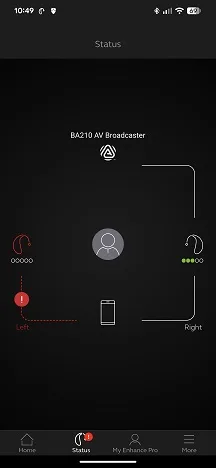
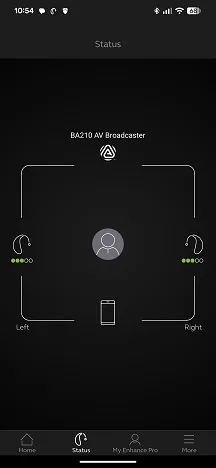
These screenshots seem to indicate that the connection is between the BA210 and the Hearing Aids directly. Even though I could still hear with both ears I lost the connection with the phone on one ear.
I can think of a number of people with hearing aids that would need outside help in setting this unit up. I’ve got a phone upgrade in the works, maybe that will make a difference.
All in all, I see a potential for these devices and I am looking forward to try out others.
You’re ignoring this member’s posts.
In addition to the USB input, the BA210 has an optical input and a 3.5mm analog stereo audio input. It can be powered from USB while using the optical or analog input.
I use the USB input for power and the optical input for sound when using with my smart TV.
You’re ignoring this member’s posts.
In addition to the USB input, the BA210 has an optical input and a 3.5mm analog stereo audio input. It can be powered from USB while using the optical or analog input.
I use the USB input for power and the optical input for sound when using with my smart TV.
The BA210 optical input is through a combo 3.5mm jack. I have generally found combo jacks not to be terribly reliable, particularly if you connect and disconnect frequently. I consider separate 3.5mm audio and Toslink optical jacks far preferable.
You’re ignoring this member’s posts.
These screenshots seem to indicate that the connection is between the BA210 and the Hearing Aids directly. Even though I could still hear with both ears I lost the BT connection with the phone on one ear.
While watching TV tonight with the BA210 I was experiencing numerous cut outs.The Jabra EP app was throwing all kinds of errors. I turned Bluetooth off on the phone & the sound was being broadcast to the hearing aids & no cut outs. The app reads “Hearing aids not connected”. Go figure.
FWIW, I can control volume with the buttons on the Hearing Aids.
I also read tonight that the upcoming December Pixel Drop will have some Bluetooth fixes. will see what that brings.
You’re ignoring this member’s posts.
can anybody please confirm, if the HomeSpot BA210 v2 only uses in ?
Or can I driectly pair hearing aids to it and use LE audio unicast, like on the C82 LEA?
You’re ignoring this member’s posts.
The BA210 optical input is through a combo 3.5mm jack. I have generally found combo jacks not to be terribly reliable, particularly if you connect and disconnect frequently. I consider separate 3.5mm audio and Toslink optical jacks far preferable.
I have no experience with repeated connection cycles as I plugged it in once and left it. I suspect that would be the case for most people using the BA210 with a smart TV. Now if you’re using it for something a little unusual, YMMV.
You’re ignoring this member’s posts.
When using the BA210 in mode, the app on the phone is only used to tell the hearing aids what broadcast to receive. The phone can then be turned off without affecting the reception of the broadcast. I don’t know how the Jabra EP app was causing problems - possibly it was telling the hearing aids to restart listening to the broadcast, and this caused an interruption in reception.
You’re ignoring this member’s posts.
but it’s not quite as flexible in terms of connections and portability.
Just for users who are wondering whether they can use the FMA120 with their existing TV: if your TV supports Bluetooth headphones, then you don’t need to connect any cables to the TV to enable . The FMA120 offers a relay mode that works entirely wirelessly, receiving audio from the TV over Bluetooth and then broadcasting it via Auracast.
No, users will need an optical-to-3.5 mm converter if their TVs only provide an optical audio output. However, many TVs that only offer optical output also support Bluetooth headphones. If that’s the case, you don’t need to use the optical port at all. You can simply load the relay-mode firmware onto an FMA120 and pair it with the TV just like a Bluetooth headset. The FMA120 will then broadcast the audio wirelessly. There’s no need to plug the FMA120 into a PC or the TV—just power it with any …
You’re ignoring this member’s posts.
Phoebe,
We got the go ahead for our pilot program. I’d (we) would really appreciate your generous offer to send the museum a free unit to evaluate. Our initial requirements are fairly basic. We need to be able to provide input from our wireless mic system (the output from the wireless mic system is a simple standard headphone jack). We will want to “name” our “channel”/transmitter something that our guests can relate to/recognize, such as Space Foundation1. Lastly, we will want to be able to set up PIN access so we can use the Auracast for special events (such as at this spring’s Space Symposium) where we charge and admission fee.
How would you like us to “formally” request your generous support.
Lou R
You’re ignoring this member’s posts.
Can we schedule a call so we can fully understand your needs and make the best arrangement accordingly?
Please use the link below to choose a time that works best for you:
https://go.oncehub.com/venucastsupport6
You’re ignoring this member’s posts.
Log in to reply to this topic.
Forum Support13 replies
Uncategorized14 replies
Uncategorized4 replies
Hearing Aids2 replies
Hearing Aids95 replies

 Taiwan