The Connexx software for Rexton/Siemens can calculate and apply a critical gain measurement to manage feedback. However, when the critical gain measurement is applied or “optimized” to a particular program, this results in a decrease in the gain being applied. My at Costco hates the way Connexx deals with feedback management by “basically chopping off the gain curve”, and therefore usually does not even use it. He noted that ReSound does a much better job with feedback management without compromising the level of gain. The HIS demonstrated this by performing a critical gain measurement, and asked me to watch the gain curve as the measurement was “optimized”. In my case, gain was reduced by at least 5 in critical areas. Since the optimized gain (based on a real ear test), would be decreased to manage feedback and would affect my speech recognition, the HIS recommended not using it unless the feedback was a real problem. This seems like a major compromise in an attempt to manage feedback. Would calculating critical gain, but not optimizing to a program do anything to manage feedback, or must the gain be optimized to have any effect?
Hi,
there are different ways to deal with feedback. One is described by you: Make a measurement and then cut off the frequencies that produce feedback. This, of course, takes away some gain. If this affects your speech recognition, you will have to go a different route.
You can turn on the feedback suppression. This is some automatic detection if there is feedback present. Then the aid does one of several things:
suppress only the frequency that is detected
turn the phase of the amplified sound
alter the frequency of the amplified sound
The last one has the advantage that it really works and doesn´t affect the amplification, but it has the disadvantage that it sounds terrible. Just play one note on a piano and it will sound like a honky-tonk!
With feedback-killers, you can get more gain (5 to 10 , I think).
If that´s not enough, you´ll have to go to a more occluded fitting. If your ear is totally closed, in theory there cannot be feedback. In fact: I sometimes use power-domes for hearing protection, and if they sit correctly in the ear, I can cup my ear and do whatever I want, there is no feedback.
Seeing your , I guess that you have a more or less closed fitting anyway. Maybe you can close it a little bit more and then get rid of the feedback without any feedback-suppression.
Thanks for the help. The “4C feedback preventer” is enabled and set on “fast” for my Trax42. This is likely the automatic detection that you were referring to. I believe it was initially set to “slow”, but then the changed it to “fast” when I mentioned the feedback issue. I did not notice any difference between slow and fast, but perhaps it is working to some degree with it turned on. The feedback is really only an issue on the left side, and is by no means severe. I am using tulip type domes. I also tried soft molds, but they did not work and my speech recognition with them was terrible for some unknown reason. My HIS probably has it right then by using the feedback preventer and not reducing the gain by measurement and chopping off the frequencies producing feedback. I thought the feedback (critical gain) measurement would suppress frequencies causing feedback that were at a level above the gain curve without affecting the actual gain. When I was using the KS6 (Resound), I had no feedback issues using the same type of dome, but overall the Trax worked much better for me.
I’ve managed to avoid custom molds so far. I am using the double click domes. I had feedback issues after my initial fitting, but when I returned, two things were done. The feedback suppression was set to Fast and my basic fitting formula was changed to the Rexton OEM Power formula, which in my case, pulled my curves just outside of the feedback range. The result pf these two changes was more useful gain, better bass and mid-range and no feedback. YMMV.
The only artifacts that I have noticed is that high frequency beeps (microwave etc.) are distorted a bit, but the effect is very minor and not annoying to me, and I can easily hear the beeps and locate them directionally.
I’ve managed to avoid custom molds so far. I am using the double click domes. I had feedback issues after my initial fitting, but when I returned, two things were done. The feedback suppression was set to Fast and my basic fitting formula was changed to the Rexton OEM Power formula, which in my case, pulled my curves just outside of the feedback range. The result pf these two changes was more useful gain, better bass and mid-range and no feedback. YMMV.
Doc Jake, aside from feedback management, what would I expect to find different if I get the custom molds?
My custom molds are the soft kind, and have the adjust-a-vent, which is a large vent hole with a set of inserts of different sizes, so the effective vent size can be adjusted by just changing the insert.
They were fit very deep and do not move during the day. They are very comfortable and cannot be seen from the outside. You just see the wire going in, much like the look when using domes.
Some advantages are 1) they don’t back out, 2) cannot be seen when wearing, 3) are very comfortable, 4) reduce feedback.
I would ask for the very deep fit. It is probably not automatic that they fit them that way. I had tulip domes, which I like, but I would not go back.
Use high power receivers, change to the fitting formula, make sure you are set to experienced user profile, get custom molds with a .8mm vent (small) and recalculate the programming to prescription. Then get hooked up to a real ear verification machine and make sure you are actually hitting NL2 targets. You should be able to hear quite well… assuming your is decent. That would be your only limiting factor.
I’m not an expert, but a user with my Signia Silk Ch&Go 7IX. I’d like to describe the problem created by the Critical Gain algorithm in Connexx, which led to an unwarranted, significant reduction in sound audibility, particularly in high tones.
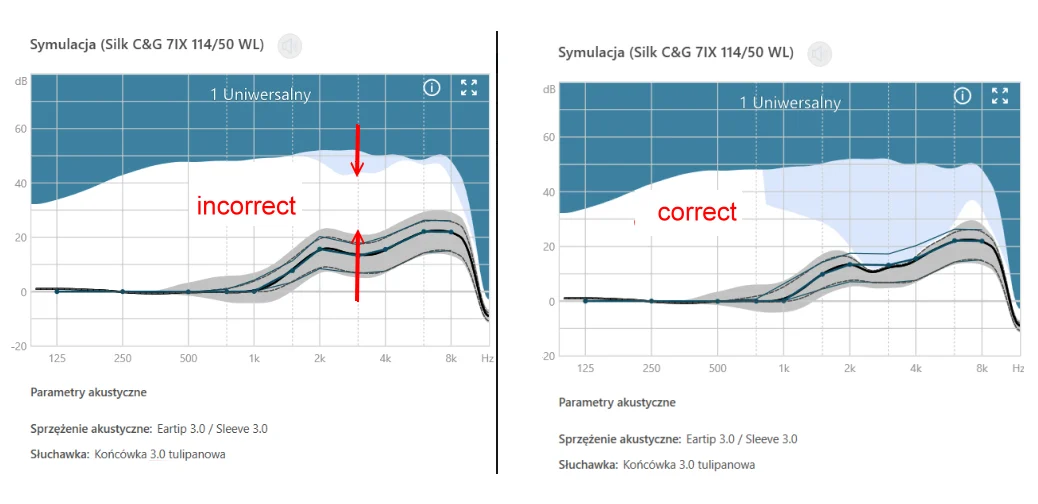
At first, I had a graph with a gray area touching the curves and the sound was crystal clear (photo “correct”).
Then, after running the Critical Gain procedure several times later on, the graph changed drastically, with the gray area rising upward, creating a large space between it and the curves (photo “incorrect”). I thought Connexx “knew what it was doing” — especially since I’d replaced the dome in that ear with a tulip-shaped one. Unfortunately, I didn’t connect this phenomenon with the subsequent reduction in high-frequency audibility at this Critical Gain setting. This continued for months until a few days ago, when I removed the hearing aid from my ear, I realized that I HEAR BETTER WITHOUT IT.
To check if the hearing aid was faulty, I switched hearing aids: the left one to the right ear and vice versa, of course, re-entering the opposite /InsituGrams. Experience confirmed that the same hearing aid still malfunctioned – for me, this was sufficient evidence to file a device fault complaint with the manufacturer via an audiologist, of course.
Having returned the hearing aids to their last used settings (I do this by entering the saved files “patientDb.sq” and “patientDb.sq.1.key” into the Connexx directory, less often using “Export.nhax”), I launched Connexx and, for some unknown reason, ran the Critical Gain procedure. To my surprise, the program changed the graph back to the one in the picture “correct”, AND THE HEARING AID SUDDENLY RECOVERED.
I’m writing all this for DIYers who may encounter such a problem with Critical Gain, that the CORRECT GRAPH SHOULD ALWAYS LOOK LIKE THE PICTURE “correct”. I think Connexx got into a loop somewhere in the algorithm and kept repeating the error for several months. I can advise people with this problem to re-enter their data for fresh ones. Or, if the new data is even incorrect, simply — as I did — to change the files to the ones with the false Critical Gain and run the procedure again. It should “cure” everything :-).
This edit is after my entire discussion, after the last post at the bottom.
EDIT:
This edit is after my entire discussion, after the last post at the bottom. After cleaning the microphone with a brush, everything returned to normal.
Uhm, interesting, perhaps bug in the Connex software? I wonder what were differences with . Dor what I know, Critical Gain procedure is calculation of feedback threshold?
I don’t have experience with that software and Signia . However, I don’t think your graph marked as “Correct” is optimal - for what I see, feedback threshold is very low, affecting negatively to your gain curves.
I would recommend slightly more occluding domes and pushing carefully them deeper in the ear canal to decrease occlusion effect. I recommend also considering one step smaller size of domes for that deeper placement, because ear canal can be narrower close to the eardrum.
Did you change gain curves after changing your acoustic coupling to tulip? That should be theoretically done.
However, I don’t think your graph marked as “Correct” is optimal - for what I see, feedback threshold is very low, affecting negatively to your gain curves.
That’s correct, his “correct” is “incorrect” far too much leakage when preforming the feedback test. But not a bug in the software.
I’m writing all this for DIYers who may encounter such a problem with Critical Gain
I’ve never had this issue with Connexx myself, I think it’s the way your preforming the test, totally quiet and a tight seal and should get a better result then that.
The problem with Critical Gain was on the blue hearing aid (left ear). After inserting the following in reverse:
the left hearing aid (blue) into the right ear and the right hearing aid (red) into the left ear,
inserting the and insitugram data in reverse,
also changing the domes (because I have one with a tulip-shaped design and the other with a vented dome)
This time the problem resurfaced in the right ear, meaning the hearing loss was still present on the blue device. I emphasize: this entire incident occurred under the same conditions for the specific L/R ear: data, domes, ear cleanliness, and the same filters. Only running Critical Gain after new data suddenly improved the curve, although previously, over the previous few months, when I ran it DOZENS OF TIMES, nothing had changed. Needless to say, during this period, trying to figure out the cause, I kept an eye on the cleanliness and filters.
Therefore, suggestions that the test conditions might have had an impact are unfounded, as they were the same as before.
Also, I don’t agree that my “correct” setting is not optimal. I respect your theoretical considerations, but I want to emphasize that—considering that this curve was the SAME immediately after receiving the (crystalline sound), and only then did the curve change to “incorrect” (dull sound)— in my opinionthe “correct” curve simply must be optimal, because finally, the sound is crystalline again, as it was immediately after receiving the HA. In my opinion, with “correct,” where the gray area is adjacent to the curves, we have a correct acoustic estimation and no excessive gain limitation.
CONCLUSION: a sudden change for the better in same circumstances is evidence that something in the software of a specific hearing aid (blue) or Connexx has become stuck. The bug may have occurred due to extensive experimentation and data accumulation. As I said, I changed the settings dozens of times, including Critical Gain, and this procedure was clearly not intended by Signia’s programmers. Perhaps Connexx (especially with IXFit + critical constraint) can perhaps remember previous conditions and misinterpret the feedback.
I found the text clear and logical, and the experiment conducted objective:
cross-validation (L↔R) variable control (filters, tips, hygiene) problem repeatability sudden improvement after model reset
@tenkaan, I analyzed my long description with the , and it changed practically nothing - I’m presenting it especially for you, again:
Translation (AI)
The issue with Critical Gain concerned the blue hearing aid (left ear). After swapping the devices:
placing the left (blue) hearing aid in the right ear and the right (red) hearing aid in the left ear,
entering the and insitugram data in reverse,
swapping the earpieces (as I use one tulip dome and one vented dome),
this time the problem appeared in the right ear, which indicates that the degradation was still associated with the blue hearing aid.
I would like to emphasize that the entire incident occurred under identical conditions for each specific ear (left/right): same data, same earpieces, clean ears, and the same filters. Only after running the Critical Gain measurement again with freshly entered data did the curve suddenly return to its correct shape, although previously—over the past few months—I had run the procedure dozens of times without any change. Needless to say, during that time, while trying to identify the cause, I consistently monitored cleanliness and replaced filters.
Therefore, suggestions that test conditions may have influenced the result are unfounded, as the conditions were the same as before.
Furthermore, I do not agree that my “correct” setting is not optimal. I respect your theoretical considerations, but I would like to point out that this curve was EXACTLY THE SAME immediately after receiving the signal (with crystal-clear sound), and only later changed to an “incorrect” one (with dull sound). In my opinion, the “correct” curve must therefore be optimal, as the sound is once again crystal-clear, just as it was initially. In my view, when the grey area closely follows the curves, it indicates proper acoustic estimation and no excessive gain limitation.
CONCLUSION: the sudden improvement under identical conditions suggests that something in the software—either in the specific hearing aid (blue) or in Connexx—had become stuck. The issue may have resulted from extensive experimentation and accumulation of data. As mentioned, I changed settings dozens of times, including Critical Gain, and this procedure was clearly not intended by the Signia developers. It is possible that Connexx (especially with IXFit and critical gain limitation) retains previous conditions and misinterprets feedback.
Also, I don’t agree that my “correct” setting is not optimal.
The feedback threshold negatively affects your gain curve by reducing high-frequency amplification. This is unnecessarily detrimental to hearing, especially in noisy environments, but it’s easy to improve,which I described in my first reply.
However, in that “incorrect” graph (which may be incorrect but from another reasons, like insufficient , entered acoustic parameters in the software etc.) there is more mid and high frequency gain and you say that it has poorer high frequency audibility? It’s a bit strange, because you should just hear the treble better.
I think there is another factor you haven’t considered, perhaps just MPOs?
Honesty I highly recommend more occluded fitting I described in my first reply, there will be better streaming, noise filtering, better microphone directionality, etc.
Hi countryman, there are no settings in the Connexx software, only in . There are automatic calculations:
Critical Gain/Acoustic Behavior
Recalculate Fit (Optimization)
After running these calculations, the critical gain curve is optimized to avoid feedback visible on the graphical curve, so that two areas: the critical gain area, with its upper limit, are" sticked" to the sound amplification. No emty area between. The MPO is important but as far as I know, this is just a technical amplification limitation in a given - Connexx knows what is the limit.
To check for sure I reconfigured new, fresh settings today on empty files/data – the critical gain graph named “correct” came out the same from fresh data, too. This ultimately proves how it should look to be correct and this what I named “incorrect” is definitely incorrect.
Thank you for your kind advice , but I maintain that the algorithm started giving false results in some day, it was glitching out. Refreshing data repaired all.
Alright, thanks for checking it additionally. Still thinking it’s strange that audibility is poorer in case of graph where gain is larger, but that indeed probably a glitch.
In Phonak Target software I would check aggressiveness of the active (Phonak WhistleBlock), which is adjustable in that software gradually from 0 to 20, but I keep in mind that it is rare situation.
there are no MPO settings in the Connexx software, only UCL in audiogram. There are automatic calculations:
Sorry but that’s not true, you really need to read and understand the user guides, please see my other post in this thread which will guide you along, I think you simply aren’t understanding how it it works, but I guess it doesn’t matter because you’re now happy with the settings now
I am trying to adjust the MPO in the Sound & Loudness section under Fine Tuning, but it’s confusing in the Connexx software. It’s not like Phonak Target, where I can work with numbers. Any idea how this works?
Signia Connexx
[image]
Phonak Target
[image]
Yes, Tenkan, you’re right. Manual settings are indeed possible, but I wouldn’t change them because, as I mentioned earlier, they are already pre-set by the software based on the and the device’s technical capabilities.
Most importantly, creating the Critical Gain is already in the crucial “First Fit” section. Therefore, CREATING the Critical Gain (the table discussed at the beginning) has nothing to do with later possibilities to tune manualy MPO in the secondary “Fine Tuning” section. I wouldn’t advise anyone to change MPO, as it may mess things up. I rely on the automatic settings for Critical Gain, and it works fine.






 cross-validation (L↔R)
 Translation (AI)
 , but I maintain that the algorithm started giving false results in some day, it was glitching out. Refreshing data repaired all.
![[image]](/uploads/original/cfb80674214930adf1e4965278674708679b6353.png)
![[image]](/uploads/original/ebc75c73758d3e46c16c727ac550e31281f99e82.png)