
@Craftwiz This is good news for people who don’t want to or can’t afford to update their hearing aids.
Thanks.
You’re ignoring this member’s posts.
95 replies5.3k viewsLast reply
@Craftwiz This is good news for people who don’t want to or can’t afford to update their hearing aids.
Thanks.
You’re ignoring this member’s posts.
offering the FMA120 in separate transmitter and receiver versions
If you do decide to make a receiver version, hope it’s a USB-C connector instead of Type A 
Using an adapter is a bit cumbersome especially if its sitting in your pocket.
You’re ignoring this member’s posts.

Exactly as I was thinking, you can add people who don’t want to wait for widespread adoption,
hope it’s a USB-C connector instead of Type A
Another important advantage!
You’re ignoring this member’s posts.

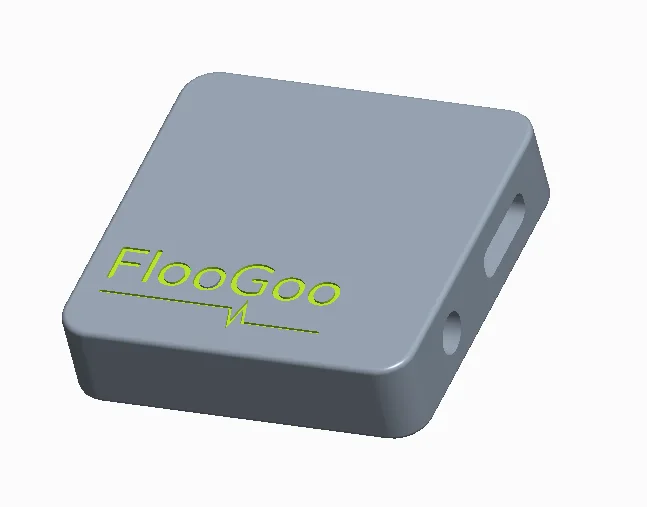
Yes, there will be a USB-C version (FMA121), though it still needs some time before release. It looks like this:
Size: 33mm x 33mm x 7mm (Final design may vary slightly)
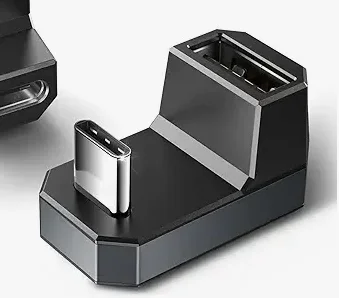
While I can’t guarantee it, the adapter below might help improve comfort when using the FMA120 with your phone. You can search for “180° USB-C to USB-A” if you’d like to give it a try.
You’re ignoring this member’s posts.
“180° USB-C to USB-A
That’s awesome! I’m waiting for the 3.5mm input device as that’s the solution my church needs to get through their existing PA system.
You’re ignoring this member’s posts.
Just bought an FMA120 and I’m having issues with the dongle intermittently disconnecting and reconnecting from every device. On my Windows 11 laptop ports I tried both USB-As and one USB-C, as well as the USB-A port on my old Windows 10 machine. Also happens when connected to my S24 phone. The Windows 11 machine and S24 both have the Floocast app installed, and the Windows 10 machine does not.
It did pair successfully with my 9050s immediately so no issues there. Haven’t yet tried other headphones/buds.
There doesn’t seem to be a pattern or timing to the perpetual cycling, it can happen after 60 seconds or 2 seconds. Firmware is updated and config looks like it should per the manual. I don’t know what else to try.
I sent a support ticket to Flairmesh but in the meantime am wondering if anyone with the FMA120 experienced this. Could be user error on my part.
You’re ignoring this member’s posts.
I discovered my S24 case is incompatible with the Anker USB-C adapter, it can’t fully seat into the port. It just barely misses; I can apply pressure and it connects but that’s not a workable solution.
Looking for a different adapter (love the 180 style) but here’s hoping that the length of the C-connector on the FMA121 is on the longer side.
You’re ignoring this member’s posts.
This appears to be a contact issue. When audio playback starts, the dongle draws more power, increasing the current on the USB’s +5V line. If the connection isn’t firm, this can cause a voltage drop on the power line, which may prevent the dongle from receiving sufficient power and trigger it to reset as a protective measure.
You can try gently cleaning the four golden contacts on the USB connector using a clean piece of paper or cloth and see if that helps improve the connection.
You’re ignoring this member’s posts.
Thanks for the update. I just tried that using the microfiber cloth from my glasses and no joy. Also tried the dongle in a third computer with same result: It maintains the connection for a minute or so and then begins to cycle intermittently,
Maybe a manufacturing issue? This was right out of the package yesterday and visually it looks OK. I’ll process a return through Amazon and order another one.
You’re ignoring this member’s posts.
That makes sense — it could be the fuse, which is designed to limit the dongle’s peak current to protect the host device. If it’s defective, it may wrongly block power. Replacing it through Amazon is a good approach, and hopefully you’ll receive the new one soon.
You’re ignoring this member’s posts.
Happy to report the replacement dongle arrived and works perfectly. Definitely a hardware issue with the first device; it’s on its way back through Amazon.
You’re ignoring this member’s posts.
Great to hear it’s working now!
If you plan to visit public areas or events with broadcasts, you can perform a “Clean All,” then load the receiver mode firmware and install the FlooCast mobile app to receive them using your Philips 9050 hearing aids.
Thanks again for choosing the FMA120 — hope you continue to enjoy it!
You’re ignoring this member’s posts.
Which firmware should we use - the 1.1.2 that the app defaults to or the AS1.0.6 for ? Not many Auracast equipped places that I know of. Mostly just want to stream music at the best rate. Thanks!
You’re ignoring this member’s posts.
AS1.0.6 is designed for users with legacy hearing aids that do not support or . Since these hearing aids can already connect to a phone, AS1.0.6 allows the FMA120 to receive an Auracast stream—either from public transmitters or a personal broadcast from another FMA120—and relay it to the phone. The phone then plays the audio to the hearing aids. This setup also supports seamless transitions during incoming or outgoing calls.
Firmware 1.1.2, on the other hand, is intended for adding LE Audio/Auracast capabilities to legacy source devices, such as PCs or audio systems with USB audio output. In contrast, AS1.0.6 serves the receiving side, like hearing aids.
You’re ignoring this member’s posts.
How much delay is there with the relay firmware? What protocol is being used to communicate with the phone?
You’re ignoring this member’s posts.
For accurate latency insights, real-world testing is key. Stay tuned — we’ll share our results soon.
You’re ignoring this member’s posts.
You’re ignoring this member’s posts.
The iOS version of FlooCast is now available!
To enjoy on your iPhone with any compatible hearing aids, please update your FMA120 dongle to firmware version AS1.0.7.
 Firmware AS1.0.7 Download:
https://www.flairmesh.com/support/FMA120_AS1.0.7.zip10
 FlooCast on the App Store:
Transform your phone into an Auracast™ receiver! Simply connect the FlooGoo FMA120 (with Auracast™ receiver firmware) to stream broadcasts directly to your phone’s speaker, or to Bluetooth headphones, earbuds, or hearing aids.
In the app, go to ‘Setup’ and tap ‘New Pairing’ while the dongle’s LED is flashing rapidly. Once the connection is established, the app is ready to use.
No further setup is needed—just swipe down in the app to scan for nearby Auracast broadcasts.
Tap the broadcast you want, and when an icon appears next to the name, you should hear it through your hearing aids connected to the phone.
After selecting a broadcast, if you don’t hear audio through your hearing aids, open Control Center (swipe down from the top-right or up from the bottom on older devices) and make sure your hearing aids are selected as the audio output.
You’re ignoring this member’s posts.
You’re ignoring this member’s posts.
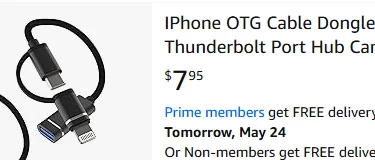
We’ve successfully tested it with an iPhone 15 (using a USB-C to USB-A adapter), an iPad, and an iPhone XS with an inexpensive Lightning OTG adapter, as shown in the photo below. I hope this helps users choose a suitable adapter for connecting the FMA120 to their iOS devices.
Just a note: the cable shown below isn’t an endorsement—it’s simply provided as a reference. I think most OTG cables should do the job.
You’re ignoring this member’s posts.
Log in to reply to this topic.
Hearing Aids0 replies
Uncategorized1 reply
Uncategorized54 replies
Hearing Aids23 replies
Hearing Aids13 replies
