
MED-EL Sonnet 2 AudioStream processors
Maybe it’s clearer to answer your questions in reverse order.
At the museum, you have two options:
-
You can wear the provided headphones (though you’d likely need to place them over your hearing aids, which might not be very comfortable).
-
Alternatively, you can use an FMA120 with your iPhone, allowing the audio stream to reach your hearing aids via .
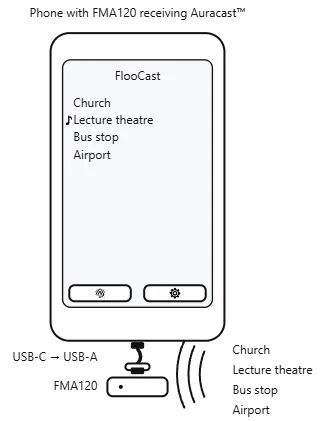
For your home setup, the concept is the same. You would still use your phone and the FMA120 as the receiver, while each audio source you’d like to listen to would have its own FMA120 (or an FMA121 for your TV, since most TVs don’t support USB audio output). This way, each source functions like the museum’s broadcast system. As shown in the demonstration image, switching between sources is simple and can be done directly in the app.
Just make sure to load the correct firmware versions for the transmitter and receiver roles on the FMA120/121. You can refer to the two user guides for each respective role.
FMA120 User Guide (PDF)8 : See the section “Using FMA120 as an Auracast Transmitter.”
You’re ignoring this member’s posts.


 Besides, the M1 MacBook is still very powerful for me, and even when it loses official support, it already runs a stable version of Asahi Linux.

![[image]](/uploads/original/88a415ca78381b4c42d3099ffb62b0fadb150703.png)